
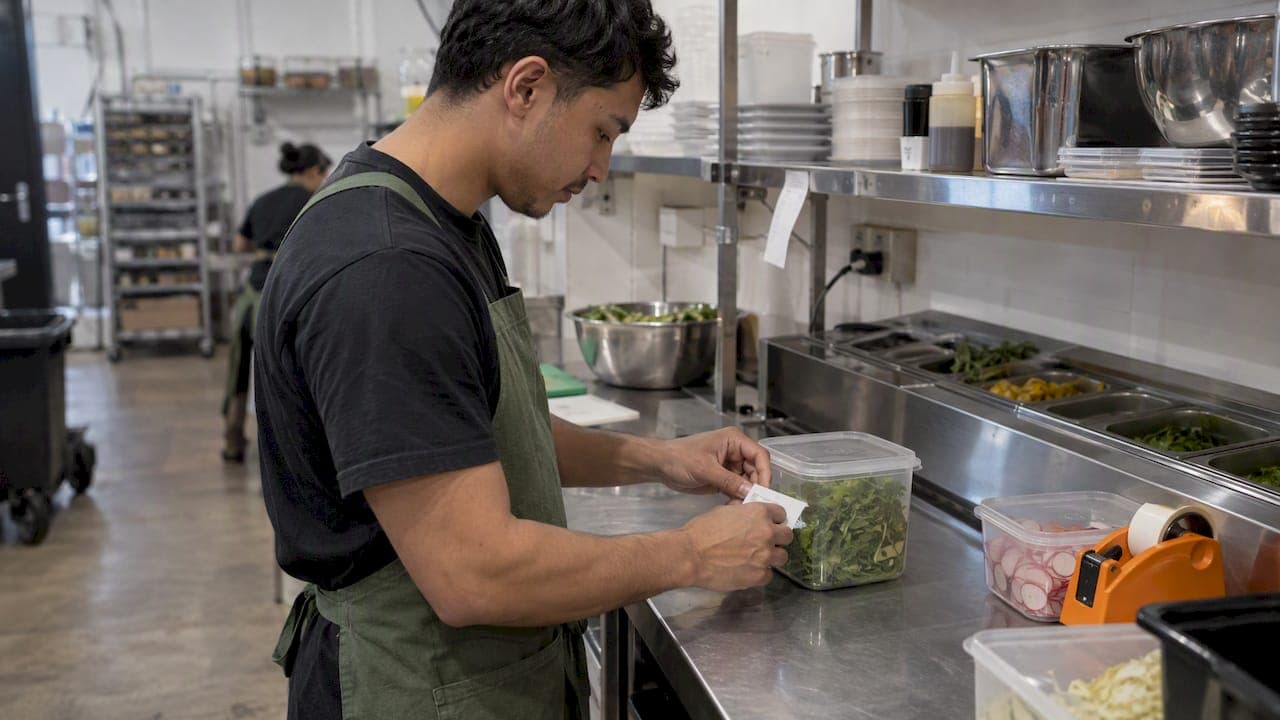
A good kitchen labeling system answers three questions in two seconds, for any container in your kitchen: what is it, when was it made or opened, and when must it be used or binned. Get that right and you cut waste, pass inspections with less stress and stop arguing about whose tub that is. This guide covers what to put on a label, how to date prepared and opened food, how shelf labels and barcode scanning fit in, and how to roll it out across a team.
TL;DR
- Every prepped or opened container needs the item name, the date (and time where it matters), a use-by date and, ideally, who prepared it.
- Pick labels for the storage conditions: freezer-grade adhesive for the freezer, removable or dissolvable labels for containers you wash and reuse.
- Shelf labels and barcodes do a different job to date labels: they tell you where stock lives and let software track quantities and expiry.
- A label never replaces temperature control. Fridges at 5°C or colder, rotation and regular checks still carry the food safety load.
- Start simple: one label standard, one dispenser per station, one person responsible for checks, then add scanning when paper stops keeping up.
Table of Contents
- What a kitchen labeling system actually covers
- What goes on a prep label
- Date labeling: how long is too long?
- Choosing the right labels
- Shelf labeling: where stock lives
- Barcode scanning in the kitchen
- What a label cannot do
- How to roll out a labeling system your team will follow
- Our perspective: labels are the start of inventory control
- Where PantryHub fits
- FAQ
- Sources
What a kitchen labeling system actually covers
Most venues use the phrase to mean three separate things, and mixing them up is where systems fall over.
- Prep and date labels go on containers of prepped, opened or portioned food. They are about food safety and rotation.
- Shelf and location labels go on shelves, bins and racks. They are about organization: where each item lives and how much of it you should hold.
- Barcodes and scan codes link a physical item or location to a record in software. They are about tracking: quantities, batches, expiry and ordering.
A small café might only need the first. A multi-site restaurant group usually needs all three working together. Start with prep labels because they carry the legal and safety weight, then layer the others on as you grow.
What goes on a prep label
There is a difference between the labels on packaged food you sell and the labels on containers inside your kitchen. Retail packaged food has a long mandatory list. Labeling requirements for food sold in Australia are set out in the Food Standards Code, and packaged food must carry details such as the food name, ingredients, date mark, nutrition information, country of origin, warning statements, lot or batch number and the supplier's name and Australian or New Zealand street address. If you make packaged products for sale, such as sauces, bottled dressings or takeaway jars, that list applies to you, so check it with your local council or state food authority.
For internal kitchen use, the goal is different: nobody should have to guess what a container holds or whether it is safe. A practical prep label carries:
- Item name, in plain words everyone on the team uses ("Chimichurri", not "Sauce 3").
- Date prepared or opened, and the time for high-risk items.
- Use-by date, calculated from your shelf-life rules, not worked out on the fly.
- Staff initials or name, so questions go to the right person.
- Allergen flags where the item contains one of the major allergens.
- Storage note where it matters, such as "keep frozen" or "refrigerate".
The Victorian Government's FoodSmart guidance backs the underlying habit: opened food should be resealed or moved into clean food-grade containers, and unlabeled food that cannot be identified, or may be contaminated, should be thrown out. That last point is the one to teach new starters. If you cannot tell what it is, it goes in the bin.
Allergens on unpackaged food
Food you serve without packaging still needs allergen information. For unpackaged food, allergen declarations must be visible with the food on display or provided to the customer on request. In a kitchen, that means your prep labels should carry allergen flags so front-of-house can answer accurately, and your catering and platter trays should be labeled before they leave. If you cater, these allergen questions for platters are a useful checklist for the kind of detail customers ask about.
Date labeling: how long is too long?
Date marking is where most kitchens either overthink or underthink. Two ideas matter.
Use-by versus best-before. Food Standards Australia New Zealand explains that use-by dates apply where food must be eaten before a certain time for safety, and food should not be eaten after its use-by date. Supplier labels also carry the required storage conditions, such as refrigeration. When you decant or open a supplier's product, copy the supplier's use-by onto your own label, and never extend it.
Shelf life for food you prepare. The Australian Food Standards Code does not hand you a single number of days for every dish, so venues write their own shelf-life rules inside their food safety program, based on the ingredients and storage. One useful reference point comes from the UK: guidance from a UK council suggests that prepared, ready-to-eat food held for more than 24 hours should carry preparation and consume-by dates, and that chilled food prepared in-house is used within the shortest ingredient shelf life or otherwise within three days, counting the day it was made. Treat that as a common starting point rather than an Australian rule, and confirm your own limits with your environmental health officer or food safety supervisor.
A simple way to make this usable is a shelf-life table on the wall of the kitchen:
| Item type | Where the rule comes from | What goes on the label |
|---|---|---|
| Supplier product, unopened | Supplier's date mark | Nothing extra, store as directed |
| Supplier product, opened or decanted | Supplier's date mark and storage conditions | Date opened, original use-by |
| Prepped ingredient (chopped, portioned) | Your food safety program | Date prepared, use-by |
| Cooked and chilled item | Your food safety program | Date and time made, use-by |
| Frozen item | Your food safety program | Date frozen, use-by, contents |
Write the number of days into the table once, then let staff follow it. The fewer calculations on a busy Friday, the fewer mistakes.
Choosing the right labels
The wrong label is worse than none: it peels off in the cold, smears in the dishwasher or leaves glue on every tub. Food safety guidance for professional kitchens notes that labels should show dates, ingredients and preparation stage, and use an adhesive suited to the storage conditions so they do not fall off.
The main types you will meet:
- Removable paper day labels, colour-coded by weekday. Cheap and quick, good for dry and chilled storage. Many come on a dispenser roll, so staff tear and stick.
- Freezer-grade polyester labels. Examples on the market are writable, water- and temperature-resistant and freezer-, dishwasher- and microwave-safe, with a removable adhesive designed to leave no residue.
- Dissolvable labels. Products in this category are designed so that the label dissolves in a dishwasher or under running water in under 30 seconds without sticky residue, which saves the scraping job on reusable containers.
- Printed labels from a thermal printer. Staff pick the item, the printer produces the name, preparation date and time, use-by and staff name. Some systems also store the shelf-life settings, so the use-by is calculated rather than guessed.
Applying labels so they stay put
A few habits stop most label failures. Apply labels to a clean, dry, flat surface at room temperature. If you are labeling something already frozen or about to be frozen, use a freezer-grade adhesive, and write with a permanent marker made for freezer use. Put labels in the same spot on every container, usually the upper left of the side facing out, so a quick scan of a shelf shows every date at once.
When it is time to reuse the container, remove the old label completely. A stack of overlapping labels with three different dates is how a mistake gets made.
Shelf labeling: where stock lives
Date labels tell you about the food. Shelf labels tell you about the place. Together they make rotation almost automatic.
A well-labeled store room or walk-in has:
- A named location for every product: shelf, bay or bin, labeled in large type.
- A par level on or near the location, so anyone can see what "full" looks like.
- Zones that separate raw from ready-to-eat. FSANZ advises that raw food should be stored separately from, or below, ready-to-eat food.
- A front-to-back flow: older stock at the front, newer behind.
That last point is rotation. Good guidance says food stocks should be rotated frequently using the first in, first out rule. For items where expiry matters more than arrival date, the Australian Cold Chain Guidelines point to first-expired, first-out, noting that it minimizes waste and relies on product identification, records of product location and a handling system, which can range from pen and paper to automated systems. In other words, labels and locations are the foundation. If you want to go deeper on the method, our guides on FIFO versus FEFO and stock rotation in the kitchen walk through the rollout, and the dry goods management checklist covers the shelf-stable side.
Barcode scanning in the kitchen
Paper labels and wall charts work until volume grows. Then three things start to hurt: counts take hours, expiry dates get missed, and nobody can say what is on hand without walking the store room.
Barcode scanning fixes this by tying a physical item or location to a record. A typical flow looks like this:
- Receiving. Scan the product barcode (or the delivery docket) when stock arrives, and record the quantity, batch or lot number and expiry date.
- Putaway. Scan the shelf location label so the system knows where the product sits.
- Use and transfer. Scan when stock moves between stations or sites, or when it is used in a prep batch.
- Counts. Scan shelf by shelf with a phone instead of writing on a clipboard, and let the system compare against the expected level.
- Alerts. Low stock and short-dated items surface automatically, so ordering and menu specials respond to reality.
The tracking side matters for compliance too. FSANZ says businesses should keep supplier details, transaction and delivery dates, batch or lot identifiers, quantities and other production records to support traceability, and should be able to trace all inputs, including ingredients and packaging. Scanning batch and expiry at receiving builds that record as a by-product instead of an extra chore. You can see how this works for expiry in our six step expiry date tracking guide.
You do not need specialist scanner hardware to start. A phone camera is enough for most cafés, restaurants and pubs, as long as the process is quick enough for a busy receiving window.
What a label cannot do
A label records a decision. It does not make the food safe. FSANZ's storage guidance is clear that potentially hazardous food should be stored at 5°C or colder and frozen food kept frozen hard. A perfect label on a tub in a fridge running at 9°C is still a problem.
Three checks belong alongside your labels:
- Thermometers. One kitchen policy requires that fridges and freezers have accurate thermometers, within 1°C, checked regularly through the day. Log the readings.
- Hot and cold holding. For buffet or display food in the temperature danger zone of 5°C to 60°C, labels and written logs should track it, and food that has been there more than two hours is discarded.
- Regular review. Councils recommend that labeling and temperature logs are reviewed internally at least every six months to find and correct risks.
Requirements differ by state and by your food business classification, so confirm specifics with your local council or state food authority.
How to roll out a labeling system your team will follow
The best system is the one a casual on a Saturday night actually uses. Here is a rollout that holds up.

1. Write the standard on one page
List what goes on every label, the shelf-life table and the three or four rules ("no label, no use"; "old label off before reuse"). Laminate it and put it at every prep station.
2. Put the tools where the work happens
A dispenser, a marker and a roll of labels at each station. If staff have to walk to the office for a label, they will skip it.
3. Standardize names and containers
Use the same item names as your recipes and your ordering list. Matching names make later scanning and reporting far cleaner, and it is why we recommend standardizing recipes and ingredient names before you digitize anything.
4. Train in five minutes, not fifty
Show the new starter one correct container, one wrong one and the bin rule. Then check on shift one, shift three and week two.
5. Assign an owner and audit
One person (head chef, kitchen manager or the closing supervisor) does a short walk-through each day: any unlabeled, out-of-date or mislabeled container gets pulled and recorded. Patterns tell you where to retrain.
6. Digitize when paper stops scaling
Signs that it is time: counts take hours, you have more than one site, waste is rising and you cannot see why, or ordering still relies on someone's memory.
Our perspective: labels are the start of inventory control
We built PantryHub with chefs, and what we see in Australian kitchens is consistent. Labels get started with energy, then slip during the first busy season, because they sit outside the rest of the workflow. The venues that keep them going connect labeling to something the team already cares about: ordering, counts and food cost.
Our view is that a label should be the visible edge of a record. When stock is received into a system with its quantity and expiry, the system can tell you what is about to run out, what is about to expire and what you should order, without anyone doing sums. Labels then do their proper job: help a human make a quick call at the shelf. Spreadsheets and clipboards cannot keep up with that for long, so bin them once counts start eating your week.
For single sites, we suggest starting with solid date labels and clean shelf locations. For groups, standardize names and par levels before anything else, because consistency across venues is what makes reporting meaningful.
— Admin
Where PantryHub fits
PantryHub is a hospitality inventory and ordering platform for Australian restaurants, cafés, bars, pubs, clubs and commercial kitchens. It gives you real-time stock tracking, low-stock alerts, supplier ordering, recipe and pricing standardization, waste and cost reporting, and team access controls, across one location or many. Plans are listed on the pricing page: Starter is $39 per month, Regular is $69 per month and Pro is $99 per month, all in Australian dollars.
📦 Track stock and expiry in one place 🔔 Get low-stock alerts before service 🛒 Order from your suppliers faster
You can start a free trial and see how it fits your kitchen, or read more about our hospitality inventory software. If your venue is a seafood shop, our guide to fish shop stock control covers the specifics.
FAQ
Do I need to put a date on every container in my kitchen?
Yes, for anything prepped, opened, portioned or decanted, because staff need to know when it was made and when it must go. Unopened supplier products already carry the supplier's date mark. Unlabeled food that cannot be identified should be discarded, as the Victorian FoodSmart guidance says.
How many days can prepared food be kept?
It depends on the food, the ingredients and your storage, and your food safety program should set the limits. A common starting point, drawn from UK council guidance, is the shortest ingredient shelf life or three days including the day made. Check your own limits with your local council or food safety supervisor.
What is the difference between shelf labels and date labels?
Date labels sit on containers and record when food was made or opened and when it must be used. Shelf labels sit on the storage location and record what belongs there and how much you should hold. You need both for reliable rotation.
Can I use barcode scanning without special equipment?
In most cases, yes. Phone cameras can scan product barcodes and location codes for receiving and counts. The value comes from recording quantity, batch and expiry at the point of delivery, which also supports the traceability records Australian food businesses are expected to keep.
Sources
- Labelling laws, NSW Food Authority
- Food and drinks safety standards, NSW Government
- FoodSmart guidance, Victorian Government
- AFMA Farmers Market Food Safety Guide 2023
- Allergen questions for platters
- Use-by and best-before dates, FSANZ
- Shelf life and stock rotation, Runnymede Borough Council
- Preventing cross-contamination in professional kitchens
- Freezer-safe kitchen labels, Avery Australia
- StoreSafe dissolvable labels, Cambro
- About PREPsafe Australia
- Use freezer labels correctly, Renton Labels
- Storing food safely, FSANZ
- Food storage policy
- Australian Cold Chain Guidelines 2017
- Food traceability, FSANZ
- Hot holding and buffet food safety
- Food safety assessment best practice records, Whitehorse City Council