

The fastest way to stop expiry losses is to record expiry dates at receiving by batch, enforce FEFO picking, and automate alerts so nothing gets checked "when someone remembers." Start today: pull every item expiring within 30 days and tag it. A spreadsheet, a mobile scan app, or inventory software can each run this system. Pick the one that matches your team size and volume.
TL;DR:
- Recording expiry dates at receiving and enforcing FEFO picking are essential to prevent spoilage and optimize stock rotation in dynamic delivery environments.
- FEFO requires batch-level expiry data for each SKU, with a minimum of five fields captured upon receipt to ensure accurate tracking and compliance.
- Daily expiry checks by a designated staff member significantly improve waste reduction, with thresholds set according to product category and shelf life.
- Automating expiry data capture via barcode or inventory platforms reduces manual effort and increases coverage, especially in high SKU volume settings.
- Focusing on disciplined receiving habits first yields better long-term results than relying solely on software or periodic cleanup routines.
Table of Contents
- How Does Expiry Date Tracking Actually Work?
- Setting Up an Expiry Tracking Workflow Step by Step
- Which Tools Fit Your Operation's Scale?
- What to Measure and How to Act on Near-Expiry Stock
- How PantryHub Supports an Expiry Tracking Workflow
- Why the Usual Advice on This Gets the Order Backward
- Turn Expiry Alerts Into a System That Runs Itself
- Sources
How Does Expiry Date Tracking Actually Work?
Most kitchens and stockrooms default to FIFO: first in, first out. It works fine when every case of a product has the same shelf life. The problem is that real deliveries don't behave that way. Two cases of the same SKU can carry different expiry dates depending on when they were produced, so the older delivery isn't always the one closer to spoiling.
That's why FEFO (first-expired, first-out) is the safer default for anything with variable shelf life, which is most fresh food, dairy, and many packaged goods. FEFO ranks stock by the date it expires, not the date it arrived. A newer delivery with a shorter shelf life gets picked before an older one that still has weeks left.
To make FEFO work, expiry data has to live at the batch or lot level, not just the SKU level. "Chicken breast" isn't one expiry date. It's a dozen batches, each with its own countdown. Recording at the SKU level alone hides that variance and defeats the whole point.
At receiving, capture five fields minimum:
- SKU or product name
- Batch or lot number
- Expiry date
- Quantity received
- Storage location and received date
Skip any one of these and your alerts become guesswork. Get all five right, and every downstream report, from markdowns to compliance audits, has something solid to stand on.
Setting Up an Expiry Tracking Workflow Step by Step
A tracking system only works if the process behind it is boring and repeatable. Here's the sequence that holds up under real shift pressure:
- Assign batch numbers at receiving. Before anything goes into storage, record the batch and expiry date against the delivery. Do this before putaway, not after.
- Organize shelves for FEFO picking. Newer stock goes behind older stock (by expiry, not arrival), so staff naturally grab the soonest-to-expire item first.
- Set alert thresholds by category. Packaged and shelf-stable goods can run on a 90/60/30-day cadence. Fresh food needs a tighter 30/14/7-day window, since category shelf life should drive the threshold, not a one-size-fits-all rule.
- Map each threshold to an action. A 90-day flag means "monitor." A 30-day flag means "act now," whether that's a markdown, a menu push, or a transfer to another location.
- Run a daily check as the first task of the shift. Make the expiry alert list the opening item on the floor manager's checklist, not an end-of-week cleanup.
- Pull a weekly at-risk report. Track how much value sits in stock expiring within the next two windows, and check whether last week's flagged items actually got resolved.
Pro Tip: Assign one person per shift to own the expiry check, even in a small kitchen. A shared responsibility with no owner quietly becomes nobody's job by the third week.
Which Tools Fit Your Operation's Scale?
The right tool depends on how many SKUs you're tracking and how many hands touch inventory each day, not on how "advanced" a system sounds.
- Spreadsheets with manual labeling work for a single small venue with a limited SKU count. They're free and flexible, but every entry depends on someone remembering to type it in, and there's no automatic alert when a date creeps close.
- Mobile barcode scan apps let staff capture expiry dates by scanning instead of typing, and some now use OCR to read dates straight off the label, cutting entry time further. These suit small teams that need speed and better coverage without a full software rollout.
- Inventory or WMS platforms with batch and FEFO support become necessary once you're running multiple locations or high SKU volume. These systems apply FEFO deduction automatically and hold everything in one shared view instead of one manager's laptop.
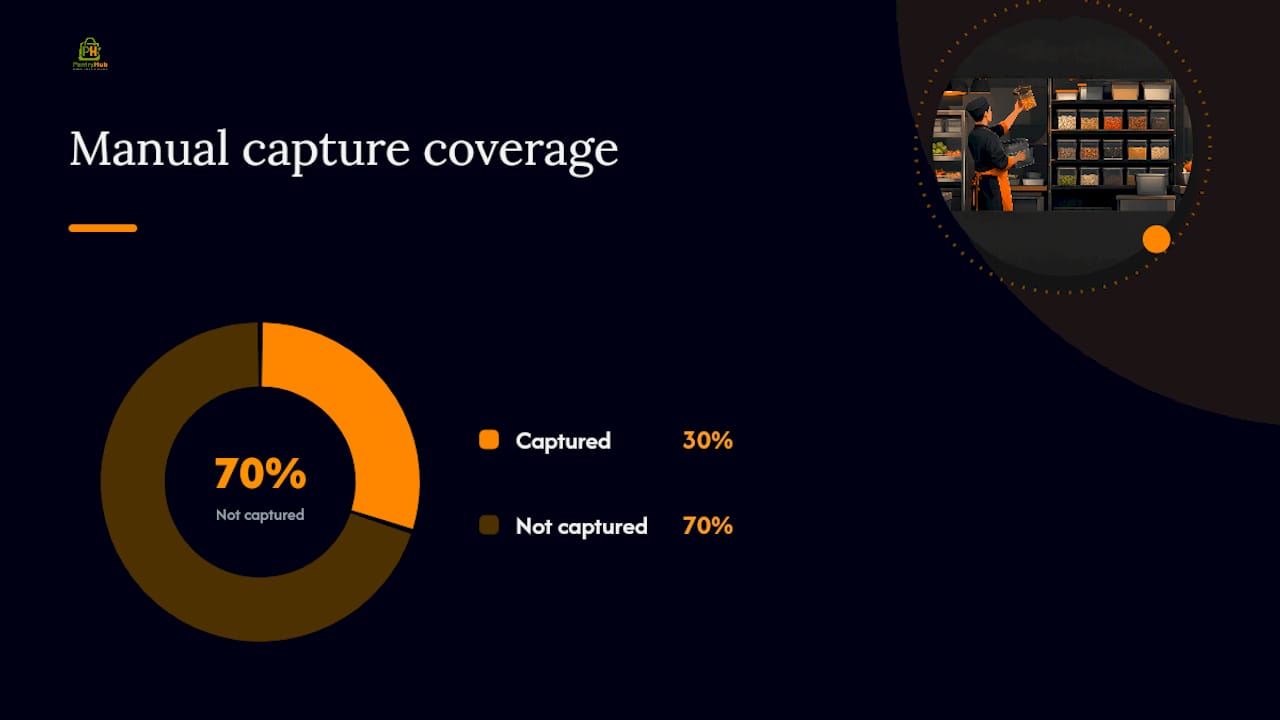
Manual capture in many large grocers only reaches about 30% of items on shelf, which caps how much markdown and recovery activity is even possible. Automating capture reduces the time spent per item by roughly 60%, which is the real reason software pays for itself once volume rises.
Whatever the tool, connect it to your point-of-sale and supplier ordering data where you can. Double entry between systems is where dates get mistyped and batches get lost. Standardize the date format across every input point, and run a monthly spot audit against physical stock to catch drift before it compounds.
What to Measure and How to Act on Near-Expiry Stock
Tracking dates only matters if the numbers drive action. Four metrics tell you whether the system is actually working:
| Metric | What it tells you |
|---|---|
| % of inventory with expiry captured | Whether your capture process has real coverage, not just spot checks |
| Value at risk (next 7/30 days) | Dollar exposure sitting in stock that could become total loss |
| Expiry compliance rate | How often flagged stock gets acted on before the deadline, not after |
| Recovered value from markdowns | How much of the at-risk figure you actually clawed back |
Pair those numbers with a clear action ladder, so nobody has to improvise when an alert fires:
- 90 days out: monitor, no action needed yet.
- 30 days out: critical. Move to markdown, repurpose into a special or prep item, or bundle with a faster-moving product.
- 7 days out: donate if usable, or quarantine and dispose if it's not safe to serve.
Keep a one-line template for staff to mark flagged stock ("30-day alert, markdown by [date], [initials]") so accountability travels with the item, not just the spreadsheet. And loop in food safety compliance requirements here too: some categories carry mandatory disposal or labeling rules once past a threshold, and your action ladder needs to respect those before margin recovery.
How PantryHub Supports an Expiry Tracking Workflow
PantryHub’s system handles batch-level tracking effectively to support expiry date management. Every delivery gets logged with its own batch and expiry date at receiving, not bolted on afterward, which keeps the audit trail intact for compliance checks.
Kitchens running on PantryHub typically lean on a few specific pieces:
- Batch and lot-level stock records tied to expiry dates, not just SKU counts
- Configurable low-stock and near-expiry alerts that push to the right team member
- Role-based team access, so a line cook sees what they need without wading through supplier pricing
- Supplier ordering integration that pulls delivery data straight into the batch record
- Reporting that surfaces waste trends and at-risk value over time
The interface is designed around kitchen workflows to aid staff adoption compared to generic inventory software. A manager's guide to inventory alerts walks through how that daily alert habit gets built on the floor.
Why the Usual Advice on This Gets the Order Backward
Most guidance on this topic leads with tools: buy an app, install a scanner, pick software. That's backward. The research is clear that automation cuts time per item and lifts coverage, but automation only amplifies whatever process is already underneath it. A bad receiving habit, automated, just produces bad data faster.
What actually matters first is the discipline of capturing batch and expiry data at the point of receiving, every single time, with no exceptions for busy shifts. FEFO shelf layout and alert thresholds are the second layer. Software is the third. Teams that buy an inventory platform before fixing their receiving habits usually end up with a system that reports garbage numbers with impressive speed.
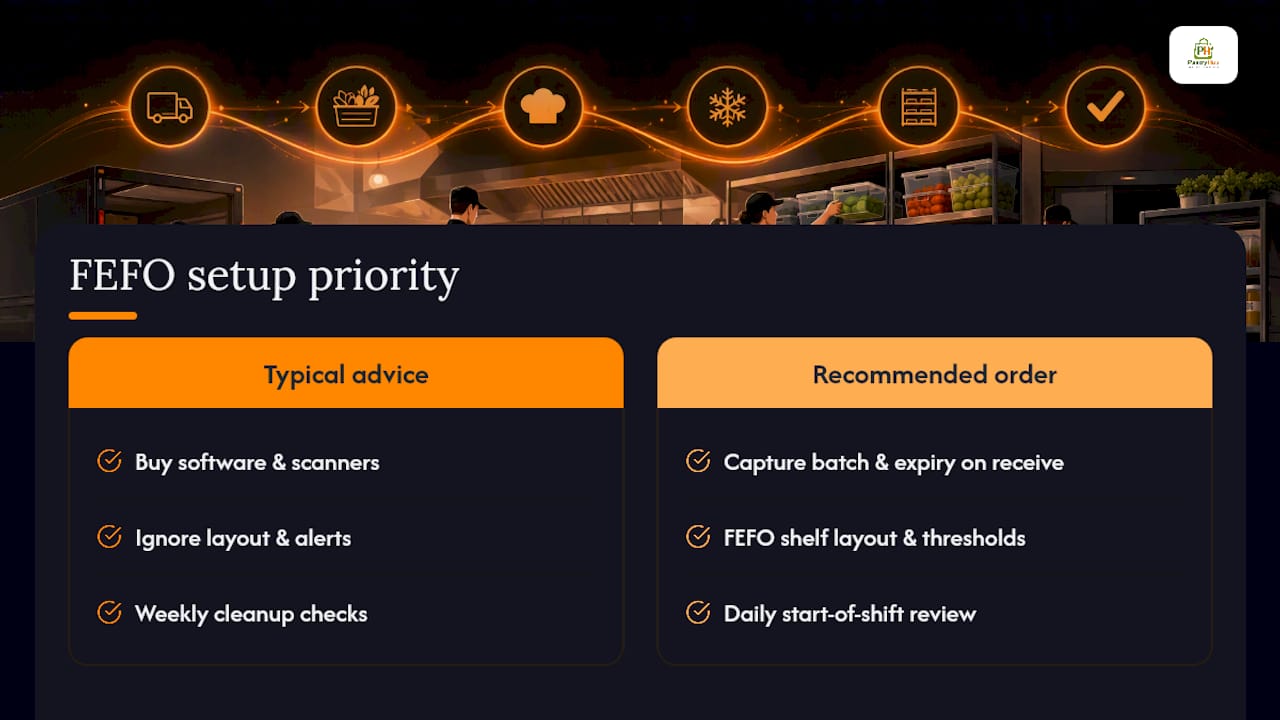
The other overrated idea is treating expiry checks as a periodic cleanup task, something for Sunday morning before the delivery truck arrives. Expiry alerts belong at the start of every shift, reviewed by a named person, not squeezed in when there's downtime. That single change, making the check a daily habit instead of a weekly chore, does more for waste reduction than any software purchase.
If you're starting from zero, fix receiving first. Everything else compounds from there.
— Admin
Turn Expiry Alerts Into a System That Runs Itself
PantryHub is built for exactly the operations-first workflow this article describes: less time chasing dates on paper, more real-time visibility into what's about to expire and what needs action now. Batch-level tracking, configurable alerts, and FEFO support come standard, so your team spends less time cross-checking spreadsheets and more time actually running the kitchen.

If you're managing stock across multiple sections of a kitchen or bar, the hospitality inventory software built for restaurants, cafés, and commercial kitchens gives you one shared view instead of scattered notes. Teams working mostly off phones and tablets can start with the kitchen inventory app for scanning and alerts on the move. And if your ordering process still involves phone calls to suppliers, a wholesale stockist relationship built around clear delivery data makes batch capture easier from the moment stock arrives. Book a demo or start a free trial to see how it fits your kitchen before your next delivery lands.
Sources
- The Expiry Date Management Issue Costing $90bn a Year
- Expiration Date Management for Inventory: FIFO, FEFO, and Batch Tracking