
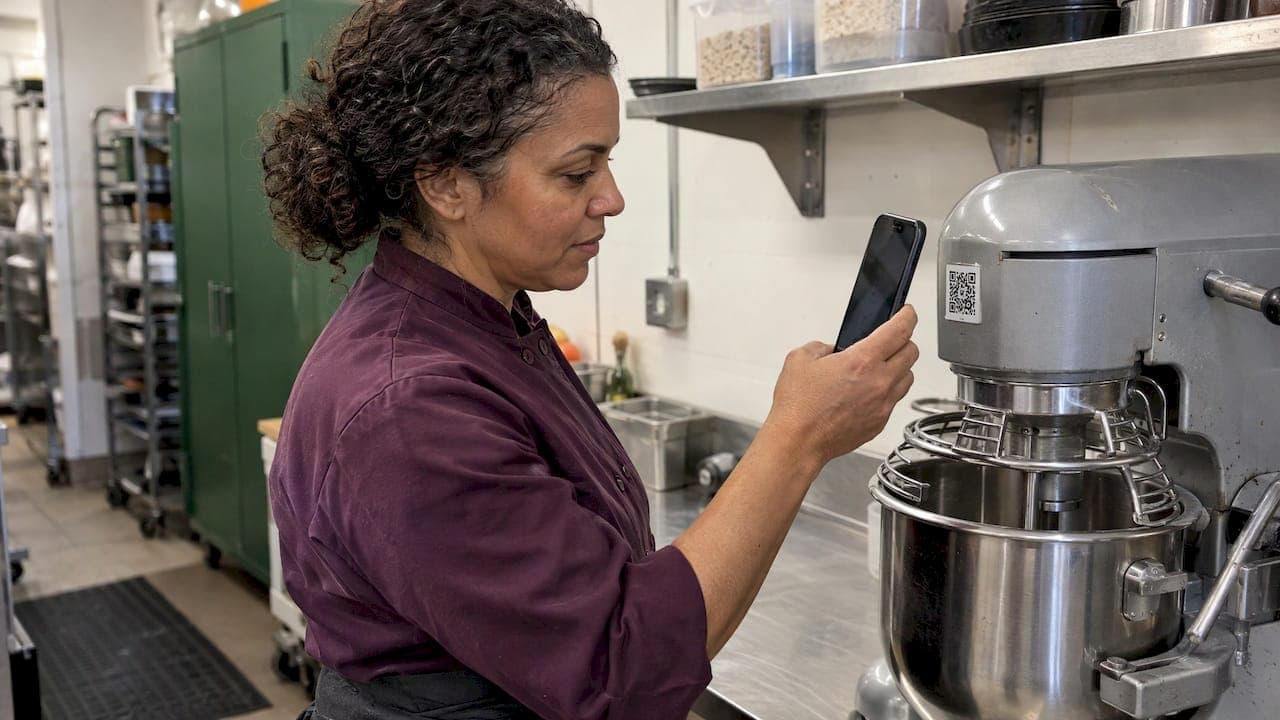
A QR code label is a printed sticker that opens a record when someone scans it with a phone. In a restaurant, café, pub or commercial kitchen, that record can be a stock item, a batch with its expiry date, or a piece of equipment with its service history. The label is only the key. The value sits in the system behind it, so decide what each code should open before you buy a single roll.
This guide covers what to put on a label, which materials cope with moisture and cleaning, how to set labels up and test them, and what to check against Australian food rules.
TL;DR
- Use QR labels for three jobs: identifying stock and containers, recording batch and expiry data, and tagging equipment.
- Each code should point to one defined record that someone owns, not to a general web page.
- Pick label stock for the spot it lives in: freezer, wet prep, dishwasher or dry store. "Waterproof" alone is not a spec.
- Test every label on the finished container, under normal kitchen lighting, before printing hundreds.
- Keep your supplier invoices and traceability records in order. A QR label supports them but does not replace them.
Table of Contents
- What QR code labels can do in a hospitality venue
- QR code or barcode: which label do you need?
- What each label should link to
- Setting up QR labels at goods receipt
- Choosing label material for a real kitchen
- Australian food rules to check first
- Our perspective: labels work when the system behind them does
- A simple rollout plan for one venue
- Common mistakes
- Put QR labels to work with PantryHub
- FAQ
- Sources
What QR code labels can do in a hospitality venue
Hospitality operators meet QR codes in two places. Guest-facing codes sit on tables and signage and link to menus, specials, allergen information, feedback forms, Wi-Fi or check-in, as Australian QR suppliers describe. Back-of-house codes are different. They sit on tubs, shelves, sacks and equipment, and they feed your operations.
This article is about the second group. Three uses pay off fastest:
- 📦 Stock and ingredient labels. A code on a container or shelf bay opens the item name, quantity and storage location. A QR inventory guide from an Australian supplier describes scans returning the current product name, quantity and location.
- 🏷️ Batch and expiry labels. Printed at goods receipt, a label can carry a unique code tied to the incoming batch and its use-by or best-before date. That makes stocktakes, waste logging and rotation faster.
- 🔧 Equipment tags. A code on a combi oven, fryer or cool room can link to an asset record with an ID, location, maintenance dates and manuals. A QR asset tracking guide lists those same fields.
If you want the wider picture of how labelling fits a kitchen, our kitchen labeling system guide walks through it.
QR code or barcode: which label do you need?
Both identify an item. The difference is how much they can carry and what reads them.
A QR code holds more data than a traditional linear barcode, and any phone camera reads it. A barcode is the standard for retail point-of-sale scanning. For your own prep containers and storage, a QR code is usually the more flexible choice.
If you pack or sell your own products, note what GS1 Australia says. QR codes are not themselves GS1 standards. A QR code becomes interoperable in the GS1 system when it encodes a GS1 Digital Link URI with a GTIN. For a retail trade item, GS1 Australia says a linear barcode is still required alongside that QR code until 2D scanning is widespread at the point of sale. For internal kitchen labels, none of this applies, but it matters if you retail packaged goods.
| QR code label | Linear barcode label | |
|---|---|---|
| Data capacity | Higher, can hold a URL or structured data | Lower, usually a number |
| Reader | Any smartphone camera | Dedicated scanner or app |
| Best kitchen use | Prep containers, batches, equipment tags | Supplier-printed product codes on incoming goods |
| Updatable destination | Yes, with a dynamic code | No |
Static or dynamic codes
A static code stores its destination inside the pattern. It never changes, and it cannot be edited. A dynamic code points to a short redirect you control, so you can change where it goes without reprinting. Dynamic codes can also report scans such as time, location and count.

For internal labels, the simplest setup is often a code that holds a unique ID, with your inventory system looking up the record. That way the sticker never goes out of date, even when the item's details change.
What each label should link to
A label with no clear destination is just a sticker. Decide the record first, then print.
Ingredient or container labels should open:
- Item name and unit
- Batch or delivery reference
- Received date and use-by or best-before date
- Storage location
- Supplier
Prepped food labels should open:
- What it is and which recipe it came from
- Date and time prepared
- Use-by date
- Allergen information from the recipe
- Who prepared it
Equipment tags should open:
- Name, model and serial number
- Location
- Purchase and warranty dates
- Last and next service dates
- Manuals and the service contact
That equipment list follows the fields one asset-tag guide recommends. Another practical rule comes from an Australian barcode supplier: every code needs a defined destination and an owner, and the page it opens should work on a phone.
Want the same logic applied to ingredients and recipes? See our guide to ingredient-level stock tracking.
Setting up QR labels at goods receipt
Receiving is where the label earns its place, because that is the last moment you know exactly what arrived and when.
- Check the delivery first. FSANZ advises checking packaging for damage and checking best-before and use-by dates. Food past its use-by date must be rejected, so it never reaches a label printer.
- Match it to the order. Compare the delivery to the purchase order and supplier invoice.
- Print the label. Generate a unique code for the batch and add quantity and expiry.
- Apply it to the container, not the lid. Lids get swapped. Put the label on the body, on a clean, dry surface, with firm pressure.
- Store it where the system says. Scan the shelf or cool room bay code so location is recorded.
- Scan on use. Each scan during prep or service adjusts what is on hand and flags what is close to its date.
Receiving checks, labels and hygiene proof are questions every food business faces. Even an office caterer's guide to labels, lead times and hygiene proof shows how much a clear label tells the person receiving food.
For how to rotate by date once labels are on, read our expiry date tracking guide. To make labels part of counts, see the kitchen stocktake process.
Choosing label material for a real kitchen
Kitchens are rough on paper. Steam, spills, cold rooms, sanitiser and hot dishwashers all attack adhesive and print.
Match the stock to the spot
| Location | What to look for |
|---|---|
| Freezer and cool room | Freezer-rated label stock with an adhesive made for cold, applied to a dry surface |
| Wet prep and bain-marie | Synthetic or polyester face stock, not plain paper |
| Dishwasher-washed containers | Labels rated for dishwasher use on hard plastic or glass |
| Dry store shelving | Paper or synthetic is usually fine, permanent or removable adhesive |
| Equipment tags | Durable synthetic or vinyl, permanent adhesive |
An Australian label supplier notes that polyester labels can be waterproof, freezer-safe and resistant to tearing, oil and UV, and that wet-environment durability comes from a water-resistant face material plus a suitable adhesive. Another printer lists paper, synthetic, waterproof and freezer or chiller stocks, with permanent or removable adhesives, and says QR codes and variable data can be printed on them.
Two cautions from a materials guide: waterproof, water-resistant and dishwasher-safe are different claims, and paper can soak up water at its cut edges. Ask the printer to confirm the exact use, then test a sample.
Removable or permanent?
Use removable adhesive on reusable containers you wash daily. Use permanent adhesive on equipment tags and single-use packaging. Mixing them up is the most common reason labels peel or leave residue.
Size, contrast and the quiet zone
Keep a blank border around the code, known as the quiet zone. Packaging suppliers recommend preserving it, because printing too close to the edge or stacking text against the code stops scans. Print dark on light, avoid glossy surfaces that glare under downlights, and make the code large enough to scan from arm's length on a shelf. Then test on the finished container under normal kitchen lighting, as the barcode supplier advises.
Australian food rules to check first
QR labels are a tool. The obligations come from food law.
- Know the Code. The Australia New Zealand Food Standards Code covers food sold, handled for sale or imported in Australia and New Zealand, including standards on labelling, food identification, date marking and storage directions. Check the compilation against the current official version on the Federal Register of Legislation.
- Keep traceability. FSANZ says a business must be able to identify food and trace it back to its supplier. Supplier invoices or another supplier and purchase record can provide that evidence. A QR label that links to the delivery record makes this quick to show.
- Do not rely on a code for required label information. If you sell packaged food, ask your local council or state food authority what must appear on the label itself, rather than behind a scan.
Rules differ by state and by the type of food business, so confirm with your local council environmental health officer.
Our perspective: labels work when the system behind them does
We built PantryHub by the chef, for the chef, and we see the same pattern in venues that try QR labels. The sticker is cheap. The habit is the hard part.
A label that opens a bare spreadsheet row gets ignored by a busy line cook on a Saturday night. A label that opens the item, its batch, its par level and its supplier gets scanned, because it saves time.
That is why we think labels belong inside your inventory and ordering platform, not beside it. When stock levels, low-stock alerts, supplier ordering and recipes sit in one place, a scan can do something useful: update a count, log waste, or flag that it is time to reorder.
Our platform is designed for Australian venues, with AUD pricing, GST-ready reporting and mobile-first design, so the person standing in the cool room can do the job from a phone. Start with one area, such as the walk-in, prove it works, then roll it out.
the author
A simple rollout plan for one venue
Do not label the whole kitchen in a week. Work in this order:
- List what you want to track. Start with high-value or high-waste items: proteins, dairy, seafood, bar stock.
- Pick one zone. The walk-in cool room is usually the best pilot.
- Standardize names and units. If one tub is "chicken thigh" and another is "thigh fillet," scans will not fix your counts. A recipe-first approach helps, as in our guide to tracking ingredient usage.
- Order a small sample run in the right stock and test it through a week of real washing and freezing.
- Set one placement rule. Same side of the container, same height, every time.
- Name an owner. One person maintains codes and records.
- Review after two weeks. Check which labels peeled, which codes failed and which scans staff skip.
Pubs and clubs with big bar ranges can apply the same pilot to spirits and kegs. Our bar inventory software covers pour cost and stocktake for that case.
Common mistakes
- Printing before deciding the destination. Changing the record later is easy with a dynamic code or an ID lookup. Reprinting 500 stickers is not.
- Using office-grade labels in wet areas. Paper curls and the code smudges.
- Putting labels on lids. The code ends up on the wrong tub.
- Skipping the test. A code that looks fine on screen can fail on a curved or glossy surface.
- Treating the label as the record. The label points to the record. The record is what you show an auditor.
Put QR labels to work with PantryHub
If you want labels, counts, expiry dates and supplier ordering working together, PantryHub gives you real-time stock control, AI-powered low-stock alerts, team access controls and reporting across one or many venues. Plans are published at Starter 39 AUD per month, Regular 69 AUD per month and Pro 99 AUD per month, and you can begin with a free trial.
Ready to bin the spreadsheets? Start your free trial and set up your first zone. You can also see how our hospitality inventory software fits venues like yours, or read about the role of a mobile inventory app in your kitchen.
FAQ
Can I print QR code labels myself in the kitchen?
Yes, if you have a label printer and the right stock for the spot, such as freezer-rated or dishwasher-rated labels. Many venues print their pilot sample in-house, then move to a commercial printer once the design is proven. Always test the first batch through washing and freezing.
Should I use static or dynamic QR codes for stock labels?
Use a dynamic code, or a code that holds only a unique ID, when item details might change. A static code is fixed, so any change means reprinting. Dynamic codes can also report scans, which is handy for equipment tags.
Do QR code labels meet Australian food labeling laws?
Not by themselves. The Food Standards Code sets requirements for labels, date marking and storage directions, and a QR code does not replace information that must appear on the label. For internal kitchen labels, they support your records. For packaged food you sell, check requirements with your local council or state food authority.
What size should a QR code label be?
Big enough to scan easily from where staff stand, with a clear blank border around the code. Print dark on light and avoid glare. The only reliable check is scanning a printed label on the real container under normal kitchen lighting.
Sources
- QR Codes for Australian Hospitality
- QR Codes for Inventory Management
- QR Code Asset Tracking: From Basics to Expertise
- Learn About Next Generation 2D Barcodes, GS1 Australia
- QR Code Asset Tags: The Best Guide for 2026
- QR Codes for Packaging and GS1 Digital Link
- Custom QR Code Labels and Stickers
- Receiving food safely, Food Standards Australia New Zealand
- Food Standards Code Compilation, October 2025
- Waterproof stickers and labels, Action Labels
- Custom Labels Australia, Label Image
- Waterproof stickers materials guide, Paperlust
- Choosing an office caterer: labels, lead times and kitchen hygiene proof