

Inventory platform integration with suppliers is the process of connecting your inventory management software to supplier data streams so stock levels, orders, and pricing update automatically across both systems. For restaurants and bars, this connection is the difference between running a tight operation and constantly firefighting shortages. Inventory distortion costs retail $1.77 trillion annually, and hospitality businesses absorb a significant share of that loss through stockouts, over-ordering, and manual errors. Understanding how inventory platforms integrate with suppliers gives you the tools to cut those losses at the source.
How do inventory platforms integrate with suppliers?
The technical term for this process is supplier integration, and it covers every method by which your inventory management software exchanges data with the systems your suppliers use. Three core methods handle the majority of real-world connections.
RESTful APIs are the standard for large, high-volume suppliers. An API connection pushes and pulls data in real time, so when your beer distributor updates pricing or confirms a delivery, your inventory platform reflects that change within seconds. This is the most accurate method, but it requires the supplier to maintain a developer-ready API endpoint.

Scheduled CSV imports serve smaller suppliers who lack API infrastructure. Your platform pulls a spreadsheet file from an FTP server or email inbox on a set schedule, say every hour or every morning. The data is less current than an API feed, but the method works reliably for suppliers who update stock and pricing daily rather than continuously.
Middleware sits between your inventory platform and your suppliers when data formats do not match. Middleware normalizes disparate supplier data formats into a single structure your system can read. Think of it as a translator that converts a supplier's proprietary product codes and unit measures into the language your kitchen software understands.
- RESTful APIs: best for large distributors with developer resources
- CSV via FTP or email: practical for local or smaller suppliers
- Middleware: required when supplier and platform data formats conflict
- Orchestration layers: coordinate multi-step workflows across ERP, warehouse, and procurement systems
Pro Tip: Before selecting an integration method, ask each supplier whether they support API connections. Many regional food and beverage distributors now offer basic API access, which eliminates the lag and manual cleanup that CSV imports create.
Distribution API architectures manage protocols, payloads, security, and event routing through a central orchestration layer. This means your inventory platform does not need custom logic built for every supplier. The orchestration layer handles the routing, and each supplier connects to it once.
How do you govern and normalize supplier data in your inventory system?
Data governance is the set of rules that decides which system owns which piece of information. Without it, your inventory platform and your supplier's system will overwrite each other's data, creating what practitioners call inventory drift. Inventory drift occurs when systems overwrite data without clear ownership, leading to stock counts that are wrong in ways you cannot easily trace.
The most practical governance framework for a restaurant or bar assigns ownership by data type:
- Supplier owns: pricing, product availability, lead times, and pack sizes
- Your inventory platform owns: par levels, reorder points, internal product names, and cost allocations
- Shared with reconciliation: on-hand quantities, which both systems track and must agree on after each delivery
SKU crosswalk systems solve the catalog confusion that comes with multiple suppliers. Your distributor calls a product "Chicken Breast 2kg IQF." Your inventory system calls it "Frozen Chicken Breast." A crosswalk maps supplier SKUs to your internal product identifiers automatically, using confidence scoring to flag uncertain matches for human review. Building this mapping before you go live prevents the most common integration failure: orders placed against the wrong product.
Two pitfalls trip up most hospitality operations during integration.
Race conditions happen when two systems attempt to update the same stock record at the same moment. A delivery confirmation from your supplier and a manual stock count from your team can collide, leaving you with a corrupted quantity. The fix is a write-lock protocol, where one system holds update rights for a defined window.
Inconsistent unit measures are equally damaging. A supplier invoices in cases; your recipe system tracks in grams. Without a conversion layer in your middleware, your ingredient-level stock tracking will show phantom shortages or surpluses that confuse your kitchen team.
Pro Tip: Run a reconciliation routine at the end of every trading day during the first month of integration. Compare your platform's on-hand quantities against supplier delivery confirmations line by line. This catches governance gaps before they compound into serious discrepancies.
Regular reconciliation and master data governance prevent drift from becoming a structural problem. Audit readiness is a secondary benefit. When your accountant or a compliance auditor asks for a stock history, a governed system produces a clean trail. An ungoverned one produces a spreadsheet argument.
What does supplier onboarding look like in practice?
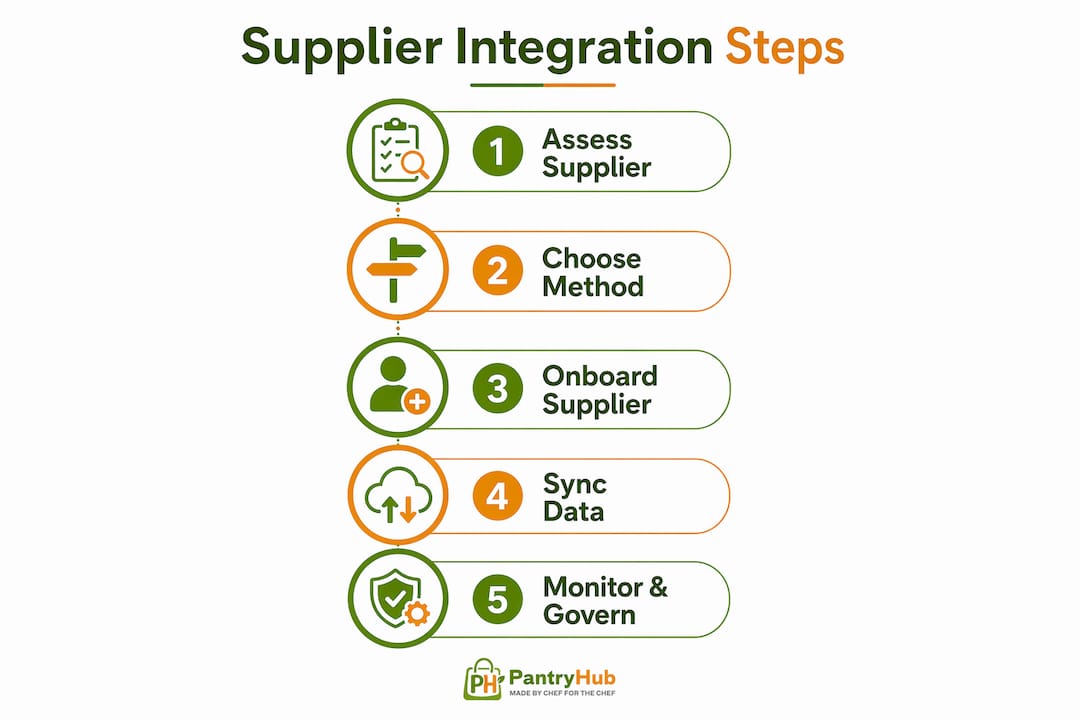
Supplier onboarding is the structured process of connecting a new supplier to your inventory platform so data flows correctly from day one. The most effective onboarding programs use a portal that requires suppliers to complete mandatory data fields before the connection activates. This includes product codes, unit measures, lead times, and pricing tiers.
Automated compliance verification within a 24-hour SLA is the industry benchmark for onboarding speed. Waiting longer than 24 hours to verify a new supplier's data creates order delays that ripple through your kitchen schedule. Automation handles the verification checks, flags exceptions, and routes approvals without requiring your purchasing manager to chase emails.
Key elements of a structured onboarding workflow:
- Supplier portal with mandatory data fields (product codes, pack sizes, pricing, lead times)
- Automated compliance checks completed within 24 hours
- Direct write of master data to your ERP or inventory platform on approval
- Procurement orchestration coordinating purchasing, finance, and operations teams in one visible workflow
- Automated alerts when supplier data changes post-onboarding
Procurement orchestration platforms replace email-based workflows with a unified, automated process. This matters for multi-location restaurant groups where a new supplier may need to be onboarded across five venues simultaneously. An orchestration layer handles the rollout, tracks completion, and flags any venue that has not completed the connection.
The onboarding process also sets the foundation for ongoing synchronization. A supplier who enters clean, complete data at onboarding creates fewer reconciliation problems later. Investing time in onboarding quality pays back in reduced manual corrections every week after.
What benefits and challenges do restaurants and bars actually see?
The measurable benefits of connecting inventory platforms with suppliers are well documented. Multi-channel sync cuts stockouts by 40%, which for a busy bar means fewer 86'd menu items on a Friday night. The same research shows that 66% of consumers lose trust after an overselling incident. In hospitality, that translates directly to negative reviews and lost repeat business.
| Benefit | Practical impact for restaurants and bars |
|---|---|
| Reduced stockouts | Fewer menu items unavailable during service |
| Automated reordering | Purchase orders generated without manual input |
| Accurate cost tracking | Real-time ingredient costs reflected in margin reports |
| Supplier accountability | Delivery discrepancies flagged automatically |
| Multi-location visibility | Stock levels across all venues in one view |
The challenges are real too. Data mismatch between supplier catalogs and internal product lists is the most common failure point. Integration complexity increases with the number of suppliers, and smaller venues often lack the IT resources to manage middleware configurations.
Near-real-time sync, running every 1–5 minutes, is sufficient for most hospitality inventory needs. True real-time sync is resource-intensive and rarely necessary unless you are managing a high-velocity bar program with dozens of SKUs turning over hourly. Matching your sync frequency to your actual operational tempo reduces tech overhead without sacrificing accuracy.
"The goal is not the fastest possible sync. The goal is the right data at the right moment, with clear ownership of every number."
For multi-location hospitality operations, integration pays its biggest dividends in visibility. A group purchasing manager can see which venue is running low on a shared supplier's product and redistribute stock before placing a new order. That kind of decision is impossible without connected systems.
Key Takeaways
Successful supplier integration requires clear data governance, a structured onboarding process, and sync frequency matched to your operational tempo, not the maximum your technology can deliver.
| Point | Details |
|---|---|
| Choose the right connection method | Use APIs for large suppliers and CSV imports for smaller ones; add middleware when formats conflict. |
| Build SKU crosswalks before go-live | Map supplier product codes to internal identifiers before activating the integration to prevent catalog errors. |
| Assign data ownership explicitly | Define which system owns pricing, quantities, and product names to prevent inventory drift. |
| Automate supplier onboarding | Use a structured portal with 24-hour compliance verification to avoid order delays from day one. |
| Match sync frequency to your needs | Near-real-time sync every 1–5 minutes handles most hospitality workflows without excess resource use. |
What I've learned from watching integrations succeed and fail
Most integration projects fail in the first 90 days. Not because the technology breaks, but because nobody redesigned the operation around the new data flow. The kitchen team keeps doing manual counts. The purchasing manager still sends emails to confirm deliveries. The integration runs in the background while the old habits run the business.
The operations that get real value from supplier integration processes treat the go-live date as the start of an operational redesign, not the finish line. They assign a single person ownership of the integration's health. They run daily reconciliation for the first month. They build the SKU crosswalk before they flip the switch, not after.
The governance question is the one most venues skip. Who owns the on-hand quantity when the supplier's delivery confirmation disagrees with your team's physical count? If you cannot answer that question before you integrate, you will be answering it at 11pm on a Saturday when your stock report looks wrong and service starts in an hour.
Near-real-time sync is almost always enough. I have seen venues spend significant money on true real-time connections that delivered no operational advantage over a five-minute sync cycle. Spend that budget on better onboarding and cleaner master data instead.
Test rigorously with two or three suppliers before you onboard your full catalog. The errors you find in a controlled test are far cheaper to fix than the ones you discover during a busy service week.
— Admin
Pantryhub connects your kitchen to your suppliers
Running a restaurant or bar means your inventory platform needs to talk to your suppliers without you in the middle of every conversation. Pantryhub is built specifically for hospitality, with automated ordering workflows, low-stock alerts, and supplier integration that keeps your stock data current without manual input.

Pantryhub handles supplier onboarding, real-time stock updates, and reporting across single venues and multi-location groups. The platform writes supplier data directly to your inventory records, so your team always works from accurate numbers. Explore Pantryhub's hospitality inventory software to see how restaurants and bars across Australia are cutting waste and reducing stockouts through connected supplier workflows.
FAQ
What does inventory platform integration with suppliers mean?
Inventory platform integration with suppliers is the process of connecting your inventory management software to supplier data systems so stock levels, pricing, and orders sync automatically. This removes manual data entry and reduces errors caused by outdated information.
What is the best method for connecting inventory systems to suppliers?
RESTful APIs provide the most accurate real-time connection for large suppliers, while CSV imports via FTP work reliably for smaller suppliers who update data daily. Middleware handles format mismatches between the two systems.
How often should inventory data sync with supplier systems?
Near-real-time sync every 1–5 minutes is sufficient for most restaurant and bar operations. True real-time sync is only necessary for high-velocity items where stock accuracy changes by the minute.
What is a SKU crosswalk and why does it matter?
A SKU crosswalk maps your supplier's product codes to your internal product identifiers so orders and deliveries match the correct items in your system. Automated crosswalk mapping with confidence scoring prevents catalog errors that cause incorrect orders.
How long does supplier onboarding take with an automated system?
Automated supplier onboarding with compliance verification completes within 24 hours under industry best practice. Manual email-based onboarding typically takes several days and introduces data errors that require correction after the supplier goes live.