

Running two or more hospitality venues without a clear grip on how multi-location inventory works is like cooking without a recipe. You know the ingredients exist somewhere, but you're never sure which kitchen has them. Overselling a bottle of wine that's actually at your other venue, or running out of a key ingredient because your manager assumed the other location would transfer stock, are not small problems. They cost you money, customers, and credibility. This guide breaks down the mechanics, the challenges, and the practical steps to get multi-location inventory management working the way it should.
Table of Contents
- Key takeaways
- How multi-location inventory works at its core
- Challenges specific to hospitality and how technology helps
- Comparing inventory strategies and software features
- Practical steps to implement multi-location inventory
- Benefits that show up in your bottom line
- My honest take on what actually goes wrong
- See how Pantryhub handles multi-location inventory
- FAQ
Key takeaways
| Point | Details |
|---|---|
| Location-specific tracking | Every item and transaction must be tied to a specific location to prevent overselling and fulfillment errors. |
| Inventory states matter | Understanding on-hand, committed, in-transit, and safety stock per location is critical for accurate ordering decisions. |
| Technology solves split-brain | Real-time synchronization across locations eliminates the data misalignment that causes stock discrepancies. |
| Clean rollouts prevent data corruption | All open orders must be closed before enabling multi-location features to protect data integrity. |
| Cycle counting beats full stocktakes | Continuous, structured cycle counting keeps accuracy high without shutting down your operations. |
How multi-location inventory works at its core
At its most fundamental level, multi-location inventory management means every single item in your system is associated with a specific physical location. Not just "you have 20 kilograms of flour." It's "you have 12 kilograms at your CBD café and 8 kilograms at your airport outlet." That distinction changes everything about how you order, transfer, and fulfill.
Multi-location inventory systems associate every item and transaction with a location, enabling per-location stock level tracking and transfers. This means your software knows not just what you have, but where you have it, and it enforces that distinction at the transaction level.
There are four inventory states you need to understand for each location:
- On-hand: The physical quantity currently sitting at that location.
- Committed: Stock that has been allocated to an order but not yet dispatched.
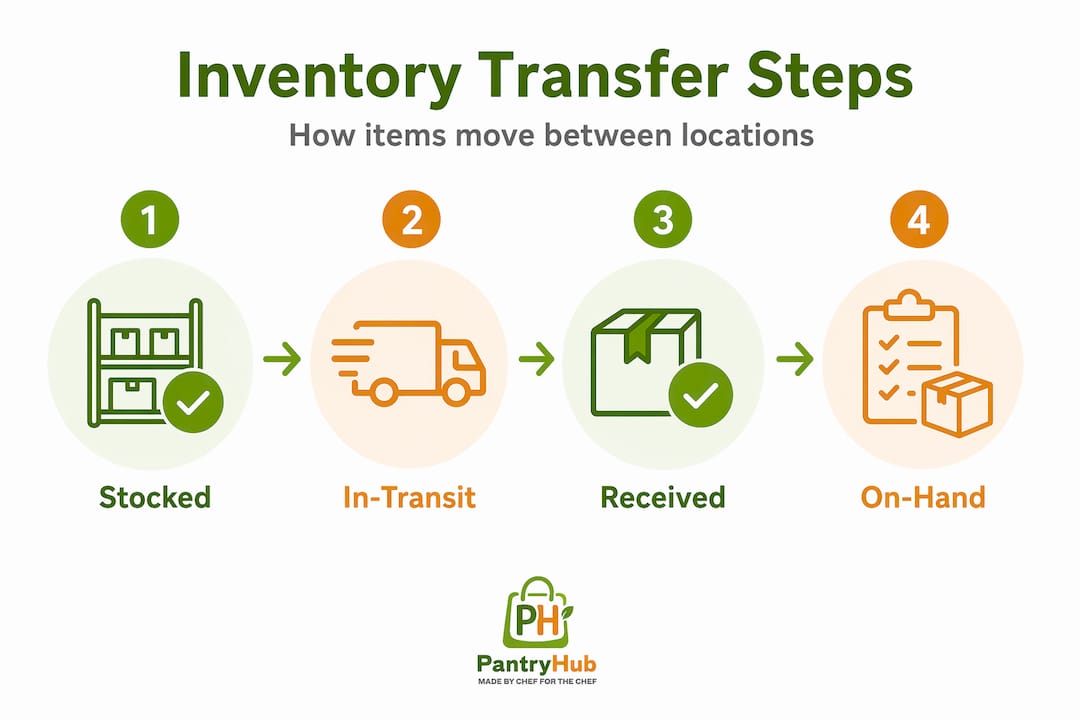
- In-transit: Items that have left one location but haven't arrived at another yet.
- Safety stock: The minimum buffer quantity you want to maintain before triggering a reorder.
These states are not interchangeable. A bottle of premium whisky that's in-transit from your main bar to your rooftop venue is not available to sell at either location until it arrives and is received. Multi-location systems differentiate these states to produce accurate available-to-promise calculations during transfers. Without this differentiation, you end up with phantom stock.
For serialized items, the controls get tighter. Sales of serialized items are restricted to the stock location of that serial number, and mismatches trigger system notifications. This enforcement prevents location-based overselling mistakes that are particularly costly in hospitality with high-value stock like premium spirits or specialty equipment.
Pro Tip: When setting up location-based tracking, map out your transfer workflows before going live. Knowing exactly how stock moves between your venues will help you configure in-transit states correctly from day one.
Challenges specific to hospitality and how technology helps
Hospitality businesses face a particular version of multi-location complexity that warehouse operators don't. Your stock moves fast, your team changes frequently, and your locations often operate semi-independently with their own suppliers and ordering habits. That creates some specific failure points.

The most common is what inventory professionals call "split-brain syndrome." This happens when two locations are operating on different data sets, each believing they have the correct picture of total stock. One manager orders more because their system shows low stock, while the other location is sitting on excess. ATP calculations that depend on location-specific inventory states including on-hand, committed, safety stock, and in-transit within transfer windows break down completely when locations aren't syncing in real time.
Here's how technology addresses the most critical challenges in order of priority:
- Real-time synchronization: Cloud-based platforms update stock levels across all locations simultaneously. The moment a bartender at your Fremantle venue uses the last case of a mixer, your Perth CBD manager sees that change reflected instantly.
- Transfer tracking with in-transit modeling: Rather than treating a transfer as a background event, good systems create a formal in-transit record. Treating transfers as a background process causes ATP inaccuracies. Modeling in-transit inventory with transfer windows is the fix.
- Mobile cycle counting: Instead of shutting down for a full stocktake, teams use handheld devices to count sections of stock during quiet periods. Continuous cycle counting maintains high inventory accuracy without operational shutdown.
- Summary-level reconciliation: Summary cycle counts can be performed at a location summary level using scanning with optional detail capture for discrepancies, allowing quick reconciliation during operations with audit trails for variances.
- Order routing logic: Systems can route orders based on proximity, available stock, and fulfillment capacity rather than requiring manual decisions from your team.
"Continuous, structured reconciliation with cycle counting is more effective for multi-location hospitality inventory than periodic full stocktakes." — Vinculum Group
Pro Tip: Set transfer windows in your system to match your actual delivery schedules between venues. If your central kitchen delivers to satellite locations every Tuesday and Friday, those windows should be reflected in your in-transit settings so ATP calculations stay honest.
Comparing inventory strategies and software features
Understanding multi-location inventory also means choosing the right operational model. There are three main approaches, and each has real trade-offs for hospitality businesses.
| Strategy | How it works | Best for | Watch out for |
|---|---|---|---|
| Centralized | One main location holds all stock; others request from center | Large groups with a central kitchen or warehouse | Transfer lag time; single point of failure |
| Distributed | Each location manages its own stock independently | Venues with very different menus or supplier relationships | Inconsistent ordering, higher per-unit costs |
| Hybrid | Core items managed centrally; location-specific items managed locally | Multi-concept groups or venues with unique needs | Requires clear rules on what's central vs. local |
Most growing hospitality groups land on a hybrid model. Your core spirits, base ingredients, and high-volume consumables are managed centrally with transfers to each venue. Specialty items unique to one venue's concept are managed locally. This gives you cost efficiency on bulk purchasing while preserving operational flexibility.
Beyond the strategic model, here are the software features that matter most for inventory tracking in multiple locations:
- Real-time visibility across all sites from a single dashboard, not a daily export
- Serialized item tracking that links specific items to specific locations and blocks incorrect sales
- Cycle counting tools with mobile support for floor-level counting without system shutdowns
- Transfer management that creates formal in-transit records between venues
- Low-stock alerts configured per location, not just at the group level
- Reporting by location so you can compare performance, waste rates, and ordering patterns across venues
For hospitality businesses exploring buy-online-pick-up-in-store or click-and-collect models, location-aware systems expose inventory availability for branch pickup including future and in-transit stock, giving customers clearer visibility and improving order fulfillment accuracy.
Practical steps to implement multi-location inventory
Getting multi-location inventory management right is as much about process as it is about software. Here's how to approach it without creating chaos during the transition.
The single most important step before you flip the switch on any multi-location system is closing out your open orders. All open orders must be fully shipped or closed to ensure correct data association. Open orders remaining can cause unassociated or incorrect transactions after enabling multi-location features, which means your opening stock figures at each location will be wrong from day one.
Beyond that, a clean rollout follows this sequence:
- Audit your current stock at every location and reconcile physical counts with system records before migration.
- Define your location hierarchy clearly. Are you tracking by venue, by storage area within a venue, or both? More granularity is useful, but only if your team will actually maintain it.
- Set up transfer workflows with formal approval steps so stock doesn't move between locations without a paper trail.
- Train your team by role, not just by venue. Your bar managers need to understand transfers; your kitchen staff need to understand cycle counting; your venue managers need to understand the reporting.
- Split order lines by location rather than changing the location on a partially fulfilled order. Changing location on partially fulfilled lines can cause out-of-sync stock counts and fulfillment errors.
- Establish a cycle counting schedule per location so every SKU gets counted at least once per period without requiring a full operational shutdown.
Pro Tip: Run your first cycle count within 48 hours of going live on your new system. It catches setup errors early before they compound into bigger discrepancies.
For Perth-based hospitality groups, how Perth multi-location inventory tracking works in practice often depends on the distance between venues and supplier lead times. Venues spread across the metro area benefit significantly from formal in-transit modeling because a transfer from Fremantle to Joondalup isn't instant, and your system needs to reflect that reality.
Benefits that show up in your bottom line
When multi-location inventory management is working well, the benefits are measurable and they show up quickly. The most immediate is the elimination of overselling. When stock is tracked at the location level with real-time sync, you cannot sell something at one venue that only exists at another.
Fulfillment speed improves because routing decisions are made by the system rather than by a manager making phone calls. Your team spends less time checking stock levels manually and more time serving customers. For hospitality groups running hotel F&B operations across multiple outlets, this operational clarity directly reduces labor costs tied to inventory management.
Cost control is another significant benefit. When you have accurate visibility across all locations, you stop over-ordering as a hedge against uncertainty. You can see which venue is sitting on excess stock before you place a new order, and you can transfer rather than purchase. That reduction in dead stock and emergency ordering adds up fast across a multi-venue group.
Customer satisfaction improves too. Location-aware inventory visibility for BOPIS and branch pickup, including future and in-transit stock, gives customers clearer visibility and improves order fulfillment accuracy. Whether you're running a restaurant group or a bar chain, customers who get what they ordered, when they expected it, come back.
My honest take on what actually goes wrong
I've seen hospitality groups invest in multi-location inventory software and still end up with the same chaos they had before. The technology wasn't the problem. The process was.
The most common mistake is treating multi-location inventory as a software project rather than an operational change. You can configure the best system in the world, but if your team at each venue is still texting each other to check stock levels or manually adjusting counts to "fix" discrepancies they don't understand, the system data becomes worthless within weeks.
What I've found actually works is starting with one or two locations and getting the process right before expanding. That means real training, not just a walkthrough. It means building transfer requests into the daily workflow, not treating them as an exception. And it means someone at the group level reviewing the reconciliation reports weekly, not monthly.
The detail that gets underestimated most often is the in-transit configuration. Teams set up locations and transfers but don't define transfer windows, so the system either double-counts stock or hides it entirely during transit. That single configuration error will undermine your ATP calculations and make your managers distrust the system. Fix it before go-live, not after.
Incremental improvement beats a big-bang rollout every time in hospitality. The venues that get this right are the ones that treat it as an ongoing operational discipline, not a one-time implementation.
— Admin
See how Pantryhub handles multi-location inventory
If you're managing stock across two or more hospitality venues and the current approach isn't giving you the real-time visibility you need, Pantryhub was built specifically for this challenge.

Pantryhub's hospitality inventory software gives you live stock visibility across every location from a single dashboard, with low-stock alerts, transfer tracking, and supplier ordering all in one place. It connects with your POS system so stock levels update automatically as sales happen, and it scales from a single café to a multi-venue restaurant group without adding complexity. If you run bars, the bar inventory software tracks pour costs and stocktakes across multiple venues. For Perth-based businesses, the Perth restaurant inventory tools are tailored to local supplier workflows and metro-area transfer logistics.
FAQ
What does multi-location inventory management mean?
Multi-location inventory management means tracking stock levels, transfers, and orders separately for each physical location your business operates, with all data connected in a single system for group-level visibility.
How do inventory transfers work between locations?
A transfer creates a formal record that moves stock from one location's on-hand count to an in-transit state, then to the receiving location's on-hand count once it arrives. This prevents the stock from being counted at both locations simultaneously.
Why do ATP calculations break down in multi-location setups?
Available-to-promise calculations fail when in-transit inventory isn't modeled with transfer windows, causing systems to either double-count stock in transit or hide it entirely, which leads to inaccurate ordering decisions.
What is cycle counting and why does it matter for multiple venues?
Cycle counting is a method of counting sections of your inventory on a rotating schedule rather than doing a full stocktake. It keeps accuracy high across all locations without requiring you to pause operations.
How do I start implementing multi-location inventory tracking?
Close all open orders first, then audit physical stock at every location before enabling multi-location features in your system. A clean data foundation prevents the corruption that undermines most multi-location rollouts from the start.