

A kitchen supplier database is a centralized repository of every vendor your operation depends on, from produce wholesalers to smallwares distributors, structured so your procurement team can act on it instantly. Building one is the single most direct way to cut procurement delays, reduce ordering errors, and protect your kitchen when a supplier goes dark. The hospitality industry manages supplier relationships at serious scale. Over 21,757 kitchen supply stores operate across Europe alone, which illustrates just how much supplier data a growing operation must track. A well-built kitchen supplier directory turns that complexity into a competitive advantage.
What fields should you include when building a kitchen supplier database?
The right fields are the ones your team needs to make a procurement decision, nothing more. Starting with decision-critical fields lets you launch fast and refine later, rather than waiting months for a perfect schema. That principle alone separates databases that get used from ones that collect dust.
The core fields every kitchen supplier directory needs at launch:
- Company name and trading name if different
- Primary category (produce, dairy, dry goods, equipment, packaging)
- Lead-time range in business days
- Stock availability status (in stock, seasonal, limited)
- Service radius or delivery zones
- Preferred contact method (phone, email, portal)
- Payment terms and minimum order value
- Compliance documents (food safety certificates, insurance)
Each field maps directly to a procurement decision. Lead time tells your chef whether a supplier can cover an emergency order. Service radius tells your purchasing manager whether a new venue location is covered. Compliance documents tell your operations director whether a supplier can pass an audit.
Pro Tip: Add a "backup supplier" field to every primary category from day one. When your main produce supplier has a shortage, you need that alternative in the same record, not in someone's email inbox.
Once your team is using the database consistently, you can expand to secondary fields: contract expiry dates, pricing tiers, performance ratings, and risk tags like tariff exposure and supply fragility. These context-aware tags give your procurement team early warning before a supply chain problem becomes a service problem.
What platform should you use to create a supplier database?
The right platform depends on how complex your supplier relationships are and how much IT support you have. For most hospitality businesses, the answer is a no-code or low-code relational database, not a spreadsheet.

Flat files like Excel fail when supplier data grows beyond simple contact lists. Spreadsheets cannot enforce data relationships, trigger approval workflows, or control who can edit a supplier's payment terms. A no-code relational database handles all three.
| Feature | Spreadsheet (Excel/Google Sheets) | No-code platform (Softr, Mekari Officeless) |
|---|---|---|
| Data relationships | Manual, error-prone | Built-in relational tables |
| Approval workflows | Not supported | Automated, configurable |
| Role-based access | Basic sharing only | Granular permission controls |
| Document uploads | File attachments only | Linked document management |
| Duplicate prevention | Manual checks | Validation rules at entry |
| Procurement integration | Copy-paste | API or native connection |
No-code platforms reduce development cycles from months to hours using drag-and-drop interfaces and pre-built workflow templates. That speed matters for hospitality operators who cannot wait for an IT project to complete before the next busy season.
Softr adds AI-assisted auto-classification for vendor categories and permission management for supplier portals. Relational vendor databases built on platforms like Softr support interconnected tables for suppliers, tasks, documents, and invoices in a single system. Mekari Officeless targets procurement teams that need approval chains and audit trails without writing code.
Pro Tip: Before choosing a platform, map your three most common procurement workflows. The right tool is the one that handles those three workflows without workarounds, not the one with the longest feature list.
How do you build and maintain a kitchen supplier database step by step?
A working database is built in phases, not all at once. The goal of phase one is a usable system, not a perfect one.
-
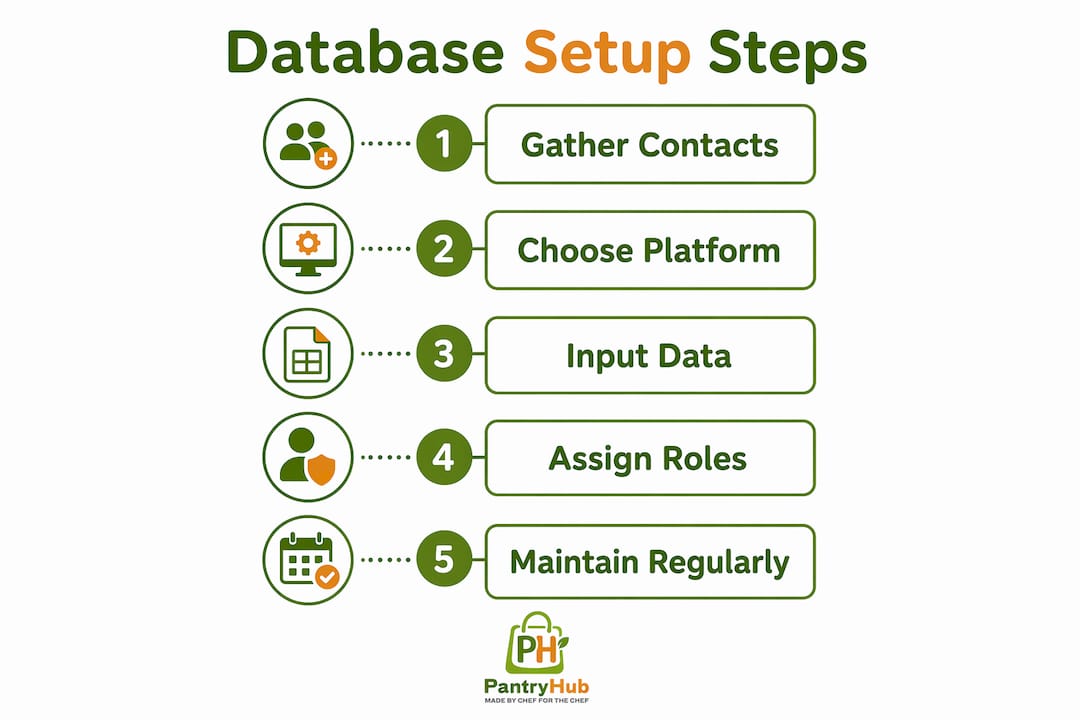
Collect and consolidate existing supplier data. Pull contacts from email threads, invoices, and spreadsheets into one staging document. Assign a category to each supplier immediately. Gaps in data are normal at this stage.
-
Choose your platform and set up the schema. Create your core fields as defined columns or properties. Set field types precisely: lead time as a number, not free text. This prevents data rot from the start.
-
Build a supplier onboarding form with validation rules. Strict validation rules at entry prevent duplicate records and enforce consistent formatting. A supplier who submits their own data through a form is less likely to create errors than a staff member copying from an email.
-
Set up automated notifications for key events. Contract expiry, compliance document renewal, and low-stock alerts from linked suppliers should trigger automatic notifications to the relevant team member. Automating onboarding and contract management cuts the time your procurement team spends on administrative follow-up.
-
Implement an approval workflow for new supplier verification. New vendors should go through a defined review before they appear in active procurement views. This protects your operation from unapproved or non-compliant suppliers entering the supply chain.
-
Create filtered views for different roles. Your head chef needs a different view than your finance manager. Filtered views by category, location, or lead time make the database useful without overwhelming any single user.
-
Link the database to your procurement workflows. Top procurement teams connect supplier databases to purchase orders and contracts rather than treating the database as a standalone contact list. This connection is what makes the database a live operational tool. For multi-venue groups, centralizing this data is especially critical. A multi-venue inventory guide covers how to structure that centralization effectively.
-
Assign database ownership to your procurement team. Procurement staff who maintain their own databases update lead times and pricing in real time because they feel the consequences of stale data directly. Ownership drives accuracy.
The table below shows a practical maintenance schedule for an active kitchen supplier directory.
| Task | Frequency | Owner |
|---|---|---|
| Update lead times and pricing | Monthly | Procurement manager |
| Review compliance document expiry | Quarterly | Operations manager |
| Audit for duplicate or inactive suppliers | Quarterly | Procurement manager |
| Add new suppliers from onboarding queue | As needed | Procurement team |
| Review risk tags and supply fragility flags | Biannually | Head chef or GM |
What are the most common mistakes when building a kitchen supplier database?
The most damaging mistake is waiting until the database is perfect before using it. A database with 20 well-structured supplier records delivers more value than a 200-record spreadsheet that nobody trusts.
Common pitfalls that kill database usefulness:
- Over-engineering the schema at launch. Adding 40 fields before you have 10 suppliers means most fields stay empty. Empty fields create the illusion of incompleteness and discourage updates.
- Treating the database as a contact list. A contact list stores names and phone numbers. A procurement database stores lead times, risk flags, contract terms, and performance history. The difference determines whether your team uses it or ignores it.
- Skipping validation rules. Without validation, the same supplier appears as "Fresh Co," "FreshCo," and "Fresh Co. Pty Ltd" in three records. Searching for that supplier returns incomplete results. Data cleansing at entry is far cheaper than fixing fragmented records later.
- No single owner. Databases maintained by committee go stale. One person must be accountable for accuracy.
- Ignoring supply chain context. A supplier's name and phone number tell you nothing about their vulnerability to a port disruption or a commodity price spike.
"Treat the supplier database as your procurement system's central source of truth. When every purchase order, contract, and performance review links back to a single supplier record, your team stops making decisions based on memory and starts making them based on data."
Context-aware supplier tagging for risks like tariff exposure and supply fragility anticipates procurement crises before they occur. A supplier tagged as "single-source, high tariff exposure" tells your team to find a backup before the shortage hits, not after. Real-time supplier data visibility is equally critical. Understanding why real-time data matters for restaurant inventory helps frame why a static database is never enough.
Key Takeaways
A kitchen supplier database delivers its full value only when it is structured around decision-critical fields, maintained by the procurement team, and connected directly to purchasing workflows.
| Point | Details |
|---|---|
| Start with decision-critical fields | Launch with six to eight core fields and expand only after the team is using the database consistently. |
| Choose a no-code relational platform | Platforms like Softr and Mekari Officeless replace spreadsheets with validation rules, workflows, and role controls. |
| Automate onboarding and notifications | Supplier forms with validation prevent duplicate records and reduce manual data entry errors from day one. |
| Assign clear database ownership | One accountable procurement owner keeps lead times, pricing, and compliance documents current in real time. |
| Tag suppliers with risk context | Supply fragility flags and tariff exposure tags give your team early warning before a shortage becomes a crisis. |
Why most kitchen supplier databases fail within six months
The databases I have seen fail share one trait: they were built as filing systems, not decision tools. Someone spent a weekend populating a spreadsheet with supplier names and phone numbers, called it a supplier directory, and shared it with the team. Six months later, half the numbers were wrong and nobody was updating it.
The shift that changes everything is treating the database as a live procurement asset. That means connecting it to your actual ordering process, not parking it in a shared folder. When a chef places an order and the system pulls lead time and stock status from the supplier record automatically, the database earns its place in the daily workflow. When it sits separately from ordering, it becomes optional, and optional tools get ignored.
The no-code argument is also stronger than most operators realize. I have watched procurement managers build functional supplier approval workflows in an afternoon using Mekari Officeless, with zero IT involvement. The barrier to building a proper relational database is now a few hours, not a development sprint. The operators who still use spreadsheets are not saving time. They are creating future cleanup work.
Start with eight fields. Get your team using it. Add risk tags in month two. Connect it to your purchase orders in month three. A database that grows with your operation is worth ten times more than a perfect schema that never launches.
— Admin
Pantryhub makes supplier and inventory management work together
Managing a kitchen supplier directory in isolation from your inventory system creates a gap that costs real money. When stock levels, supplier lead times, and ordering workflows live in separate tools, your team fills the gap manually, and manual processes introduce errors.

Pantryhub is built specifically for restaurants, cafés, bars, and commercial kitchens that need supplier integration and inventory control in one place. The platform provides real-time stock visibility, low-stock alerts, and direct supplier ordering from a single dashboard. For multi-venue groups, Pantryhub centralizes procurement data across every location. Explore hospitality inventory software from Pantryhub to see how supplier management and inventory tracking work as a connected system.
FAQ
What is a kitchen supplier database?
A kitchen supplier database is a centralized, structured record of every vendor a hospitality business uses, including contact details, lead times, compliance documents, and supply risk information. It functions as the single source of truth for all procurement decisions.
How do you find kitchen suppliers to add to your database?
Start by consolidating existing supplier contacts from invoices, emails, and purchase orders. Supplement with trade directories, food service expos, and referrals from other operators in your network.
What is the best platform to create a supplier database?
No-code relational platforms like Softr and Mekari Officeless are the most practical choice for hospitality operators. They support approval workflows, role-based access, and validation rules without requiring IT development resources.
How often should you update a kitchen supplier database?
Lead times and pricing should be reviewed monthly. Compliance documents and risk tags should be audited quarterly. Assigning a single procurement owner to the database is the most reliable way to keep it current.
How does a supplier database connect to kitchen supply chain management?
A supplier database becomes a supply chain management tool when it links directly to purchase orders, contracts, and inventory systems. That connection gives procurement teams real-time visibility into supplier performance and stock availability across every venue.