

What does managing inventory during renovations actually involve?
Renovation inventory management is the process of planning, tracking, and controlling all materials, tools, and equipment across every phase of a construction project. The goal is straightforward: get the right items to the right place at the right time, without overspending or creating waste. When you're coordinating multiple trades, shifting timelines, and unpredictable site conditions, that goal gets complicated fast.
Effective inventory control during construction covers more than just counting stock. It means:
- Forecasting material needs before work begins
- Coordinating deliveries around project phases, not just calendar dates
- Maintaining visibility across multiple storage zones and job sites
- Assigning clear ownership so nothing falls through the cracks
- Communicating changes quickly between project managers, suppliers, and site teams
The complexity scales with the project. A single-room remodel has different demands than a multi-floor commercial renovation running across several months. What stays constant is the need for a structured system. Without one, even well-funded projects bleed money through duplicate orders, idle crews waiting on materials, and materials that simply disappear.
Common challenges when you're managing inventory during renovations
Renovation sites are not static warehouses. Materials move, storage zones shift, and the plan changes weekly. That dynamic environment creates inventory problems that don't show up on a spreadsheet until they've already cost you.
Here are the challenges that derail projects most often:
- Tracking across multiple locations. When materials are split between a central warehouse, a staging area, and the active job site, knowing what's where becomes a daily battle. Without real-time visibility, teams order materials they already own.
- Inaccurate stock data causing delays. A single incorrect count can stall an entire trade. If the drywall count is off by 20 sheets, the crew stops. That idle time adds up fast.
- Material loss, theft, and damage. Open renovation sites are vulnerable. Tools walk off. Lumber gets damaged by rain. Temperature-sensitive materials like adhesives and electronics degrade when stored in direct sunlight or extreme heat, requiring climate-controlled or shaded storage to avoid costly replacements.
- Overordering and surplus buildup. Ordering extra "just in case" sounds safe. In practice, a significant portion of building materials delivered to a construction site can end up as waste due to over-ordering, damage, or mismanagement.
- Communication breakdowns. When procurement, site managers, and subcontractors aren't sharing the same information, you get duplicate orders, missed deliveries, and last-minute scrambles. A mechanical contractor quietly using the last duct piece without logging it is a small act with a big ripple.
- Static manual records. Spreadsheets are outdated the moment someone hits save. Relying on disconnected paper logs or siloed files makes it nearly impossible to catch discrepancies before they affect the schedule.
- Temporary storage mismanagement. Renovation projects often require container or temporary storage that needs to be planned around project phases. A container removed too early, or loaded without a system, creates scrambling when contractors need access mid-project.
Best practices for keeping inventory under control on renovation projects
The best project managers don't react to inventory problems. They build systems that prevent them. These practices are grounded in how experienced contractors actually run tight jobs.
- Plan proactively and build contingency in from the start. Review the full project scope before ordering anything. Use data from past projects to estimate quantities, then identify your high-risk items: long-lead materials, theft-prone supplies, and anything with a single supplier. Have a backup plan for each.
- Centralize your inventory data. A single source of truth beats three spreadsheets and a group chat. Digital systems that tag items with statuses like "Ordered," "In Transit," and "On-Site" prevent material creep and redundant orders that inflate costs.
- Run regular cycle counts. Don't wait for a crisis to reconcile your records. Weekly or biweekly audits of high-value and critical items catch discrepancies before they trigger urgent orders and schedule delays.
- Set reorder points for critical materials. Know the lead time for every key item and set a threshold that triggers reordering before you run out. If you need 200 light fixtures but can only store 50 on site, reorder when you drop to 15, not zero.
- Coordinate deliveries with project phases. Materials arriving too early clutter the site and increase theft risk. Arriving too late stalls the crew. Align procurement to your construction schedule so materials show up when the trade needs them, not a week before or after.
- Assign an inventory coordinator. Someone needs to own this function. That person maintains the tracking system, logs all requests, and serves as the hub for every inventory-related communication on the project.
- Use barcode or RFID scanning. Manual entry is slow and error-prone. Scanning a pallet as it arrives takes seconds and instantly updates your digital count. That speed matters when you're receiving multiple deliveries across a busy site.
- Protect storage from environmental damage. Assign dedicated zones by material type. Keep adhesives, electronics, and other temperature-sensitive items away from sun-exposed walls or areas prone to moisture.
Pro Tip: Apply the 80/20 inventory principle to your audit schedule. Roughly 80% of inventory-related issues come from 20% of items. Run more frequent checks on your high-value and mission-critical materials, and you'll catch most problems before they escalate.

Key steps in the renovation inventory management process
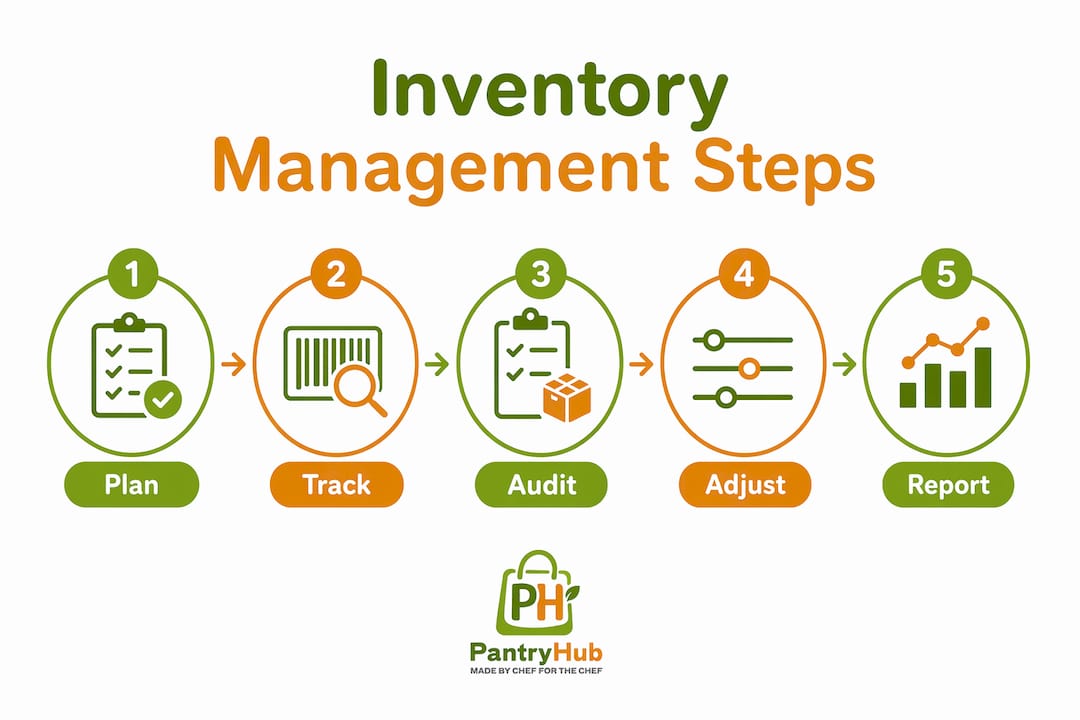
A reliable workflow follows five core steps. Skip one and the gaps compound across every phase that follows.
-
Plan and estimate material and equipment needs. Start with a thorough scope review. Quantify every material category, factor in waste allowances, and flag long-lead items that need early ordering. Input from all trades at this stage prevents surprises later.
-
Procure and order aligned with the project schedule. Purchasing too early ties up cash and creates storage problems. Purchasing too late stalls the crew. Build a procurement calendar that maps each order to the phase that needs it, with buffer time built in for supplier delays.
-
Receive and verify shipments on site. Every delivery needs a check against the purchase order before it's accepted. Count quantities, inspect for damage, and log the receipt immediately in your tracking system. A missed discrepancy at receiving becomes a much bigger problem three weeks later.
-
Organize storage and protect inventory. Assign dedicated zones by material type and usage pattern. Load containers with heaviest items at the back and frequently accessed materials near the doors. Label everything. A container loaded wall-to-wall with no access aisle is a container where nothing can be found without unloading half of it.
-
Track allocation, usage, and costs continuously. As materials move from storage to installation, log every transaction. Compare actual consumption against your original estimate regularly. Discrepancies tell you whether waste, theft, or estimation errors are eating your budget, and they give you better data for the next project.
These five steps of construction inventory management form the operational backbone of any well-run renovation. The details change by project size, but the sequence doesn't.

What types of inventory do you need to track during a renovation?
Not all materials need the same level of attention. Construction inventory breaks into four main categories, each with different handling, storage, and tracking requirements.
- Raw materials. Lumber, conduit, drywall, concrete, and structural components. These are typically high-volume and high-cost, making accurate quantity tracking critical. Damage or miscounting here directly affects structural work.
- Consumables. Nails, screws, adhesives, fasteners, caulk, and PPE. These move fast and get used in small quantities across many tasks. They're easy to undercount and easy to over-order. A consumption ledger helps you spot when usage is running ahead of the estimate.
- Equipment and tools. Power tools, machinery, scaffolding, and hired plant. These require check-out and check-in logging to prevent loss and ensure availability. Equipment sitting idle at one site while another site waits for it is a coordination failure, not a supply problem.
- Finished goods and project-specific components. Custom fixtures, prefabricated assemblies, specialty hardware, and items ordered to specification. These often have long lead times and no easy substitute. They need to be flagged early, ordered first, and stored carefully once they arrive.
Understanding which category each item falls into shapes how you store it, how often you count it, and how much buffer stock you carry. A box of screws and a custom skylight are both "inventory," but they need completely different management approaches.
Which tools and software help you track inventory across renovation sites?
Manual tracking breaks down fast on renovation projects. The job site changes daily, materials move between zones, and teams need updates in real time. Digital tools close that gap.
Modern inventory management software built for construction typically includes:
- Real-time stock monitoring. Unlike a static spreadsheet, a live system updates the moment an item is checked out or delivered. You see current quantities across every location without making a phone call.
- Barcode and QR scanning. A smartphone scan at receiving logs a full pallet in seconds. The same scan at check-out assigns materials to a specific room or project phase. Manual typing is the enemy of accuracy on a busy site.
- Multi-location visibility. If Site A has surplus vinyl planks and Site B is running short, a multi-site platform lets you transfer stock digitally before placing a new order. That cross-location view prevents duplicate purchasing.
- Automated reorder alerts. Set a par level for each critical item and the system notifies you when stock drops below it. Some platforms can even generate a draft purchase order for one-click approval.
- Integration with procurement and project management systems. When inventory connects to your purchase orders, project schedule, and job costing, you get a complete picture of how materials affect margins, not just a count of what's on the shelf.
- Cloud access for field teams. If the software only lives on a desktop, it's useless to the person receiving a delivery. Cloud-based platforms let site managers update stock levels from a tablet the moment something arrives or gets used.
- Analytics and reporting. Over time, your inventory data reveals patterns: which materials run out fastest, which suppliers deliver late, which sites have higher shrinkage rates. That data improves estimating and procurement on every future project.
Frequent communication among procurement, site management, and trades remains essential even with the best software. Technology gives you visibility. Regular check-ins give you the context to act on it. A weekly inventory coordination meeting, even a short one, keeps everyone aligned on upcoming needs, current stock status, and any shortages that need attention.
For hospitality operators managing a venue renovation, the same principles apply. Pantryhub's real-time inventory tracking gives you live visibility across your stock during operational disruptions, so you're not flying blind when your kitchen or bar is mid-renovation. If you're seeing the signs that your current system isn't keeping up, it's worth checking whether your kitchen needs inventory software built for exactly this kind of pressure.
Key Takeaways
Effective renovation inventory management comes down to one principle: the right materials, in the right place, at the right time, tracked continuously from procurement to installation.
| Point | Details |
|---|---|
| Plan before you procure | Estimate all material needs from the full project scope before placing a single order. |
| Centralize your data | Use a digital system with real-time status tags to prevent duplicate orders and material creep. |
| Audit on a schedule | Weekly or biweekly cycle counts catch discrepancies before they stall the project. |
| Apply the 80/20 rule | About 80% of inventory issues come from 20% of items; focus tighter controls on high-value materials. |
| Coordinate deliveries with phases | Align procurement to your construction schedule so materials arrive when the trade needs them. |