

Tracking stock levels daily is the practice of monitoring inventory quantities continuously to prevent stockouts, cut waste, and protect cash flow in food service operations. The industry standard method for achieving this is cycle counting, a discipline that maintains 99% inventory accuracy without shutting down your kitchen or dining room. Combined with the reorder point formula ROP = (Average Daily Usage × Lead Time) + Safety Stock, daily monitoring gives hospitality managers the data they need to order right, not just order often. Pantryhub was built specifically for this kind of operational discipline, giving restaurants, cafés, and bars real-time visibility into stock across every location.
What is cycle counting and how does it support daily stock tracking?
Cycle counting is the practice of counting a small subset of your inventory on a rotating schedule, rather than stopping operations for a full physical count. Counting small subsets frequently keeps records accurate all year and avoids the disruption that comes with monthly or annual shutdowns. For hospitality managers, this is the most practical way to track stock levels daily without pulling your team off the floor.
The ABC classification system determines how often each item gets counted. A-class items, your highest-value or fastest-moving ingredients, get counted weekly or bi-weekly. B-class items are counted monthly, and C-class items quarterly. A busy restaurant might classify fresh proteins and premium spirits as A-class, canned goods as B-class, and cleaning supplies as C-class. This tiered approach focuses your team's attention where the financial risk is highest.
The contrast with annual physical inventory counts is stark. A full physical count gives you one accurate snapshot per year, then leaves you flying blind for the next 364 days. Continuous cycle counting provides ongoing inventory control and catches discrepancies before they become costly. A single miscounted case of salmon caught in a weekly A-class count saves far more than the time it took to count it.
Pro Tip: Post your weekly Inventory Record Accuracy (IRA) rate on the kitchen notice board. Staff who can see the accuracy score tend to take counts more seriously, and a visible metric creates natural accountability without extra management effort.
| Feature | Cycle counting | Annual physical count |
|---|---|---|
| Frequency | Daily, weekly, or monthly by category | Once per year |
| Operational disruption | Minimal | High |
| Accuracy over time | Continuously maintained | Accurate only at count date |
| Error detection speed | Days | Up to 12 months |
| Staff workload | Distributed and manageable | Concentrated and intensive |
How do reorder points and safety stock work for daily inventory monitoring?
The reorder point (ROP) formula is the backbone of any daily stock monitoring system. ROP = (Average Daily Usage × Lead Time) + Safety Stock. Each component matters. Average daily usage is your mean consumption of an item per day based on recent sales. Lead time is the number of days your supplier takes to deliver. Safety stock is the buffer you hold to absorb demand spikes or supplier delays.

A practical hospitality example: your café uses 10 kg of coffee beans per day. Your supplier's standard lead time is three days. Your safety stock is 15 kg, calculated to cover a worst-case five-day delay. Your ROP is (10 × 3) + 15 = 45 kg. When your stock hits 45 kg, you place an order. Without this number, you are guessing.
Safety stock must account for worst-case delays, not just average lead times. Holding only average-based stock leads to shortages in the weeks when your supplier runs late or demand spikes unexpectedly. Calculate your buffer using the longest historic supplier delay you have experienced, not the typical one. For a restaurant with seasonal demand, recalculate safety stock at least quarterly.
Common mistakes hospitality managers make with reorder points include:
- Using average lead time instead of worst-case lead time for safety stock calculations
- Ignoring allocated stock when calculating available inventory, which causes phantom reorder triggers
- Setting a static ROP and never updating it as sales patterns change
- Failing to account for minimum order quantities from suppliers, which can push actual order timing earlier than the formula suggests
Pro Tip: Automate your reorder alerts based on calculated ROP values rather than gut feel. When stock dips below the threshold, an automated alert fires instantly. This removes human error from the equation and scales across multiple locations without adding headcount.
What tools and systems can improve daily stock level updates in hospitality?
Manual daily reports have a critical weakness: they only capture stock at the moment someone writes them down. Stockouts that occur overnight or on weekends are invisible until the next manual check, often after the damage is done. A Saturday night service running out of a key ingredient because Friday's count looked fine is a preventable failure.
Automated alert systems solve this by monitoring stock in real time against calculated thresholds. Automated reorder systems trigger notifications by email or messaging platforms when stock falls below a reorder point, freeing managers to focus on decisions rather than manual calculations. The threshold range of 14–45 days of stock on hand is a common setting for food service businesses, adjusted by item velocity and supplier reliability.
One distinction that most manual systems miss is the difference between physical stock, allocated stock, and available stock. Confusing these three states causes overselling and inaccurate reorder decisions. Physical stock is what sits on your shelf. Allocated stock is committed to orders but not yet used. Available stock is physical minus allocated. Your reorder triggers should fire based on available stock, not physical stock alone.
| Tool category | Real-time updates | Reorder alerts | Stock state tracking | Multi-location support |
|---|---|---|---|---|
| Cloud spreadsheets | No | Manual only | Limited | Difficult |
| Entry-level inventory apps | Partial | Basic thresholds | Physical stock only | Rarely |
| Purpose-built hospitality platforms | Yes | Automated by ROP | Physical, allocated, available | Yes |
Purpose-built platforms for food service, like Pantryhub, track all three stock states and fire alerts based on available inventory. That distinction alone prevents a significant share of common inventory mistakes that restaurants make when relying on generic tools.
How to implement a daily stock checking process in your venue
A consistent daily stock checking process requires three prerequisites before you count a single item: accurate data entry from the previous period, a current item classification list (ABC), and up-to-date supplier lead times. Without these, your counts produce numbers that cannot be trusted or acted on.
The daily routine itself follows a clear sequence:
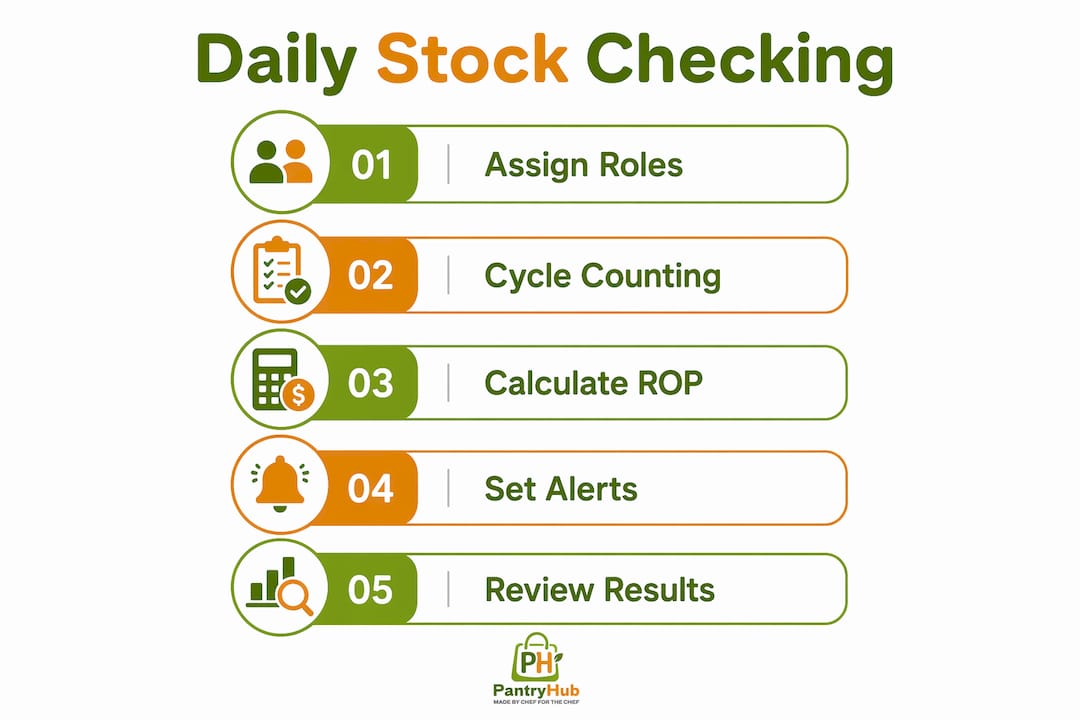
- Select the items for today's count based on your cycle counting schedule. A-class items appear most frequently; C-class items appear rarely.
- Physically count and record quantities for each selected item. Cross-check against your system's expected on-hand figure.
- Reconcile discrepancies immediately. A variance of more than 5% on an A-class item warrants investigation before the next service.
- Review reorder alerts generated by your system. Confirm that available stock figures are accurate before approving any orders.
- Flag aging inventory. Items sitting idle beyond their expected turnover window tie up cash and risk spoilage. Items idle for extended periods incur storage costs and create cash flow pressure. Daily visibility into aging stock lets you run specials or adjust ordering before the problem compounds.
Assign clear roles for each step. One team member handles physical counts; a supervisor reviews reconciliation and approves reorders. This separation reduces errors and creates a natural check on the process. For multi-location operations, centralize the review function so one manager can see all sites simultaneously.
Pro Tip: Schedule a brief weekly audit of your cycle counting results alongside the daily routine. Compare your system's on-hand figures against a surprise physical count of five to ten items. This catches systemic data entry errors before they distort your reorder points.
Key Takeaways
Hospitality managers who track stock levels daily using cycle counting, accurate reorder point formulas, and automated alerts achieve the highest inventory accuracy with the least operational disruption.
| Point | Details |
|---|---|
| Cycle counting beats annual counts | Count small subsets daily or weekly to maintain accuracy without shutting down operations. |
| Use the ROP formula correctly | Calculate reorder points using worst-case lead times and safety stock, not averages. |
| Distinguish available from physical stock | Base reorder triggers on available stock to avoid phantom orders and overselling. |
| Automate alerts at calculated thresholds | Automated systems catch overnight and weekend stockouts that manual reports miss. |
| Assign roles and audit regularly | Clear staff responsibilities and weekly spot audits keep your daily process reliable. |
Why daily tracking changed how I think about hospitality inventory
The hospitality industry spent decades treating inventory as an annual accounting exercise. A full physical count in january, a reconciliation headache in february, and then twelve months of educated guessing. That model does not work for a kitchen where ingredient costs move weekly and supplier reliability varies by season.
What I have seen work consistently is treating the daily stock checking process as a non-negotiable operational rhythm, the same way you treat opening and closing procedures. The managers who resist this usually cite time as the barrier. The ones who adopt it realize within a month that the time spent counting is far less than the time spent managing stockout crises, over-ordering to compensate, or writing off spoiled inventory.
The combination of cycle counting and automated reorder alerts is where the real shift happens. Manual checks catch what is there. Automation catches what is missing before anyone notices. Neither works as well alone. The benefits of digital stock management become obvious once you stop treating inventory software as a replacement for counting and start treating it as the system that makes counting meaningful.
My honest advice: start with your A-class items only. Get the habit right on your ten most critical ingredients before expanding to the full catalog. Accuracy on the items that matter most delivers the majority of the financial benefit, and a small win early builds the team's confidence in the process.
— Admin
Pantryhub makes daily stock tracking practical for hospitality teams
Running a daily stock monitoring routine manually is possible, but it does not scale. Pantryhub is built specifically for Australian restaurants, cafés, bars, and commercial kitchens to put the practices described in this article into daily operation without adding administrative burden.

Pantryhub's hospitality inventory software tracks physical, allocated, and available stock in real time, fires automated low-stock alerts based on your calculated reorder points, and gives you full visibility across single or multiple locations from any device. The platform handles ingredient-level tracking, supplier ordering, and inventory reporting in one place. If you are ready to move from manual spreadsheets to a system built for the pace of food service, Pantryhub is the practical next step.
FAQ
What does it mean to track stock levels daily?
Tracking stock levels daily means monitoring inventory quantities on a continuous basis using cycle counting and real-time data, rather than relying on periodic full counts. The goal is to prevent stockouts, reduce waste, and keep reorder decisions accurate.
What is the reorder point formula for hospitality inventory?
The reorder point formula is ROP = (Average Daily Usage × Lead Time) + Safety Stock. Safety stock should cover your worst-case supplier delay, not just the average lead time, to protect against unexpected shortages.
How often should A-class inventory items be counted?
A-class items, your highest-value or fastest-moving ingredients, should be counted weekly or bi-weekly according to cycle counting best practices. B-class items are counted monthly and C-class items quarterly.
What is the difference between physical stock and available stock?
Physical stock is the quantity on your shelf. Available stock is physical stock minus any quantities already allocated to pending orders. Reorder alerts should be based on available stock to avoid over-ordering or missing a genuine shortage.
Why do manual daily inventory reports miss stockouts?
Manual reports capture stock only at the moment of writing. Stockouts that occur overnight or on weekends go undetected until the next manual check. Automated threshold alerts monitor stock in real time and notify managers the moment levels drop below a calculated reorder point.