
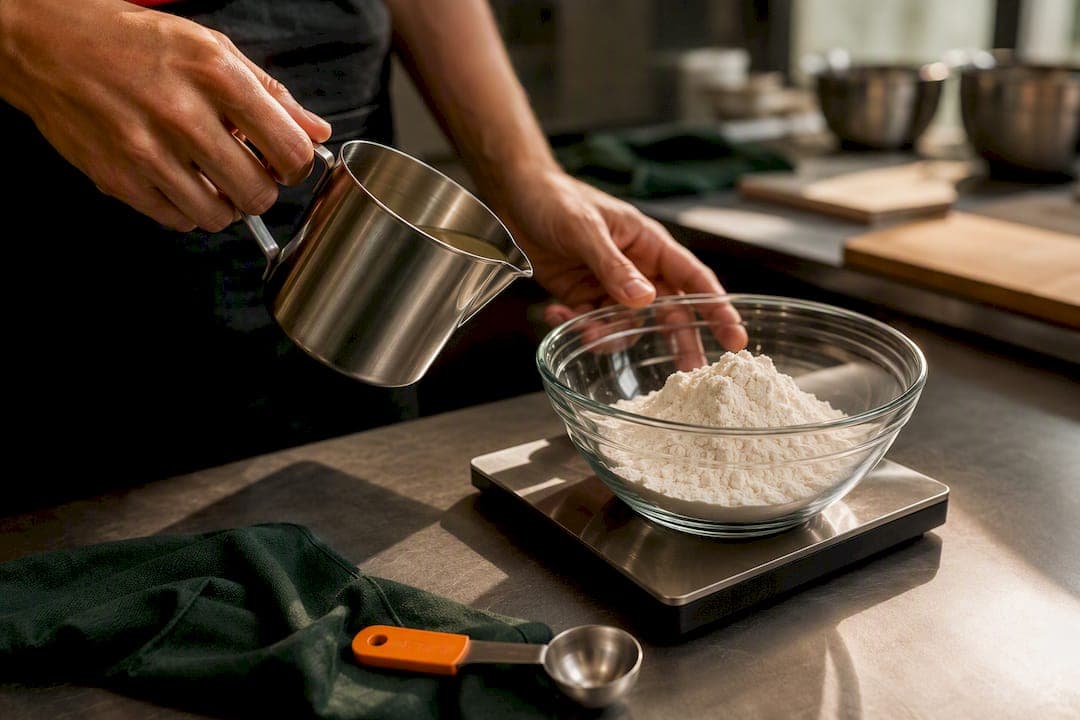
Convert every recipe amount into a base unit, milliliters for liquids, grams for solids, then divide by the pack size to get the fraction to deduct or order. Watch for the one mistake that wrecks inventory counts: fluid ounces measure volume, ounces measure weight, and they are never interchangeable. Get this rule wrong on a single ingredient and your par levels, food cost, and purchase orders all drift together.
TL;DR:
- Using consistent base units, such as grams for solids and milliliters for liquids, is crucial to prevent inventory drift caused by unit-family errors.
- Converting volume to weight requires density data only when ingredients are measured by volume but tracked by weight, and this data should be logged accurately for each ingredient.
- Mistakes like confusing fluid ounces with ounces, ignoring yield percentages, or mismatching invoice units are common and directly impact food cost and inventory accuracy.
- Regularly reconciling POS sales, package sizes, and ingredient densities helps catch drift early and maintains reliable recipe costing and inventory levels.
- Automating conversions with tools like PantryHub reduces manual errors and ensures consistency across multiple kitchens and suppliers.
Table of Contents
- Standard Cooking Measurements Chefs Need to Know
- How Do You Convert Recipe Units Into Inventory Deductions?
- When Do You Need Density to Convert Cups to Grams?
- Converting Container and Pack Sizes Into Base Units
- From Recipe Line to Purchase Order: The Full Workflow
- What Causes Most Recipe Conversion Errors?
- Copy-Ready Conversion Tables for Your Kitchen SOPs
- Why Conversion Discipline Pays Off in the Kitchen
- Let PantryHub Handle the Math for You
- Sources
- FAQ
Standard Cooking Measurements Chefs Need to Know
Every kitchen running unit conversion recipes through an inventory system needs one shared set of constants. Mixed units between recipe cards and supplier invoices are the fastest way to corrupt a stock count, so pick your base units now: milliliters for anything liquid, grams for anything weighed.
The industry-standard conversion constants below cover the volumes and weights that show up on almost every recipe card.
| Unit | Converts to | Value |
|---|---|---|
| 1 fl oz | ml | 29.5735 ml |
| 1 cup | ml | 237 ml |
| 1 tbsp | ml | 15 ml |
| 1 tsp | ml | 5 ml |
| 1 L | ml | 1 L |
| 1 oz | g | 28.3495 g |
| 1 lb | g | 453.592 g |
| 1 kg | g | 1 kg |
Here's where kitchens get burned: a recipe calling for "4 oz of hot sauce" is ambiguous unless someone specifies weight or volume. Treat that as fluid ounces (4 fl oz = 118.3 ml) and you'll deduct the wrong quantity from a bottle every single time you run the recipe. This is not a rounding error. It's a unit-family error, and it compounds across every batch you cost.
How Do You Convert Recipe Units Into Inventory Deductions?
Every conversion follows the same four-step logic, whether you're working from a spreadsheet or a full inventory platform.
- Check for a direct match. If the recipe unit already equals the inventory unit (grams to grams, milliliters to milliliters), skip straight to the pack-size division.
- Convert to the base unit. Multiply the recipe quantity by the constant from the table above (fl oz → ml, oz → g).
- Apply density if you're crossing volume and weight. A cup of flour and a cup of rice do not weigh the same amount, so this step only applies when the recipe measures by volume but the ingredient is tracked by weight.
- Divide by the package size to find what fraction of a supplier unit the recipe consumes.
Two worked examples show how this plays out:
- Liquid: A cocktail recipe calls for 2 fl oz of vermouth. That's 2 × 29.5735 ml = 59.15 ml. A bottle holds 750 ml, so each pour uses 59.15 ÷ 750 = 0.0789, or roughly 7.9% of the bottle.
- Solid: A pasta dish needs 4 oz of dried linguine. That's 4 × 28.3495 g = 113.4 g. A 1 lb (453.592 g) box covers 113.4 ÷ 453.592 = 0.25, exactly a quarter of the box.
Neither example needed density data, since both units matched the ingredient's natural state (liquid measured by volume, dried pasta measured by weight). Density only enters the picture when a recipe writer measures a solid by volume instead, which is where the next section picks up.
When Do You Need Density to Convert Cups to Grams?
Density conversions only apply when a recipe measures a solid ingredient by volume, a cup of flour instead of grams on a scale. Skip this step for anything already weighed or for true liquids, and you'll save yourself a lot of unnecessary math.
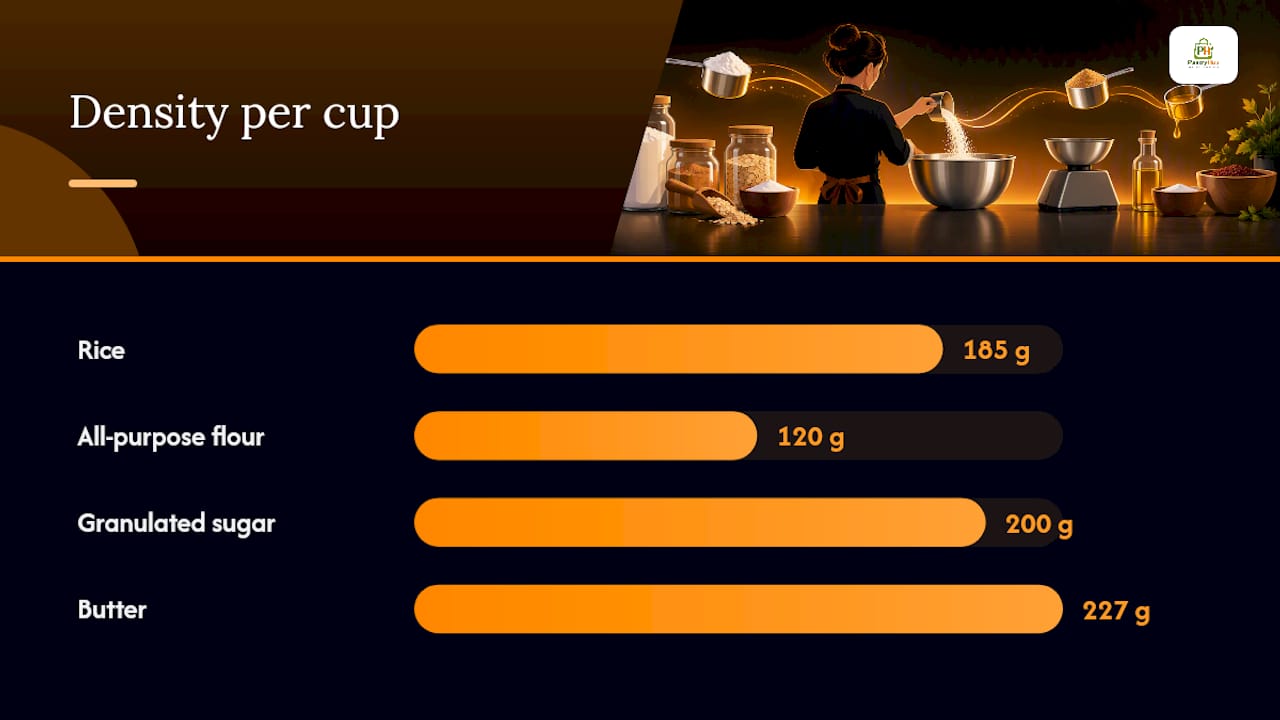
Kitchen systems commonly use approximate density values like these:
- Rice: about 185 g per cup
- All-purpose flour: about 120 g per cup
- Granulated sugar: about 200 g per cup
- Butter: about 227 g per cup
Generic values get you close, but your actual product will vary by brand, grind, and how the recipe author packed the cup. The fix takes five minutes: weigh a dry cup measure of the ingredient on a kitchen scale, three times, and average the result. Then save that number against the ingredient record instead of relying on a published estimate.
Pro Tip: Log kitchen-specific density values directly on the ingredient card, not in a separate note or a chef's memory. Anyone entering a new recipe should pull the same number automatically.
Converting Container and Pack Sizes Into Base Units
Every supplier SKU has a size_value and a size_unit, like "750" and "ml," or "24" and "count." Multiplying those together gives you the total base-unit quantity in the container: a 750 ml bottle is exactly that, but a "24 count" case of sauce packets needs a second equivalency, how many grams or milliliters each individual packet holds, before it means anything for costing.
"Each" units are the most common source of drift in inventory records, because they hide a real weight or volume behind a vague label. A few equivalencies worth locking down early:
- Liquor bottle: 750 ml is standard, but confirm it against the label. Some spirits ship in 700 ml or 1 L formats depending on the supplier.
- 24-count case: Define the per-unit weight or volume once (a can, a packet, a jar) and multiply by 24 for the case total.
- Bakery loaf: An "each" loaf might be tracked by weight (450 g) or by slice count, depending on how the recipe consumes it. Pick one and stay consistent.
Get this wrong once, on a high-volume item like pour spirits, and every recipe using that ingredient inherits the error.
From Recipe Line to Purchase Order: The Full Workflow
Moving a recipe ingredient from the card to a supplier order runs through four connected calculations, and skipping any one of them breaks the chain.
- Capture the as-purchased (AP) price for the SKU exactly as it appears on the supplier invoice.
- Apply yield percentage to find the as-used cost: as-used cost = AP price ÷ yield %. A case study on recipe costing shows how a 90% yield on trimmed produce raises the effective cost per usable pound noticeably compared to the invoice price.
- Calculate batch and portion cost. Multiply the as-used cost by the quantity the recipe consumes, then divide by the number of portions the batch produces. This feeds directly into menu pricing.
- Map the ingredient to a SKU and round for the PO. Convert the recipe's per-batch usage into base units, multiply across your forecasted covers for the period, then divide by pack size. This step is where a proper costing workflow matters most: round at the total order level, not per portion, or you'll systematically over-order on every low-usage ingredient.
Minimum order quantities complicate the last step further. If a supplier only sells cheese in 5 kg blocks and your forecasted usage comes to 3.2 kg, you're rounding up to a full block regardless of what the math says, and that gap needs to show up in your cost projections. For a deeper walkthrough on turning yields into SKU-ready numbers, see PantryHub's guide to recipe yield conversion.
What Causes Most Recipe Conversion Errors?
Three mistakes account for the overwhelming majority of bad inventory deductions, and all three are avoidable with a five-minute check before a recipe goes live.
- Oz vs. fl oz confusion. This is the single most common error in recipe unit conversions, and it's invisible until a stock count comes up short.
- Forgetting yield. Costing a recipe off the AP price instead of the as-used cost after trim, evaporation, or cooking loss overstates margin and understates true food cost.
- Invoice unit mismatch. A supplier invoice listing "case" while your recipe system expects "each" or "kg" will silently misfire unless someone defines that equivalency up front.
Run three checks on a regular cadence: confirm every ingredient has a defined unit family, spot-weigh a sample of high-volume items against your recorded density, and reconcile POS sales volume against actual package usage at least monthly. Forecasting and prep tools only produce reliable numbers when the underlying recipe and POS mappings are properly maintained, so treat this reconciliation as ongoing maintenance, not a one-time setup task.
Pro Tip: When no conversion path exists for a new ingredient, don't guess. Log a warning and hold the item until someone confirms the correct unit family, the same practice recommended in production-grade inventory systems.
Copy-Ready Conversion Tables for Your Kitchen SOPs
Two quick calculations cover the majority of daily conversions you'll run by hand.
Bar pour into a 750 ml bottle: A 1.5 fl oz pour = 44.36 ml.
4 oz of pasta from a 1 lb box: 4 oz = 113.4 g.
| Conversion | Formula | Result |
|---|---|---|
| fl oz to ml | fl oz × 29.5735 | Base volume |
| oz to g | oz × 28.3495 | Base weight |
| Recipe use ÷ pack size | Base unit ÷ container size | Fraction to deduct |
Drop both tables straight into your recipe SOPs or spreadsheet templates so nobody has to recalculate from scratch.
Why Conversion Discipline Pays Off in the Kitchen
Inconsistent unit conversions quietly eat into margins long before anyone notices a problem on the P&L. A kitchen that standardizes its density values, defines every "each" unit, and reconciles POS data against package usage on a fixed schedule catches drift in weeks instead of quarters. Build these checks into your daily routine, not just your recipe launch process, and pair them with a written SOP so the standard survives staff turnover.
— Admin
Let PantryHub Handle the Math for You
PantryHub is the alternative to spreadsheet-based conversions for kitchens juggling unit conversion recipes across multiple SKUs and suppliers. Instead of retyping density values and pack sizes every time a recipe changes, you set the equivalency once and PantryHub applies it automatically across every linked recipe and location.

The setup takes four steps: import your supplier SKUs with their size_value and size_unit fields, record your kitchen-tested densities and equivalencies against each ingredient, map every recipe line to its matching SKU, and let PantryHub's low-stock alerts and PO rounding logic handle the rest. Multi-location groups get the added benefit of consistent conversions across every site, so a recipe costed in one kitchen matches the numbers in another.
Pricing runs from the Starter plan at 39 AUD per month up to Pro, with Regular in between, all built with Australian GST-ready reporting and local support baked in. If you want to see how it handles your own recipe list before committing, start a free trial and import a handful of SKUs to test the conversions yourself.

Sources
For implementation, keep these references close: the conversion constants and costing checklist covers the purchase-to-recipe unit workflow in detail, while PantryHub's guide to tracking ingredient usage walks through recording equivalencies day to day. Bar operators should also bookmark the bar stocktake guide for liquor-specific pack conversions.
- UNIT_CONVERSIONS.md — nimble-pnl (GitHub)
- How to Calculate Recipe Cost | Food Cost Tools
- How to Cost a Recipe: A Step-by-Step Guide for Restaurants - Tabby
- When Your Restaurant Tech Stack Has a Prep-Shaped Hole - ClearCOGS
FAQ
What's the Difference Between Oz and Fl Oz in Recipes?
Ounces (oz) measure weight, while fluid ounces (fl oz) measure volume, and they are never the same number for a given ingredient. Confusing the two is the most common cause of incorrect inventory deductions, so always confirm which unit a recipe actually means before converting it.
How Do I Convert a Cup Measurement to Grams?
Multiply the cup quantity by the ingredient's density in grams per cup, since a cup of flour and a cup of sugar weigh different amounts. Generic values (flour around 120 g per cup, sugar around 200 g per cup) work as a starting point, but weighing your own product on a kitchen scale gives a more reliable number for costing.
Why Does Yield Percentage Matter for Recipe Costing?
Yield percentage accounts for trim, moisture loss, and cooking shrinkage, so the as-used cost is almost always higher than the as-purchased price. The formula is as-used cost = AP price ÷ yield percentage, and skipping this step understates your true food cost on every dish that uses trimmed or cooked ingredients.
Can PantryHub Automate These Unit Conversions?
Yes. PantryHub lets you record pack sizes, density equivalencies, and "each" definitions once per ingredient, then applies those conversions automatically whenever a recipe is used or a purchase order is generated. Plans start at $39 AUD per month for the Starter tier.
How Often Should I Review My Conversion and Density Values?
Check high-volume ingredients monthly and reconcile POS sales against actual package usage on the same schedule, since supplier products and pack sizes change more often than most kitchens realize. Forecasting tools only stay accurate when the underlying recipe data is kept current, so treat this as routine maintenance rather than a one-time setup task.