

A restaurant purchase order is the buyer's formal, line-item request to a supplier, and it's the paper trail that either protects your food cost or quietly wrecks it, as explained in the role of online food ordering. The single highest-impact fix most kitchens can make tonight is simple: stop ordering from memory or a scrawled list, and start ordering from an up-to-date vendor order guide with pack-sized par levels attached to every item.
TL;DR:
- Ensuring order guides are owned by a single person and updated immediately upon invoice receipt prevents pars and prices from becoming outdated.
- Building order guides that mirror storage layouts speeds up counting and reduces errors, especially when paired with regular review and price updates.
- Validating orders against pack sizes and usage data before sending, coupled with a confirmed delivery channel, minimizes last-minute errors and shortfalls.
- Automating order calculations and updates through software like PantryHub helps prevent manual decay, especially across multiple locations or frequent price changes.
- Consistently monitoring delivery cutoffs, using a laminated calendar and precise order math, avoids missed deadlines and costly invoice discrepancies.
Table of Contents
- What Goes Into a Restaurant Purchase Order
- Keys to Ordering: Checklist, Cutoffs, and Unit Math
- Building a Vendor Order Guide That Actually Works
- Receiving and Reconciling: Catching Errors Before They Cost You
- Why Order Guides Decay (And How to Stop It)
- A Simple Purchase Order Template You Can Copy Tonight
- PantryHub's Take: When Manual Guides Stop Being Enough
- Editorial Perspective: The Ordering Habit Nobody Fixes Until It Hurts
- Get Your Ordering Off Spreadsheets for Good
- Sources
What Goes Into a Restaurant Purchase Order
A purchase order is a document you send a supplier listing exactly what you want, how much, and at what price, and it becomes your official record of the order once the vendor accepts it. That record is what you check deliveries against, and what you argue from if a price or quantity shows up wrong.
A usable PO needs these fields:
- PO number — a unique identifier so you can trace it later
- Vendor name and contact — who's fulfilling the order
- Item description with vendor SKU — not your kitchen name for it, the vendor's exact code
- Pack size — the unit the vendor actually ships (case of 6, 10kg bag, carton of 24)
- Quantity ordered — in vendor packs, not loose units
- Unit price — the last confirmed price per pack
- Delivery day and location — which dock, which day
- Order cutoff time — when the vendor stops accepting changes
Vendor SKUs and pack sizes matter more than most managers realize. Order "tomatoes, 10" without a SKU or pack reference, and you might get 10 cases instead of 10 kilograms. That single ambiguity is behind a huge share of invoice disputes.
On the legal side, once a supplier accepts a signed PO in Australia, it generally functions as a binding contract for that transaction. If a vendor substitutes items or changes pricing without your sign off, that's a discrepancy worth escalating, not something to quietly absorb.
Keys to Ordering: Checklist, Cutoffs, and Unit Math
Getting the order right happens before you hit send, not after the delivery truck shows up short.
- Check pack sizes first. Order in vendor packs (cases, bags, cartons), never in loose kitchen units. A vendor selling flour by the 20kg bag doesn't care that your recipe calls for 3kg.
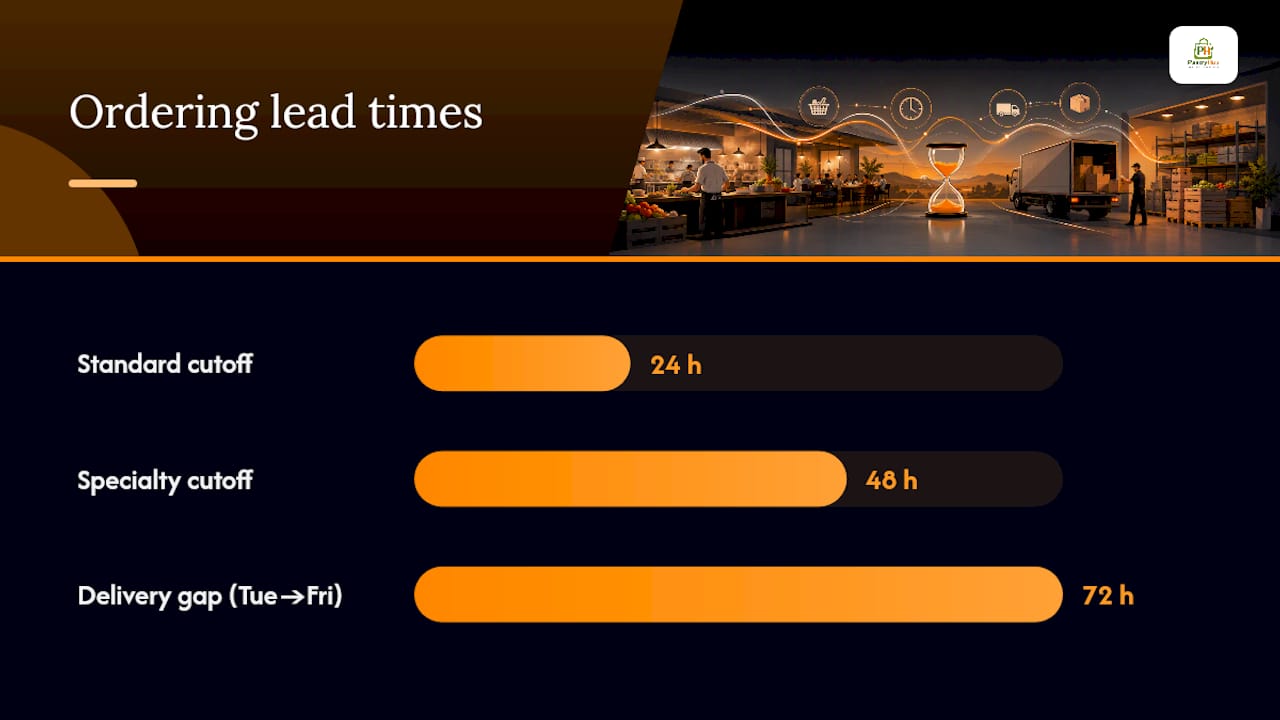
- Know your delivery days and cutoffs. Most vendors have fixed delivery windows and a cutoff the day before (sometimes 48 hours out for specialty items). Build your ordering calendar around those, not around when you happen to notice you're low.
- Account for lead time. If a vendor delivers Tuesdays and Fridays only, your Tuesday order has to cover you until Friday, plus a buffer for a missed or late run.
- Calculate from pars and recent usage, not gut feel. Subtract on-hand stock from your par level, then round up to the nearest full vendor pack.
- Route every order through one approval step. Even a single person eyeballing quantities before they go out catches the $400 typo before it becomes a $4,000 invoice.
Skipping the approval step is how kitchens end up with three cases of oil instead of three bottles. A five-minute second look is cheap insurance against that.
Pro Tip: Keep a laminated "vendor delivery calendar" taped inside the office door. When cutoffs and delivery days are visible at a glance, nobody misses a window because they were buried in prep.
Building a Vendor Order Guide That Actually Works
The order guide is the tool that makes counting fast, and it works best when you build one per vendor, sequenced to match how you physically walk your storage areas. That's the "shelf-to-sheet" method: the guide lists items in the same order you encounter them on the shelf, not alphabetically or by category, so counting takes minutes instead of a scavenger hunt.
Each vendor guide needs these columns:
- Vendor name and item SKU
- Pack size (the unit you order in)
- Last-paid price per pack
- Par level (or a low/high par range)
- Current on-hand count
- Quantity to order (calculated, not guessed)
Setting the par itself comes down to a formula: average daily usage, multiplied by lead time in days, plus a safety cushion for a busy weekend or a missed delivery. Round that number up to the nearest full pack, since a vendor won't sell you half a case.
Order guides fall apart fast without ownership rules. Assign one person per vendor guide, review pars monthly (more often for anything seasonal), and update prices the moment a new invoice comes in rather than batching it for "later." Later usually means never, and that's when your guide starts lying to you about your real food cost.
Receiving and Reconciling: Catching Errors Before They Cost You
The receiving dock is where most invoice disputes get born, and where they're cheapest to catch.
- Count against the order guide, not the invoice. The invoice tells you what the vendor says they sent. The order guide, checked physically, tells you what actually arrived.
- Sign and annotate variances on the spot. If six cases were ordered and five showed up, note it before the driver leaves. Verbal promises to "make it up next time" rarely survive contact with a busy Tuesday.
- Flag pack-size substitutions immediately. A vendor swapping a 5kg bag for two 2.5kg bags isn't a problem if the total matches, but it needs to be noted so your guide's unit math stays correct.
- Match the invoice to the PO before paying. Update your last-paid price the moment it changes, and kick off a dispute conversation the same day for any short delivery or price mismatch, not at month-end when nobody remembers the details.
Letting invoice mismatches slide is one of the most common inventory mistakes restaurants make, and it compounds quietly. A 40 cent price creep on tomatoes doesn't look like much until it's happened four times and nobody updated the guide.
Why Order Guides Decay (And How to Stop It)
Order guides don't fail all at once. They decay along three predictable paths: pars go stale because nobody revisits them after a menu change, prices go stale because receiving staff never feed invoice updates back into the sheet, and copies start to diverge when two managers keep their own versions on separate laptops.
The fix isn't complicated:
- One owner per guide. Shared ownership means no ownership.
- Set a hand-count cadence. Weekly for perishables, biweekly or monthly for dry goods and packaging.
- Tie price updates to receiving, not to a separate task. If updating the price happens the moment the invoice lands, it happens. If it's a "when I get to it" job, it doesn't.
- Laminate the guide and post it at the walk-in door. A guide nobody can find during a Friday night rush is a guide nobody uses.
Keeping pars accurate at the ingredient level is what separates kitchens that hold food cost from ones that discover the problem on the P&L three weeks too late.
Pro Tip: Print vendor headers on colored paper stock, one color per vendor. When three guides are stacked on a clipboard, staff can flip to the right one without reading a single word.
A Simple Purchase Order Template You Can Copy Tonight
You don't need software to start doing this correctly. A working template, similar to the field lists used by restaurant software vendors, needs only these columns:
- Vendor and PO number
- SKU and item description
- Pack size and unit price
- Par level and current on-hand
- Order quantity (calculated)
- Delivery date
The math behind that last column is straightforward: order quantity = par minus on-hand, rounded up to the nearest full pack, with a floor of zero. If your par for canola oil is 6 jugs, you have 2 on hand, and the vendor sells by the single jug, you order 4. If the vendor only sells by the case of 4, and your shortfall is 3, you still order a full case.
Send the finished order through whatever channel your vendor actually checks, whether that's a supplier portal, email, or a text to your rep, and always get a confirmation before the cutoff passes. An order that isn't confirmed isn't an order. It's a wish.
PantryHub's Take: When Manual Guides Stop Being Enough
A spreadsheet works right up until you're running two locations, three shifts, and a vendor list that changes prices weekly. That's usually the signal you've outgrown manual order guides: pars going stale, price updates lagging invoices by days, or a manager quietly keeping their own "better" copy of the sheet.
PantryHub automates the parts that decay fastest. It recalculates pars from real POS sales data, updates prices the moment invoices are logged, rounds order quantities to vendor pack sizes automatically, and sends the order straight to your supplier. Pricing is transparent, starting from A$39 a month, which is a fraction of what one bad invoice dispute or a week of over-ordering typically costs a mid-size kitchen.
Editorial Perspective: The Ordering Habit Nobody Fixes Until It Hurts
Most food cost overruns don't come from a bad supplier deal or a stolen case of steaks. They come from a par level nobody's touched since the menu changed six months ago, and an order guide that still lists a price the vendor stopped honoring in the spring. The 30/30/30 heuristic the ATO uses for restaurant cost structures only holds up when the ordering discipline underneath it is real, not aspirational.
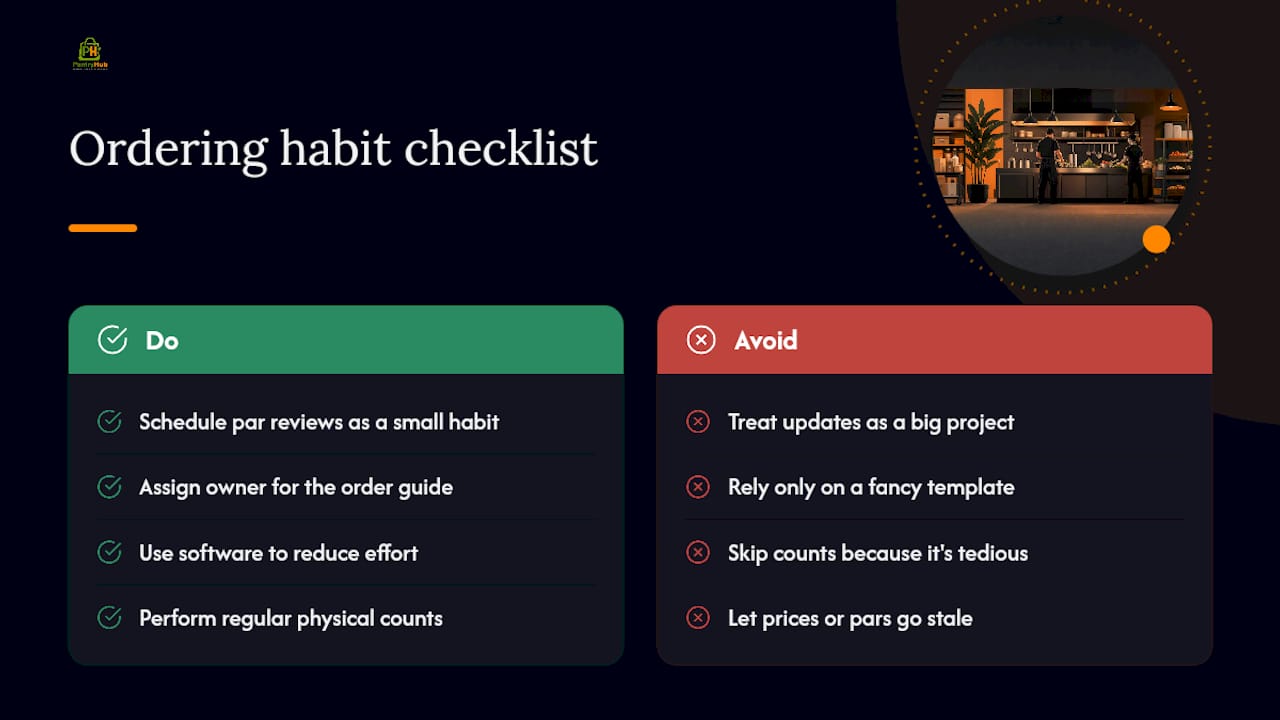
Here's the uncomfortable part: most operators know their guide is stale. They just don't fix it, because fixing it feels like a project and not a task. The kitchens that actually control food cost treat par review the way they treat a fridge temp check, a small recurring habit rather than a quarterly overhaul. Software helps, and automation removes a lot of the manual decay, but no platform saves you from skipping the count entirely. The habit comes first. The tool just makes the habit less painful to keep.
If there's one thing worth arguing against the conventional wisdom, it's this: the fanciest order guide template in the world does nothing if nobody owns it. Ownership, not format, is what separates a guide that works from one that quietly lies to you.
— Admin
Get Your Ordering Off Spreadsheets for Good
If you've made it this far, you already know the manual method works, but it takes discipline most kitchens can't sustain through a busy season. Pantryhub is the alternative to rebuilding your own spreadsheet system from scratch: it keeps pars current automatically, rounds every order to the vendor's actual pack sizes, and sends the order without you re-typing a single SKU.

It's built for restaurants, cafés, and bars running real supplier relationships, not generic procurement software bolted onto a kitchen. If your pars have drifted, your invoice mismatches are climbing, or you're managing more than one location on paper guides, that's the moment to stop patching the spreadsheet. Check out PantryHub's hospitality inventory software and start a free trial to see your first vendor guide rebuilt automatically from your own sales data.
Sources
For a free template to build from, start with LineNow's order guide template or TouchBistro's field list, then check the ATO's small business benchmarks for restaurants to see where your food cost should land.