

A kitchen prep list is the daily production plan that tells every station what to make, how much, who's making it, and by when. Copy the "Item / Par / On-hand / To-prep / Assigned / Deadline / Done" grid below, run the quantity formula on two or three line items tonight, and you'll already be prepping tighter than most kitchens ever manage. Some inventory tools bake that same formula into their systems if you'd rather skip the spreadsheet math entirely.
TL;DR:
- Regularly updating par levels based on sales trends or menu changes prevents overproduction or shortages during busy periods.
- Using specific, actionable tasks with individual responsible staff members ensures prep tasks are completed accurately and on time.
- Automated tools that integrate real-time inventory data reduce errors and save time compared to manual spreadsheet calculations.
- Sequencing prep tasks by dependency improves efficiency, with stocks and long-cook items prepared early to free up station space later.
- Writing tomorrow’s prep list before shift start maintains accuracy and helps adapt to unexpected inventory changes or special events.
Table of Contents
- What Is a Kitchen Prep List, and Why Does It Matter?
- The Core Components: Grid, Par Levels, and the Quantity Formula
- How Do You Build a Prep List Step by Step?
- Templates and Quick-Start Options You Can Use Today
- Best Practices: Sequencing, Non-Food Tasks, and What to Skip
- What a Reliable Prep List Actually Fixes
- Why Most Prep Lists Fail Before Service Even Starts
- Skip the Spreadsheet: Digital Prep Lists That Update Themselves
- Practical Templates Worth Bookmarking
- Sources
- FAQ
What Is a Kitchen Prep List, and Why Does It Matter?
A prep list is a production document. It's not a recipe, and it's not a purchase order. Recipes tell you how to make something; a purchase order tells suppliers what to deliver. A prep list tells your team what to build today, in what quantity, and by what deadline, using what's already on hand.
Confuse a prep list with an order sheet and your traceability breaks down fast. You end up over-ordering ingredients you already had and under-prepping the ones you needed.
A solid prep list typically covers:
- Stocks, sauces, and bases that need long cook times
- Proteins portioned or marinated ahead of service
- Garnishes, doughs, and other mise en place
- Opening and closing tasks: equipment checks, station setup, breakdown
Write it the evening before service, or first thing at shift start, while yesterday's usage numbers are still fresh. Someone needs to own it. A prep list with no assigned owner is just a suggestion.
The Core Components: Grid, Par Levels, and the Quantity Formula
Every effective prep sheet runs on the same skeleton. Build your grid with these columns:
- Item — the specific prep task, not a vague category
- Recipe reference — a link or code to the standardized recipe
- Par level — the quantity you need on hand to get through service
- On-hand — current inventory, counted, not guessed
- Prep quantity — what needs to be made today
- Unit — pounds, quarts, portions, whatever fits the item
- Assigned — the cook responsible
- Deadline — when it needs to be station-ready
- Done — a checkbox, nothing fancier
Par levels aren't fixed numbers you set once and forget. Watch sales trends weekly and revisit them after every menu change or seasonal shift.
Pro Tip: Set two par levels for high-variance items, one for slow weekdays and one for weekend volume, so you're not manually adjusting the same line every shift.
The math behind "how much do I prep" comes down to one formula, and it's worth memorizing: (Expected Covers × Menu Mix % × Portion Size) − Inventory = prep quantity.
Say you're expecting a significant number of covers on a Friday. Your menu mix data estimates a certain percentage of guests order the braised short rib, and each portion is about 8 ounces. Calculate the total needed accordingly and subtract what you already have portioned in the walk-in to find the prep quantity. Run that same formula across every protein and side, and your prep list writes itself.
How Do You Build a Prep List Step by Step?
Building a usable prep list is a workflow, not a form you fill in once and never touch. Here's the sequence that actually holds up under real service pressure:
- Gather your inputs. Pull expected covers from reservations and POS history, check for private events or specials, and count current inventory honestly, not from memory.
- Run the quantity formula on every line item. Don't eyeball it. A five-minute calculation now saves an 86'd item at 8 PM.
- Flag dependencies. Stocks and long-braised items need to start before sauces that depend on them. Mark those relationships directly on the sheet.
- Group tasks into time blocks. Early morning covers your long cooks and stocks. Mid-shift covers sauces, proteins, and batch prep. Late prep covers final mise en place, garnishes, and anything that degrades if made too early.
- Assign stations and people. A task with no name attached doesn't get done. Every line needs an owner.
- Set hard deadlines. "Before service" isn't a deadline. "11:30 AM" is.
- Require date and initial labels on everything prepped, so anyone on the line can check freshness at a glance.
Pro Tip: Write tomorrow's prep list at the end of tonight's shift, while your usage numbers and 86'd items are still fresh in your head. Waiting until morning means guessing.
This sequencing matters more than most managers realize. Scheduling long stocks early frees up burners and floor space for the sauce team later, which cuts down on cooks crossing paths at the same station during peak crunch hours. Skip the sequencing step and you'll have three cooks fighting over one range at 4 PM.
Templates and Quick-Start Options You Can Use Today
You don't need custom software to start. A printable grid with the nine columns above works on day one. Here's what three sample line items look like filled in:
- Braised short rib — Par: 35 lbs, On-hand: 8 lbs, Prep qty: 27 lbs, Assigned: Sauté 2, Deadline: 11:00 AM
- House vinaigrette — Par: 2 gal, On-hand: 0.5 gal, Prep qty: 1.5 gal, Assigned: Garde manger, Deadline: 10:30 AM
- Roasted garlic purée — Par: 4 qt, On-hand: 1 qt, Prep qty: 3 qt, Assigned: Sauce station, Deadline: 9:00 AM
For a digital version, build the quantity formula directly into a Google Sheets template. Put expected covers in one cell, menu mix percentage in another, portion size in a third, and current inventory in a fourth. Then let a formula cell calculate (Covers × Mix% × Portion) − Inventory automatically for every row. A printable prep sheet generator can do the same job without any spreadsheet setup at all.
Different formats suit different operations. Use a station-based sheet for daily service, a dish-based sheet for one-off events, and a compact two-column version (task and initial) for small teams that don't need the full grid.
Best Practices: Sequencing, Non-Food Tasks, and What to Skip
Time-blocking only works if you respect dependencies. Run stocks and long braises early, sauces mid-morning, and final mise en place right before doors open, so nobody's waiting on a burner someone else needs.
Put opening and closing tasks on the same sheet as food prep. Equipment checks, station breakdown, and walk-in temperature logs belong next to your braised short rib line, not on a separate clipboard nobody reads.
A few habits separate kitchens that run tight from ones that don't:
- Keep line items short and specific. "Prep salad" tells nobody anything; "quarter and core 40 heads romaine" does.
- Review par levels after every busy weekend and every menu change, not once a year.
- Add a small buffer to par levels only when you know a large event or unpredictable rush is coming, not as a default habit.
- Label every prepped item with date and initials, and rotate stock FIFO without exception.
Pro Tip: If a line item needs more than one sentence to explain, it's not a prep list task, it's a training document. Break it down or move it elsewhere.
What a Reliable Prep List Actually Fixes
A working prep list cuts food waste, speeds up service, and reduces the number of items you 86 mid-shift. It also makes training new cooks faster, since the sheet itself explains what "ready" looks like for each station, and it keeps quality consistent when your best cook is out sick.
Most kitchens lose ground to a handful of repeat mistakes: vague tasks with no quantity attached, opening and closing duties left off the sheet entirely, par levels nobody's touched since the menu changed twice ago, and line items with no name or deadline attached.
Three fixes you can make before tomorrow's shift:
- Add a quantity to every single line item on your current sheet.
- Fold your opening and closing checklist into the same document as food prep.
- Assign a name and a deadline to every task, no exceptions.
Why Most Prep Lists Fail Before Service Even Starts
The biggest gap between a prep list that works and one that gets ignored by 6 PM isn't the template. It's specificity. Kitchens that write "prep chicken" instead of "portion 18 breasts to 6 oz, bag and label" are writing wishes, not instructions, and wishes don't survive a Friday rush.
The other underestimated factor is treating the prep list as static. A par level set in January has no business surviving unchanged into a summer menu with different covers and a different mix. Kitchens that revisit par levels only when something runs out are always one bad weekend away from a wall of 86 tickets.
What actually works is boring: a grid with real numbers, a formula you trust, and a habit of writing tomorrow's list while tonight's numbers are still in your head. PantryHub's kitchen inventory checklist template gives you a starting structure if you want one you don't have to build from scratch, and multi-location operators use PantryHub's reporting to catch par-level drift across sites before it turns into a shortage.
— Admin
Skip the Spreadsheet: Digital Prep Lists That Update Themselves
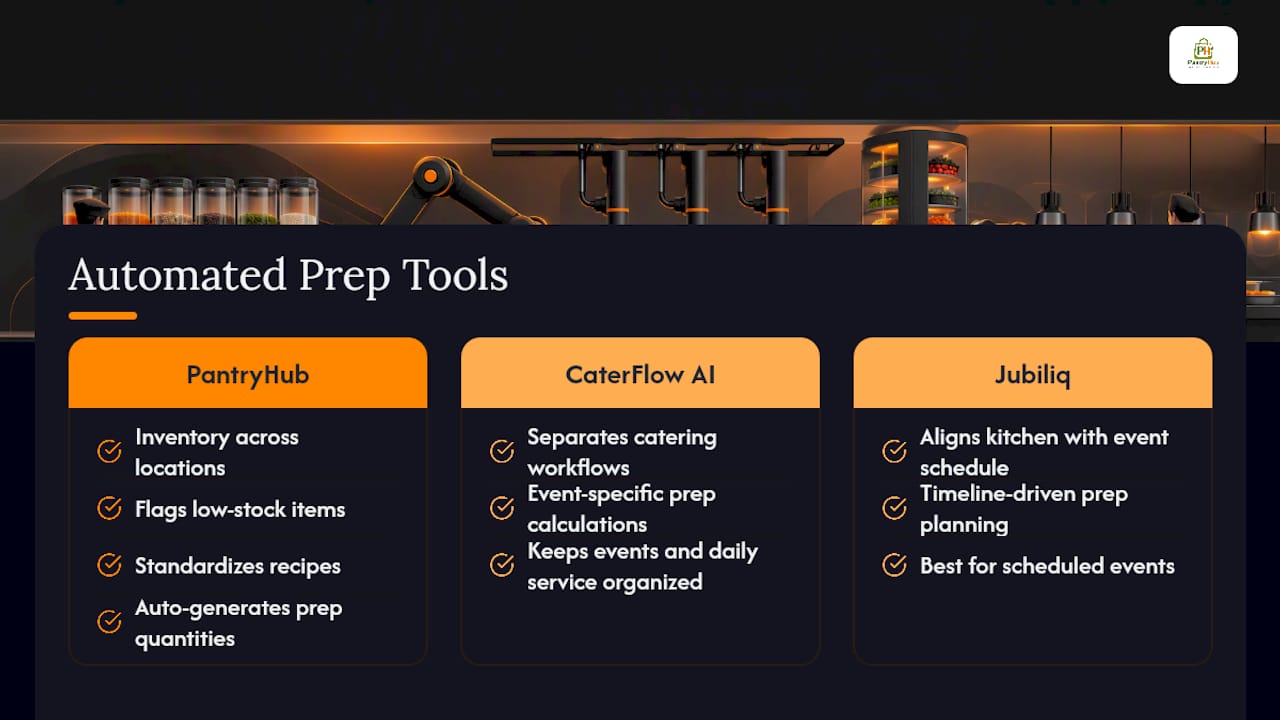
Paper prep sheets and manually calculated Google Sheets templates work fine until you're running multiple stations, multiple locations, or a menu that changes weekly. At that point, someone's retyping the same formula fifteen times a shift, and errors creep in. There are alternatives to spreadsheet math for kitchens that have outgrown it: some platforms pull real-time inventory counts and recipe data automatically, so prep quantities generate themselves instead of requiring a manager to run the formula by hand every morning.

PantryHub's inventory app tracks stock levels across one location or twenty, flags low-stock items before they become a prep-list emergency, and standardizes recipes so every station calculates portions the same way. For catering operations juggling event-specific prep alongside daily service, a tool like CaterFlow AI can help keep those workflows separate and organized. If you're planning prep around a scheduled event rather than daily covers, Jubiliq helps align kitchen timelines with the rest of the event schedule.
Check out PantryHub's inventory software and start a free trial to see how automated prep quantities compare to your current sheet.
Practical Templates Worth Bookmarking
A few resources are worth opening right now if you want to move past a blank page:
- Cucinovo's prep list template walks through the quantity formula with worked examples.
- Practical Tools' prep sheet generator produces a print-ready sheet with par levels and station fields built in.
- WebstaurantStore's prep list guide covers standard column structures and waste-reduction benefits.
Sources
- Restaurant Prep List: Template & Examples | Cucinovo
- How to Create a No-Fail Kitchen Prep System — Toast POS
- Restaurant Prep Sheet Generator - Daily Prep List - Practical Tools
- Kitchen Prep Lists for Restaurants — WebstaurantStore
FAQ
What Should Be in a Prep Kitchen?
A prep kitchen needs clearly labeled stations, FIFO-rotated storage, accurate par levels for each ingredient, and a prep list assigning specific tasks, quantities, and deadlines to each cook.
What Are the Five P's of Cooking?
Definitions vary by kitchen and culinary program, so there's no single agreed-upon standard. Most versions emphasize preparation, planning, and precision as core themes, which is consistent with what a strong prep list enforces daily.
What Do You Need for a Kitchen Checklist?
You need a grid covering item, par level, on-hand quantity, prep quantity, assigned staff, and deadline, plus opening and closing equipment tasks on the same sheet. PantryHub's free kitchen inventory checklist template covers both.
Can You Use Google Sheets for a Kitchen Prep List Template?
Yes. Set up columns for covers, menu mix percentage, portion size, and current inventory, then build a formula cell that calculates (Covers × Mix% × Portion) − Inventory automatically for each line item.