

A café ordering platform captures a customer's order through a digital channel (QR code, web, or app), processes payment, validates the order, routes it to your kitchen display system (KDS) or point-of-sale (POS) in real time, and then triggers inventory deductions and supplier alerts while sending status updates to the customer. Every step is governed by PCI-DSS payment standards, and the back-end inventory engine is where platforms like Pantryhub turn raw order data into automated supplier purchasing.
The three-stage flow at a glance:
- Stage 1: Customer places order via QR, app, or web and pays through a tokenized gateway
- ️ Stage 2: Order is validated, queued, and transmitted to KDS or POS with full modifier detail
- Stage 3: Customer receives a status notification; inventory is deducted and low-stock alerts or automated purchase orders (POs) fire
Table of Contents
- How do café ordering platforms actually work?
- The three-stage operational flow, step by step
- Ticket printing vs. full API integration: what the difference costs you
- Managing multiple locations without fragmenting your data
- How inventory and supplier ordering connect to your order data
- Security and payments compliance every U.S. café must verify
- What a realistic implementation timeline looks like
- What to ask vendors during demos
- Key Takeaways
- What operators get wrong about ordering platforms
How do café ordering platforms actually work?
Every café ordering system is built from two distinct halves. The front end captures customer intent. The back end acts as the operational brain, synchronizing that data with inventory, staff planning, and supplier ordering.
Here is what each component does:
- Front end (ordering interface): QR-code menus, branded web pages, or native apps. Must handle modifiers (milk type, shot count, temperature), special requests, and scheduled pickup windows.
- Payments layer: A PCI-DSS-compliant payment gateway that tokenizes card data so it is never stored on your server. Receipts and order-confirmation notifications live here.
- Routing and management engine: Validates orders, applies pricing rules and taxes, queues orders by channel, and routes them to the correct station.
- KDS/POS endpoints: The kitchen display or POS terminal that receives the routed order. Integration depth here determines how much manual work your staff does.
- Inventory and supplier module: Deducts stock in real time, fires low-stock alerts, and generates or suggests supplier POs.
| Component | Primary function | Key integration point |
|---|---|---|
| Front end | Capture order + modifiers | Menu sync with POS |
| Payments layer | Authorize and tokenize payment | PCI-DSS gateway |
| Routing engine | Validate, queue, and route | Webhook or API |
| KDS/POS | Display order to kitchen staff | Direct API or ticket print |
| Inventory/supplier module | Deduct stock, trigger POs | SKU mapping to supplier catalog |
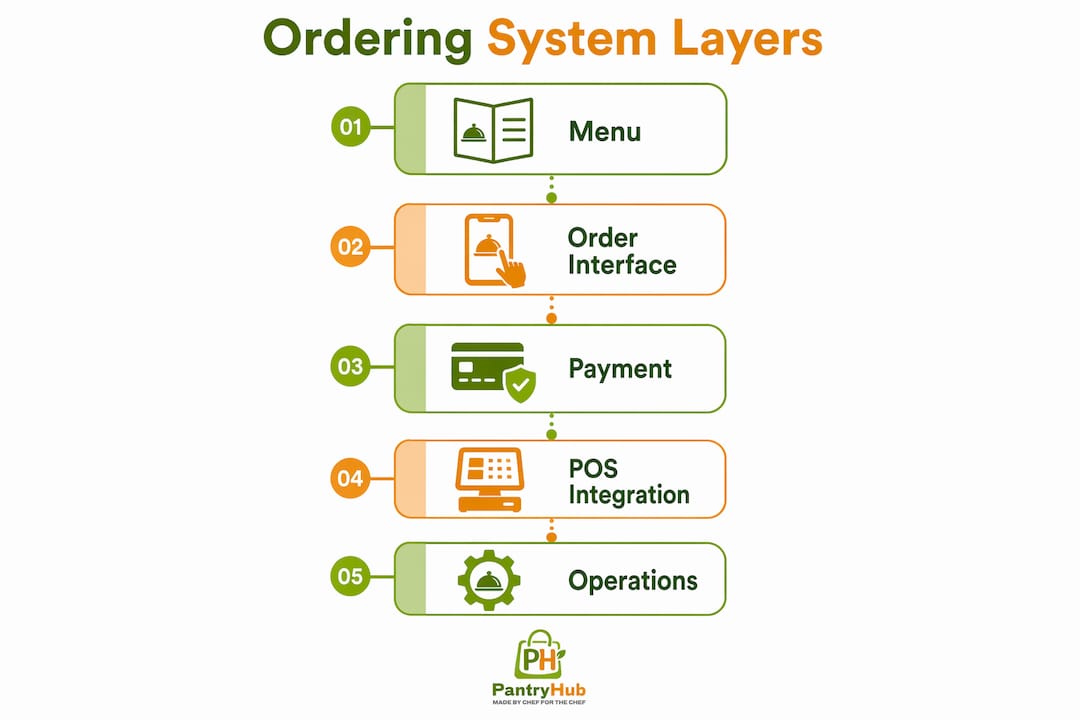
A digital ordering system typically includes five layers: menu, ordering interface, payment, POS integration, and operational logic. If any layer is missing or disconnected, the whole chain breaks.

The three-stage operational flow, step by step
Understanding the three-stage workflow is the fastest way to spot where a platform will help or hurt your operation.
Stage 1: Order capture and payment
- Customer scans a QR code, opens your app, or visits your ordering page.
- They browse a live menu (items marked sold out are hidden automatically), select items, and configure modifiers.
- At checkout, the payment gateway tokenizes their card data and authorizes the transaction. Order confirmation appears within seconds.
Stage 2: Validation and transmission
- The routing engine validates item availability, pricing, taxes, and discounts simultaneously with payment authorization.
- The confirmed order is pushed to the KDS or POS via API or webhook. Modifiers appear in bold so baristas cannot miss "oat milk, extra shot."
- For multi-station setups, the system splits the ticket automatically: espresso to the bar, food to the kitchen.
Stage 3: Automated updates and inventory triggers
- When the KDS operator "bumps" the order as complete, a push notification or SMS fires to the customer.
- Inventory is deducted at the ingredient or item level. If oat milk crates drop below your par level, a low-stock alert fires and a draft PO is generated.
- The order record posts to your POS for end-of-day reconciliation and margin reporting.
Pro Tip: Set your online ordering close time 15–30 minutes before your venue closes. Last-minute digital orders arriving during final prep create rushed drinks and unhappy staff.
Ticket printing vs. full API integration: what the difference costs you
POS integration depth is the single biggest variable in how much operational value you get from an ordering platform. Print-only setups and full API sync are not equivalent.
- Ticket-only (print or manual entry): The ordering platform sends a receipt to a thermal printer. Staff read it and manually enter the order into the POS. Sales data stays siloed in the ordering app, not your POS. Reconciliation is manual, inventory is not updated, and margin reporting is incomplete.
- Full API/webhook sync: Every confirmed order posts directly into your POS as if a cashier entered it. Sales, modifiers, taxes, and voids all flow back. Inventory deducts in real time. Reports reflect true margin across all channels.
| Integration type | Inventory accuracy | Reporting fidelity | Staff workload |
|---|---|---|---|
| Ticket print only | None (manual count) | Siloed by channel | Double entry required |
| POS add-on (native) | Partial (item level) | Unified, limited detail | Minimal extra steps |
| Full API sync | Real time (ingredient level) | Unified, full margin view | No double entry |
For POS connectivity evaluation, your integration checklist should confirm: published API/webhook documentation, a sandbox test environment, modifier and SKU mapping tools, and a defined reconciliation process. If a vendor cannot provide all four, expect manual workarounds.
Managing multiple locations without fragmenting your data
For café groups, a centralized ordering system provides a single source of truth for menu pricing and availability while still allowing location-specific overrides. That means one master menu, one price list, and one inventory baseline that each site inherits.
What stays centralized:
- Menu items, descriptions, and photos
- Base pricing and tax rules
- Supplier catalog and approved vendor list
- Brand assets and ordering page design
What can be localized:
- Store hours and online ordering windows
- Pickup slot availability
- Local promotional items or seasonal specials
- Location-level par levels and reorder quantities
Permissions matter here. Managers at individual sites should be able to adjust hours and pickup slots without touching pricing or the master menu. That separation protects brand consistency while giving operators the flexibility they need day to day.
Pro Tip: During your vendor demo, ask them to clone your master site to a second test location, then push a bulk menu price update. If it takes more than a few clicks or requires a support ticket, multi-site rollouts will be painful.
How inventory and supplier ordering connect to your order data
Real-time stock syncing is what separates a digital menu from a true ordering system. Without it, you risk selling items you no longer have, which creates service recovery problems and erodes customer trust.
Two deduction models exist:
- Item-level deduction: Each sale removes one unit of a finished product (e.g., one bottled cold brew). Simple to configure, but gives no visibility into ingredient consumption.
- Ingredient-level deduction: Each sale removes the component ingredients (e.g., 200ml oat milk, 18g espresso). More setup work, but gives you precise stock tracking and accurate food cost data.
For supplier automation, the flow works like this: an order event reduces stock, stock hits a threshold, the system fires an alert, and a draft PO is generated against your supplier's catalog using mapped SKUs from Coffee Bags Direct. Platforms like Pantryhub handle this loop end to end, including automated stock ordering and supplier integration.
| Trigger | Action | Outcome |
|---|---|---|
| Stock hits par level | Low-stock alert fires | Manager notified immediately |
| Alert confirmed | Draft PO generated | Sent to supplier via email or catalog |
| Delivery received | Stock count updated | Variance logged for reconciliation |
Security and payments compliance every U.S. café must verify
PCI-DSS (Payment Card Industry Data Security Standard) applies to any business that accepts card payments. For most cafés using a third-party gateway, your compliance scope is significantly reduced because card data is tokenized at the point of entry and never touches your server.
Key items to verify with any vendor:
- PCI-DSS attestation: Ask for their current Attestation of Compliance (AOC) or SAQ documentation.
- Tokenization: Card numbers are replaced with a secure token at the gateway. Confirm this is the default, not an add-on.
- ️ Data retention policy: Customer contact data and order history should have defined retention periods and opt-in consent flows.
- Encryption: Data should be encrypted both in transit (TLS 1.2+) and at rest.
- Breach notification: Confirm the vendor's contractual obligation to notify you within a defined window if a breach occurs.
Responsibility is split: the ordering platform handles order data, the payment gateway handles card data, and your POS handles transaction records. Get clarity on who owns what before you sign.
What a realistic implementation timeline looks like
When your EPOS supports online ordering natively, technical setup can take as little as one day. The real time sink is SKU mapping, staff training, and merchant account setup.
| Phase | Typical duration | Main risk |
|---|---|---|
| Discovery and scoping | 1–3 days | Incomplete POS documentation |
| Menu config and SKU mapping | 3–7 days | Modifier complexity, ingredient mapping |
| Integration and testing | 3–5 days | POS vendor support windows |
| Staff training | 1–2 days | Workflow resistance, not technical skill |
| Go-live | 1 day | Merchant account delays |
Cost drivers to budget for: integration complexity, custom SKU mapping labor, KDS hardware and tablets, third-party gateway transaction fees, and per-location licensing. Practical setup steps include configuring modifier sets, setting store hours for online ordering, mapping products to the online channel, and running test orders through to the KDS or receipt printer.
What to ask vendors during demos
Run this checklist before you commit to any platform.
Must-have capabilities:
- Real-time POS sync (not ticket print only)
- Ingredient-level stock deduction with SKU mapping
- KDS bumping with customer notification trigger
- Automated or suggested supplier POs
- PCI-DSS tokenized payments with published AOC
Demo test plan:
- Place a test order with three modifiers through the customer-facing interface.
- Confirm the order appears on the KDS with all modifiers visible and in bold.
- Force an item to zero stock and attempt to order it. Confirm it is hidden or blocked.
- Trigger a low-stock alert and verify the draft PO is generated with correct supplier SKUs.
- Void the order and confirm the refund and inventory reversal both process correctly.
Red flags to walk away from:
- Manual reconciliation required between the ordering app and POS
- No ability to map modifiers to ingredient-level deductions
- API or webhook documentation not publicly available
- Opaque per-transaction fees not disclosed upfront
- Integration lead times exceeding four weeks with no sandbox access
Key Takeaways
Café ordering platforms only deliver their full operational value when order capture, POS/KDS sync, inventory deduction, and supplier automation are connected in a single, unbroken workflow.
| Point | Details |
|---|---|
| Insist on API-level POS sync | Ticket-print-only setups create double entry and siloed reporting that cost you time every shift. |
| Test inventory deductions in demo | Confirm ingredient-level deduction and verify stock updates in real time before you sign. |
| Set online ordering close windows | Close online ordering 15–30 minutes before venue close to protect staff and prep quality. |
| Require PCI-DSS tokenization | Confirm the vendor's current AOC and that card data is tokenized at the gateway, not stored on your server. |
| Validate supplier PO automation | Run the low-stock-to-PO flow in the demo; if it requires manual steps, your replenishment gains disappear. |
What operators get wrong about ordering platforms
Most café owners evaluate ordering platforms on the customer-facing experience: how the menu looks, how fast checkout loads, whether it works on mobile. Those things matter, but they are table stakes. The real question is what happens after the customer taps "Place Order."
The front-end and back-end distinction is where most operators underinvest. A beautiful ordering interface connected to a print-only ticket system gives you none of the inventory accuracy, reporting fidelity, or supplier automation that actually reduce your cost of goods. You end up with a digital order channel that still requires manual reconciliation at close, manual stock counts, and phone calls to suppliers.
KDS integration is the specific capability most worth fighting for. Bumping an order on a KDS does three things at once: it notifies the customer, it logs prep time for analytics, and it triggers downstream inventory events. A printed ticket does none of that. During a morning rush, printed tickets pile up, get lost, or get read out of sequence. A KDS queue does not.
One more thing operators consistently skip: a mock shift before go-live. Run your team through a full simulated service window, including a forced out-of-stock item, a modifier-heavy order, and a refund. Baristas will find friction points that managers and IT teams never see. Schedule a post-go-live audit at 30 days to catch anything the mock shift missed. For café ordering workflow best practices that connect order data to inventory and labor, that 30-day review is where the real optimization starts.
If you want a platform that closes the loop between customer orders and supplier purchasing, Pantryhub's hospitality inventory software handles real-time stock tracking, low-stock alerts, and supplier ordering in one place. Built for cafés, restaurants, and multi-location groups. 