

The fastest way for a bar to cut shrinkage and reclaim margin is operator-focused hospitality inventory software, and PantryHub is built to meet that need directly. It solves the three problems that quietly bleed profit from every bar: inaccurate inventory counts, invisible pour-cost drift, and slow, manual supplier ordering.
Two reasons make this the practical call rather than a leap of faith. First, bottle-level and recipe-level tracking closes the gap between what you pour and what you sell, so variance stops hiding in a spreadsheet nobody checks. Second, automated supplier ordering removes the Sunday-night guesswork of par levels, which is where most under-ordering and emergency top-up costs originate.
Before committing to a full rollout, run a focused trial:
- Pick one venue or one bar section as your test site.
- Run a pilot for a period covering multiple stocktake cycles.
- Track pour cost, order accuracy, and admin hours saved against your current process.
Key Takeaways
Operator-focused bar software cuts shrinkage and protects margin by tying inventory counts, pour-cost tracking, and supplier ordering into one synced system instead of separate manual processes.
| Point | Details |
|---|---|
| Start with a pilot | Run a 30-day trial on one venue or bar section before committing to a full rollout. |
| Prioritize pour-cost tracking | Recipe-level tech cards catch cocktail drift that bottle counts alone will miss. |
| Confirm integrations early | Verify POS, accounting, and supplier compatibility during the demo, not after signing. |
| Track four core KPIs | Monitor pour cost, stock variance, admin hours, and order-fill accuracy monthly. |
| PantryHub fits operator workflows | Built by hospitality professionals, it links stocktake, pour-cost, and supplier ordering in one platform. |
Table of Contents
- What Does Bar Software Actually Do?
- How Do You Choose the Right Bar Software?
- What ROI Should You Expect From Bar Software?
- How Do You Set Up Bar Software and Budget for It?
- Do Bar Software Platforms Handle Customer Loyalty?
- How Does Employee Management Fit Into Bar Software?
- What Hardware Do You Need to Run Bar Software?
- How Secure Is Bar Software Data?
- Why Operator-Built Software Changes the Adoption Curve
- Start a PantryHub Trial Built for Bar Operations
- Selected Sources for Deeper Reading
- Frequently Asked Questions
What Does Bar Software Actually Do?
Bar software is a category of hospitality inventory management tools built to track stock, sync sales data, and automate supplier ordering for licensed venues. The label covers a wide range of products, but the ones worth your time share five core capabilities.
- Inventory control. Good systems track stock at the bottle level, not just by category, and support ingredient-level breakdowns for cocktails. Pars get set per item, and physical stocktakes happen through a phone camera or barcode scan rather than a clipboard.
- POS integration. A bar POS system that syncs with your inventory platform pulls sales data automatically, including open tabs and ticket-level detail, so depletion numbers update without manual entry.
- Pour-cost tracking via tech cards. Every cocktail recipe gets costed against its ingredients, so a $18 espresso martini that should cost $2.40 in pour gets flagged the moment it drifts.
- Supplier ordering and invoice capture. OCR scanning or direct supplier catalog integration turns a paper invoice into a line-item update in seconds, cutting the manual re-entry that eats a manager's Monday morning.
- Reporting dashboards. Daily and weekly views surface variance, low-stock alerts, and cost trends before they become a bad month, not after.
Alcohol inventory tracking software that only does one or two of these well forces you to bolt on a second tool, which is exactly the fragmented setup most operators are trying to escape.
How Do You Choose the Right Bar Software?
Match the platform to how your venue actually runs before you fall for a feature list. A single-site cocktail bar with 40 SKUs has different needs than a three-venue group running nightly stocktakes across hundreds of items, and the wrong fit shows up fast in support tickets and workaround spreadsheets.
Work through this checklist during any demo:
- Venue fit. Confirm the platform handles your throughput, whether that's one bar or a multi-site group with shared purchasing.
- Integration compatibility. Verify it connects to your existing POS, accounting software, and supplier catalogs before you sign anything.
- Accuracy method. Ask whether stock counts rely on barcode scanning, recipe-based pour tracking, or both, since single-method systems miss cocktail waste.
- Data cadence. Real-time sync catches problems mid-shift; nightly batch processing means you find out the next morning.
- Onboarding and support. Ask how long setup takes and whether local supplier lists are already mapped or need building from scratch.
- Pricing model. Get the full monthly cost, not just the headline number, including per-location fees and add-on modules.
Pro Tip: Bring your three worst-performing SKUs to the demo and ask the vendor to show you, live, how their system would have flagged the variance a week earlier.
Red flags include vague answers on integration timelines, no clear pricing page, and no mobile app for floor-level stocktakes. If a vendor can't answer a specific question about your POS in the first five minutes, that's a preview of what support will look like after you've paid.
What ROI Should You Expect From Bar Software?
Shrinkage drops first, and it drops fastest when weekly stocktakes are paired with recipe-level pour tracking rather than a single monthly count. A bar pouring off eyeballed measures instead of tech cards has no reliable way to catch the ounce-and-a-half pour that should have been an ounce, and that gap compounds across every shift.
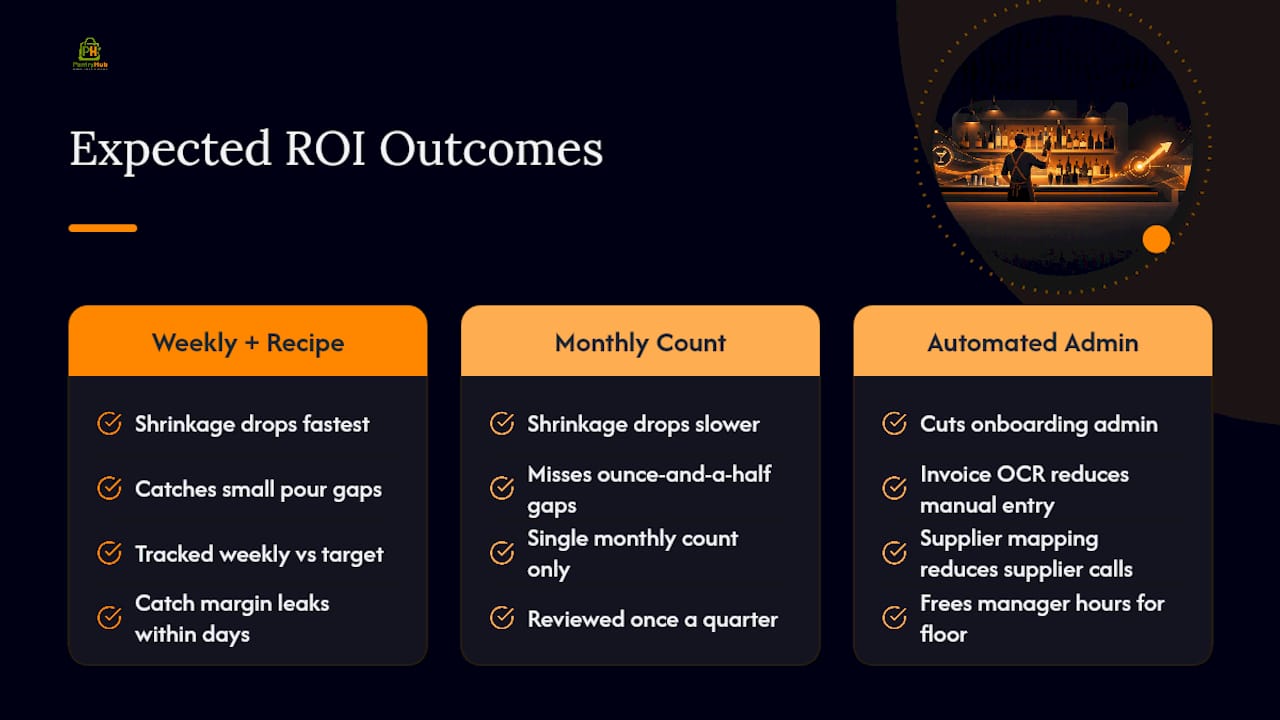
Admin time is the second win. Manual invoice entry and phone-order supplier calls are hours a manager could spend on the floor instead, and invoice OCR and supplier mapping materially cut onboarding admin for small venues once it's set up.
The metric that matters most: pour cost as a percentage of liquor sales, tracked weekly against a target range rather than reviewed once a quarter. Daily and weekly close routines built on synced POS data let you catch a margin leak within days instead of finding it buried in next month's P&L.
Track four numbers from day one: pour cost, stock variance, hours spent on admin, and supplier order-fill accuracy. Those four tell you within a month whether the switch is paying for itself.
How Do You Set Up Bar Software and Budget for It?
Setup is faster than most operators expect, provided you sequence it properly.
- Build your product list. Enter every bottle, keg, and mixer with current pars, ideally pulled from your last full stocktake.
- Map suppliers. Link each product to its supplier and standard order unit so reorders generate automatically instead of manually.
- Run the first stocktake inside the platform. This becomes your baseline for every variance report going forward.
- Assign ownership. A manager and head bartender should share data entry duties, with a bookkeeper looped in for the accounting sync.
- Confirm integrations. Test the POS sync and accounting connection (Xero or QuickBooks are common) before relying on them for a live shift.
Realistic timeframes run one to two weeks for a single venue, longer for multi-site groups needing supplier consistency across locations. For budgeting, calculate monthly total cost of ownership by adding the base subscription, any per-location fees, and hardware costs, then compare that against current shrinkage losses before deciding on a pilot scope.
Do Bar Software Platforms Handle Customer Loyalty?
Some bar management platforms include basic customer relationship features, but this is where the category splits sharply by design intent. Inventory-first platforms like PantryHub focus on stock, cost, and supplier control rather than marketing automation, which is a deliberate trade-off, not a gap.
If loyalty tracking matters to your venue, most operators handle it through a dedicated CRM or a loyalty add-on tied to their POS, keeping guest data and purchase history separate from inventory logic. That separation actually works in your favor: a platform trying to do stock control, cost tracking, and marketing all at once tends to do all three at a mediocre level.
What does connect the two worlds is data. Sales data synced from your POS into your inventory platform reveals which cocktails or beer styles actually drive repeat visits, information you can hand off to whatever loyalty tool you run. Review signals matter here too. Customer reviews increasingly shape how hospitality venues manage reputation, and a bar with tight inventory control tends to deliver the consistency that earns those reviews in the first place. A cocktail that tastes the same on a Tuesday as it does on a Saturday is a loyalty feature nobody labels as one.
How Does Employee Management Fit Into Bar Software?
Staffing and stock control intersect more than most operators expect. A well-run bar management system tracks who counted what stock and when, which turns a stocktake from a guessing exercise into an accountability record. If variance spikes on Thursdays, and Thursdays are always the same closing bartender, that pattern is visible in the data within weeks.
Employee-facing features worth checking during a demo include:
- Role-based access, so bartenders can log stock counts without seeing supplier pricing or financial reports.
- Shift-linked accountability, tying stocktake entries to the staff member who performed them.
- Mobile access, letting a head bartender run a spot-check from the floor rather than a back-office terminal.
Full-scale scheduling and payroll usually live in dedicated workforce tools, and most bar software integrates with those rather than replacing them outright. What matters is that the inventory platform doesn't sit in isolation. If your scheduling software and your inventory system can't share a login structure or export clean data to your payroll provider, you're back to manual reconciliation, which defeats the purpose of digitizing in the first place.
What Hardware Do You Need to Run Bar Software?
Most modern bar software runs on hardware you probably already own. A smartphone or tablet handles barcode scanning and stocktake entry, and cloud bar software means there's no server to maintain behind the bar.
That said, a few hardware questions are worth confirming before you commit:
- Device compatibility. Check whether the platform runs on both iOS and Android, since mixed-device teams are common in hospitality.
- Barcode scanner support. Some platforms use the phone camera; others integrate with dedicated handheld scanners for high-volume counts.
- POS terminal compatibility. Confirm your existing POS hardware, not just its software, can talk to the inventory platform without a forced upgrade.
- Internet reliability. Cloud-based systems need a stable connection, so a bar in a basement with patchy Wi-Fi should confirm offline mode exists before signing up.
The trend across the category is toward mobile-first stocktakes rather than fixed terminals, since app store listings for inventory apps commonly designed for phone-based stocktakes show vendors treating mobile access as standard, not premium. That shift matters practically: a bartender can count a keg room in the walk-in without carrying a laptop, and that alone removes one of the biggest reasons stocktakes get skipped.
How Secure Is Bar Software Data?
Cloud bar software stores sensitive data: sales figures, supplier pricing, and staff access logs. The baseline security features worth confirming before you sign a contract include encrypted data storage, role-based permissions, and regular automated backups so a lost device never means lost stocktake history.

Ask specifically about data ownership. Some platforms make it difficult to export your own inventory and sales history if you switch providers later, which is a lock-in tactic worth spotting early. A platform confident in its product lets you export your data on request, no negotiation required.
Payment and accounting integrations raise a second layer of concern. Any system connecting to Xero, QuickBooks, or your POS provider should use secure API connections rather than shared login credentials, and it should never require you to hand over your accounting password directly. If a vendor asks for that, walk away.
Multi-location groups face an added wrinkle: access controls need to separate what a single-venue manager can see from what a group-level owner can see across all sites. A bartender at one location shouldn't be able to view supplier pricing or sales data from a venue across town. Ask during the demo how granular those permissions actually get, because "everyone sees everything" is a common default that most operators only notice after a staff turnover problem.
Why Operator-Built Software Changes the Adoption Curve
Software built by people who've actually run a bar tends to match how bars really work, not how a product team imagines they work. That's the practical advantage of a platform designed by hospitality professionals rather than general-purpose inventory software retrofitted for the industry: fewer workflow mismatches, less custom configuration, faster time to value.
Adoption succeeds when it starts small. Pick one section of the bar, assign one person to own daily data entry, and build the stocktake into an existing ritual, like the end-of-shift close, rather than treating it as a separate chore. Most failed rollouts I've seen fail on ownership, not on the software itself.
If you want a second opinion on whether your setup is pilot-ready, reach out for a demo and measurement support before you commit to anything.
Start a PantryHub Trial Built for Bar Operations
PantryHub gives bar operators one system that ties stock counts to pour cost, supplier ordering, and POS sales, without needing a separate spreadsheet to reconcile the gaps between them.
Every feature maps directly to the buying criteria that matter during a demo: bottle-level and recipe-based pour-cost tracking catches cocktail drift before it compounds, mobile stocktakes cut the hours a manager spends counting kegs by hand, and supplier ordering syncs directly instead of routing through phone calls or emailed order sheets. Pricing is published upfront rather than hidden behind a "contact sales" form, and the core hospitality inventory platform supports single venues and multi-location groups from the same account.
A successful 30 to 90-day pilot looks like this: pour cost trending toward your target range by week four, order-fill accuracy improving as supplier mapping settles in, and admin hours on invoice entry dropping measurably by the second month. Start with a single bar section, run your first stocktake inside the platform this week, and see the variance numbers for yourself before deciding on a full rollout. Book a demo or start your trial to see how it fits your venue.
Selected Sources for Deeper Reading
For a closer look at PantryHub's bar-specific features, including pour-cost control and mobile stocktake tools, visit the bar inventory software product page. The broader hospitality inventory platform overview covers multi-location management and supplier integration in more depth, and the step-by-step guide to managing bar inventory efficiently walks through pilot planning and par-level mapping.
For a neutral, vendor-agnostic reference on operational audits and checklist practices in hospitality, the iAuditor listing on Capterra outlines how checklist-based tools are commonly used for venue inspections and inventory checks, independent of any specific bar software provider.
Frequently Asked Questions
What is the difference between bar software and a general restaurant POS system?
A bar POS system primarily handles transactions and tabs, while dedicated bar software adds inventory tracking, pour-cost analysis, and supplier ordering on top. Many bars run both, syncing POS sales data into the inventory platform rather than replacing one with the other.
How long does it take to set up bar software?
A single venue typically takes one to two weeks to get running, covering the initial product list, par levels, and supplier mapping. Multi-location groups need longer to standardize supplier lists and permissions across sites.
Can bar software work without integrating with my POS?
Yes, but you lose the automatic sales sync that makes variance reporting accurate day to day. Without POS integration, you're back to manually entering sales data, which defeats much of the time-saving case for switching.
Does bar inventory management software help with multiple locations?
Cloud-based platforms built for multi-site groups let you view stock, pour cost, and supplier orders across every venue from one dashboard, with permissions that keep site-level data separate where needed. This matters most for groups trying to standardize purchasing and catch variance patterns across locations rather than treating each bar as an island.
What should I budget monthly for bar software?
Costs vary by venue count and feature tier, so request the full pricing breakdown, including any per-location fees, before comparing options. Weigh that monthly cost against your current shrinkage losses and admin hours to see whether the switch pays for itself within the first quarter.