

A kitchen management system is software that centralizes order processing, inventory tracking, and staff coordination for restaurant and café back-of-house operations. Also called a KMS, it connects your point-of-sale (POS) terminal to your prep stations, supplier orders, and stock records in one platform. The result is a kitchen that runs on data instead of guesswork. If you are evaluating kitchen management software to cut waste, reduce errors, or get better visibility across your operation, this guide covers exactly how these systems work, what features matter most, and what to watch out for before you buy.
How does a kitchen management system work?
A kitchen management system operates as the central nervous system of your back-of-house, connecting every order, ingredient, and staff action into one continuous data loop. Understanding the flow helps you see where the real efficiency gains come from.
Here is the operational sequence from order to plate:
- Order entry. A customer places an order through your POS terminal, online ordering platform, or tableside device. The KMS receives that order instantly.
- Kitchen Display System (KDS) routing. The order appears on a Kitchen Display System, which replaces paper tickets and routes each item to the correct prep station. The KDS prioritizes orders by time and table, so your grill cook and your salad station are always working in sync.
- Inventory auto-depletion. As each dish is prepared and marked complete, the KMS updates stock levels in real time. Systems typically refresh inventory every minute based on sales and usage. That means your stock count reflects actual consumption, not a weekly manual count.
- Analytics capture. Every ticket time, every station delay, and every ingredient usage is logged. Managers can pull reports on prep speed, throughput, and waste without waiting for end-of-month summaries.
- Supplier and reorder triggers. When stock drops below a set threshold, the system flags a low-stock alert or generates a purchase order automatically.
The integration between POS and KMS is where most of the error reduction happens. When orders flow digitally from front-of-house to back-of-house, miscommunication between servers and cooks drops sharply. Labor costs also stabilize because managers can see exactly where time is being lost and adjust staffing before a rush, not after.
Pro Tip: Set your low-stock alert thresholds at 1.5 times your average daily usage for each ingredient. That buffer gives you time to reorder without over-purchasing.

What features should you look for in kitchen management software?
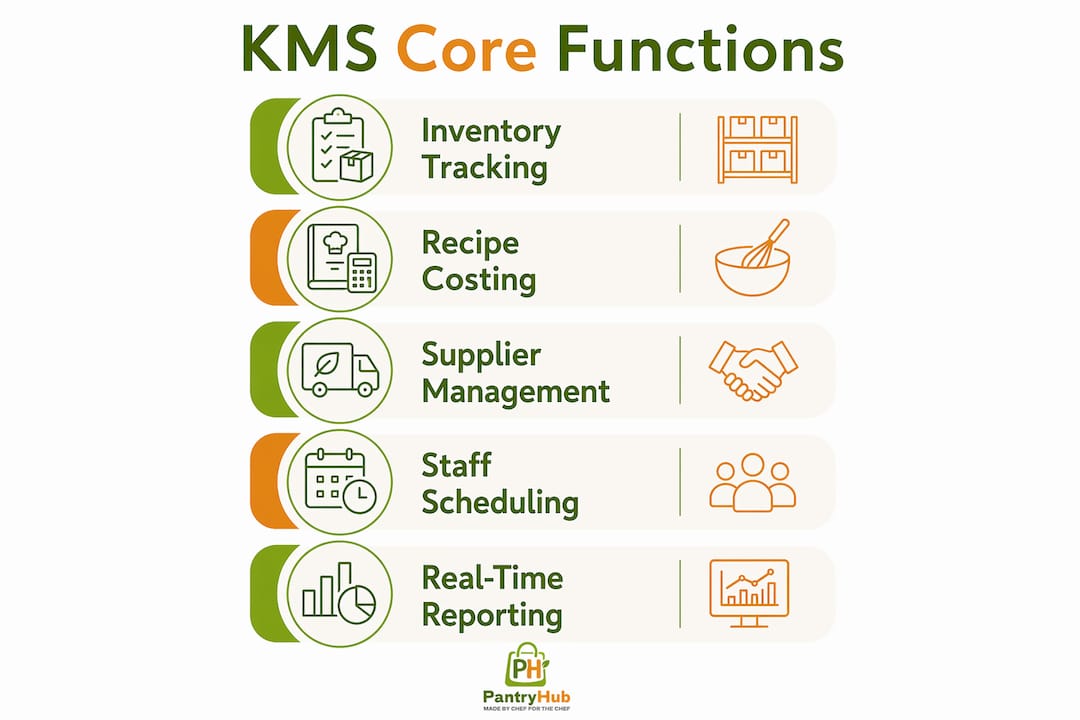
Kitchen management software typically bundles several modules that address different parts of your operation. Not every platform includes all of them, so knowing which features matter for your kitchen size and concept is worth your time before you commit.
Inventory management and auto-replenishment
Real-time inventory tracking is the foundation of any KMS. The system logs every ingredient used against every dish sold, giving you an accurate picture of what is on your shelves at any moment. Auto-replenishment alerts notify your purchasing manager or trigger a supplier order when stock hits a minimum level. This prevents both running out mid-service and over-ordering perishables that end up in the bin.
Recipe and menu costing
Recipe costing tools calculate the exact cost of every dish based on current ingredient prices. When a supplier raises the price of chicken breast, the system recalculates your margin automatically. This feature is critical for menu engineering and for catching cost creep before it damages your bottom line.
Supplier and purchase order management
A good KMS connects directly to your supplier catalog, letting you raise and approve purchase orders from within the platform. Some systems log delivery receipts and flag discrepancies between what was ordered and what arrived. That audit trail is valuable for both cost control and compliance.
Staff scheduling and compliance tracking
Labor is typically the second-largest cost in any kitchen. Scheduling modules let managers build rosters against projected covers, track actual hours, and flag overtime before it happens. Compliance tracking records food safety checks, temperature logs, and cleaning schedules in the same system.
Real-time reporting and KPI dashboards
Dashboards surface key metrics like food cost percentage, average ticket time, waste by category, and labor cost per cover. The best platforms let you drill down to station-level performance, so you can identify exactly which prep station is slowing down service rather than applying pressure across the whole team.
Pro Tip: When evaluating platforms, ask the vendor for a live demo using your actual menu size and supplier count. Generic demos hide integration gaps that only show up in real workflows.
Here is a quick comparison of the core modules and what each one addresses:
| Module | Primary Problem Solved | Key Output |
|---|---|---|
| Inventory tracking | Stock inaccuracy and over-ordering | Real-time stock counts and waste reports |
| Recipe costing | Margin erosion from price changes | Dish-level cost and profitability data |
| Supplier management | Order errors and delivery discrepancies | Purchase orders and delivery audit logs |
| Staff scheduling | Labor cost overruns | Roster vs. actual hours and overtime alerts |
| KPI dashboards | Reactive management | Live prep times, food cost %, and throughput |
What are the real benefits of kitchen management systems?
The benefits of kitchen management go beyond convenience. They show up directly in your profit and loss statement.
- Food waste reduction. Accurate stock tracking eliminates the guesswork that leads to over-ordering. When your system knows exactly how much of each ingredient you have and how fast you use it, spoilage drops and purchasing becomes precise.
- Faster service and fewer errors. A KDS removes the communication gap between front-of-house and back-of-house. Orders arrive at the correct station instantly, and ticket times are tracked automatically. This speeds up throughput and reduces the number of dishes that come back wrong.
- Labor cost control. Scheduling tools let you match staffing levels to actual demand. Combined with real-time analytics, managers can make pre-rush adjustments that prevent overtime and reduce idle time between services.
- Consistency and quality control. Standardized recipes stored in the system mean every cook follows the same specification, regardless of experience level. That consistency protects your brand and reduces customer complaints.
- Profitability visibility. When inventory, recipe costs, and labor data sit in one platform, you can see your true cost per cover in near real time. That visibility makes pricing decisions and menu changes much easier to justify.
"Waiting for month-end reports to reveal issues is too late. A kitchen management system used as an operating system rather than a reporting tool allows pre-rush adjustments that prevent financial damage before it occurs."
The compounding effect is significant. Waste reduction, faster service, and tighter labor control each contribute to margin improvement independently. Together, they can shift a kitchen from barely profitable to consistently strong.
What challenges come with adopting a kitchen management system?
Adopting a KMS is not just a technology decision. It is an operational change that requires clear roles, trained staff, and a commitment to using the data the system generates.
- Role clarity between chef and manager. Blurring the line between executive chef and kitchen manager is one of the most common causes of KMS underperformance. The executive chef owns culinary standards. The kitchen manager owns operational compliance, food cost control, and system data. When one person tries to do both, administrative tasks get neglected.
- Staff training and buy-in. A KDS only works if every cook uses it correctly. Resistance to new technology is common, especially in kitchens with long-tenured staff. A structured onboarding process for new tools reduces errors during the transition period and shortens the time to full adoption.
- Data accuracy maintenance. The system is only as good as the data going in. Recipes must be kept current, supplier prices need regular updates, and stock counts must be reconciled against physical counts on a set schedule. Letting data drift makes every report unreliable.
- Proactive vs. reactive use. Most managers initially use KMS reports to review what went wrong. The real value comes from using real-time analytics to adjust prep schedules and staffing before a service period, not after. That shift in mindset takes deliberate practice.
Pro Tip: Assign one team member as the KMS data owner. Their job is to keep recipes, stock counts, and supplier prices current. Without ownership, data quality degrades within weeks.
How do you choose the right kitchen management system?
Selecting a KMS comes down to fit: your kitchen size, your existing tech stack, and the specific problems you need to solve first.
| Consideration | What to Evaluate |
|---|---|
| POS integration | Does it connect natively to your current POS, or does it require a third-party connector? |
| Scalability | Can it handle multiple locations or just a single site? |
| Ease of use | Will your team adopt it without weeks of training? |
| Vendor support | Is support available during your service hours, not just business hours? |
| Pricing model | Is it priced per location, per user, or per module? |
Cost and ROI potential matter, but they are secondary to integration capability. A system that does not connect cleanly to your POS creates more manual work than it eliminates. Security and compliance features are also worth checking, particularly if you store supplier payment data or staff records within the platform. For Australian operators, inventory software options vary significantly in local supplier integrations and compliance support, so regional fit is a real factor.
Key takeaways
A kitchen management system delivers measurable gains in cost control, waste reduction, and service speed only when it is used proactively as an operating tool, not passively as a reporting archive.
| Point | Details |
|---|---|
| Core definition | A KMS connects POS, inventory, KDS, and supplier ordering into one real-time platform. |
| Inventory accuracy | Auto-depletion updates stock every minute, preventing over-ordering and spoilage. |
| KDS impact | Replacing paper tickets with a KDS reduces errors and tracks prep times by station. |
| Role separation | Splitting culinary authority from operational management improves compliance and cost control. |
| Proactive analytics | Using real-time data before a service period prevents losses that month-end reports cannot recover. |
The feature that most managers underuse
Most kitchen managers I have worked with adopt a KMS and immediately focus on the inventory module. That makes sense. Stock control is visible, measurable, and directly tied to cash. But the feature that consistently delivers the biggest operational shift is station-level ticket time tracking, and almost nobody uses it well in the first six months.
Here is what I have seen happen repeatedly. A kitchen is slow on a Friday night. The manager assumes it is a staffing problem and adds a cook. The real issue is a single prep station running three minutes behind on every ticket. Adding a cook does not fix a bottleneck at one station. It just adds cost. When you use station-specific analytics to identify the exact constraint, you can reassign one task, adjust the prep sequence, or retrain one person. That is a targeted fix, not a blanket response.
The second thing I would push back on is the idea that a KMS is primarily a cost-cutting tool. It is, but the more durable benefit is cultural. When your team can see ticket times, waste figures, and stock accuracy on a shared dashboard, accountability becomes part of the daily rhythm rather than a conversation that only happens when something goes wrong. That shift in culture is harder to quantify than food cost percentage, but it is what separates kitchens that sustain their gains from those that revert after six months.
The role of team management software in building that culture is something most vendors do not talk about enough. Technology does not create accountability. It makes accountability visible. That distinction matters when you are deciding how to introduce a new system to your team.
— Admin
How Pantryhub supports your kitchen management goals
Pantryhub is built specifically for restaurants, cafés, bars, and commercial kitchens that need real control over inventory, supplier ordering, and cost visibility without the complexity of enterprise software.

Pantryhub's hospitality inventory platform connects stock tracking, low-stock alerts, supplier integration, and reporting in one place. Whether you run a single café or a multi-location group, you get real-time visibility across your entire operation from any device. Pricing starts from A$39 per month, and the platform is designed so your team can adopt it without a lengthy training program. If you are ready to move from manual counts and reactive ordering to a system that works the way your kitchen does, Pantryhub is worth a close look. Check out Pantryhub's pricing plans to find the right fit for your operation.
FAQ
What is a kitchen management system in simple terms?
A kitchen management system is software that connects your POS, inventory, prep stations, and supplier ordering into one platform. It gives restaurant and café managers real-time visibility over stock, orders, and kitchen performance.
What is the difference between a KMS and a KDS?
A Kitchen Display System (KDS) is one component of a broader kitchen management system. The KDS handles order routing and prep tracking at the station level, while the KMS covers inventory, recipe costing, supplier management, and reporting.
How does a kitchen management system reduce food waste?
The system auto-depletes inventory with every sale, giving you accurate stock counts in real time. That accuracy prevents over-ordering and flags slow-moving ingredients before they spoil.
Can a small café benefit from kitchen management software?
Yes. Even a single-site café benefits from automated stock alerts, recipe costing, and supplier order tracking. The time saved on manual counts and the reduction in over-ordering typically cover the software cost within the first few months.
What should i prioritize when selecting a kitchen management system?
Start with POS integration. A system that does not connect cleanly to your existing POS creates manual workarounds that cancel out the efficiency gains. After integration, evaluate ease of use, vendor support hours, and scalability for future locations.