

Most restaurant owners think kitchen software starts and ends with inventory counts or POS receipts. That framing misses something significant. The role of team management kitchen software, what the industry formally calls kitchen operations management software, extends far beyond tracking stock. It governs how your team communicates, who does what task and when, and whether your kitchen runs as a coordinated unit or a collection of individuals hoping for the best. This article breaks down what these tools actually do, why they matter to your bottom line, and how to choose and implement them without the usual headaches.
Table of Contents
- Key Takeaways
- The role of team management kitchen software explained
- How team software cuts errors and speeds up service
- Comparing kitchen software types and capabilities
- Practical steps for implementing kitchen team software
- My honest take on what actually moves the needle
- How Pantryhub helps your kitchen team work better
- FAQ
Key Takeaways
| Point | Details |
|---|---|
| Team management is core, not optional | Kitchen software that includes scheduling, permissions, and task tracking directly reduces errors and miscommunication. |
| KDS integration multiplies team value | Connecting team management tools to a Kitchen Display System creates real-time coordination across every station. |
| Data drives accountability | Automated logging of prep times and task completion gives managers objective ground for performance conversations. |
| Implementation requires clear role permissions | Setting role-based access from day one prevents confusion and protects sensitive operational data. |
| Multi-location teams need centralized tools | Central kitchen software automates task assignment by outlet demand, making cross-site collaboration actually work. |
The role of team management kitchen software explained
Kitchen operations management software, when built well, covers four functional areas that your team touches every single shift: scheduling and role assignment, task tracking and communication, performance data logging, and compliance workflow integration. Understanding each one separately helps you evaluate what any given platform actually delivers.
Scheduling and role assignment sit at the foundation. Kitchen managers handle staff scheduling as one of their most critical daily responsibilities, and software that digitizes this process eliminates the paper rosters, missed shift notifications, and role confusion that cascade into service failures. When a prep cook knows exactly what station they own before service starts, that clarity pays off every single time.
Here is what well-designed kitchen software for teamwork typically includes across these four areas:
- Scheduling and shift management: Digital rosters with automated notifications, shift swap requests, and manager approvals built into one place
- Role and permission controls: Granular access levels so a line cook sees what they need, a sous chef sees more, and only the manager touches cost data
- Real-time task tracking: Task boards or live screens showing what is in progress, completed, or stalled at any station
- Kitchen Display System (KDS) integration: KDS receives order data from POS systems and routes it instantly to the correct station, replacing paper tickets and reducing lost orders
- Automated alerts: Low stock warnings, temperature exceedances, or overdue task notifications pushed to the right person at the right time
- Performance data logs: Timestamped records of prep times, order completions, and task ownership that feed into performance reviews
Pro Tip: When evaluating any platform, ask vendors specifically how role permissions are structured. A system that offers only two or three permission levels will create workarounds that undermine accountability.
The integration between team management tools and KDS deserves special attention. A well-configured KDS coordinates workflow by sequencing, routing, and timing orders so that grill, sauté, and garnish stations hit the pass at the same moment. That is not a screen feature. That is operational team management running at the hardware level.
How team software cuts errors and speeds up service
The connection between team management software and order accuracy is direct, not theoretical. When every station receives tasks through the same digital system, the telephone-game miscommunication of verbal handoffs disappears. A ticket does not get lost between the printer and the sauté station. A modification does not fail to reach the person plating the dish.
Here is how the efficiency gains typically stack up in practice:
- Order accuracy improves at the point of routing. Digital task assignment means every station gets the right information at the same time. There is no reading a handwritten ticket under red heat lamp light.
- Prep time visibility surfaces real bottlenecks. KDS platforms log prep times by station and employee, which means a manager can see that the cold section consistently adds four minutes to ticket times before ever having that conversation with the team.
- Shift coordination removes scheduling gaps. Automated scheduling tools flag when a station will be understaffed before service, not during it.
- Compliance tasks get completed on time. Digital HACCP systems replace paper logs with automated, continuous food safety monitoring, saving 30 to 90 minutes daily per site and creating audit-ready records automatically.
- Manager attention shifts from firefighting to improvement. When the software handles routine alerts and task routing, managers spend time on training and menu execution rather than chasing down who forgot to check the walk-in temperature.
"Team management kitchen software becomes most valuable when it converts coordination into measurable data that drives training and bottleneck visibility." — Elandapos KDS research, 2026
The measurable data point matters more than most operators realize. Subjective performance conversations are uncomfortable and easy to dismiss. Showing a team member that their station averaged 11 minutes on a dish with an 8-minute target for the past three weeks is a different kind of conversation entirely.
Comparing kitchen software types and capabilities
Not every platform serves the same kitchen, and choosing the wrong type wastes time and money. The table below summarizes the key differences between the main categories of effective kitchen management tools currently available.
| Software type | Best for | KDS integration | Multi-location support | Food safety compliance | Role permissions depth |
|---|---|---|---|---|---|
| Single-location POS-linked | Independent restaurants and cafés | Basic to moderate | No | Limited | Basic (2-3 levels) |
| Central kitchen management | Multi-unit groups, ghost kitchens | Advanced | Yes, with task automation | Integrated | Deep, role-specific |
| All-in-one hospitality platforms | Full-service restaurants and groups | Moderate to advanced | Often yes | Varies by vendor | Moderate to deep |
| Standalone KDS software | High-volume kitchens needing routing | Core function | Partial | No | Minimal |
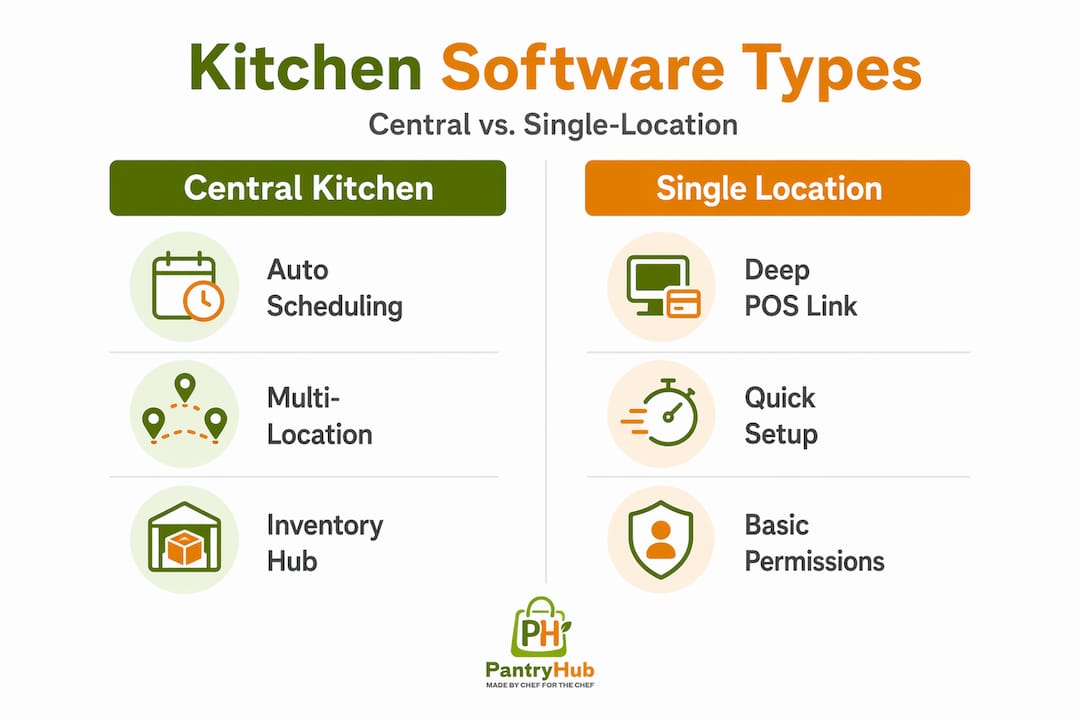
Central kitchen software automates production scheduling and task assignment based on outlet demand, which is the capability that separates multi-location solutions from everything else. When you are running three venues and a central prep kitchen, you cannot manage task assignments manually. The system has to know which outlet needs what, and route production tasks accordingly.
For single-location operators, the decision usually comes down to how deeply the software integrates with your existing POS and whether role permissions are granular enough for your team structure. A 12-seat café and a 60-cover restaurant have very different permission needs. The best kitchen management solutions for each will look different.
Multi-location inventory coordination adds another layer of complexity when team management and stock tracking have to stay in sync across sites. Platforms that handle both in one place remove the reconciliation work that comes from running separate tools.
Food safety and compliance workflow integration is often underweighted during software selection. Automated HACCP monitoring provides instant alerts and creates mandatory corrective task workflows, which means a failed temperature check does not just get noted. It generates a task, assigns it to the right person, and tracks completion. That is team management and compliance running together.
Practical steps for implementing kitchen team software
Knowing what to buy is only half the challenge. Getting a kitchen team to actually use new software, and use it well, requires a deliberate approach.
- Map your current workflow before you select anything. Write down how tasks currently move from order to plate, how shifts get communicated, and where the gaps are. Software should solve real problems, not create new ones.
- Confirm POS and KDS compatibility upfront. Ask vendors for a technical spec on exactly which POS systems they integrate with and how KDS routing is configured. Matching your KDS to specific kitchen workflow demands is critical for the integration to actually work.
- Set role permissions before go-live, not after. Decide who sees what before a single staff member logs in. Retroactive permission changes create confusion and erode trust in the system.
- Run a two-week parallel period. Keep old systems running alongside new software for two weeks during initial rollout. This catches integration gaps without risking service quality.
- Use data in weekly team meetings from day one. Pull prep time reports, task completion rates, and scheduling adherence in the first week. Teams adopt tools faster when they see the data used constructively rather than punitively.
- Explore digital tools that complement your kitchen software, particularly front-of-house tools that affect order routing and table turn times.
Pro Tip: Staff adoption rates increase significantly when a team member from each station is involved in the testing phase before full rollout. Peer credibility matters more than manager mandates when it comes to new technology.
The role of technology in kitchen management ultimately depends on whether the team trusts it. Software that is forced onto a resistant team becomes shelfware inside a month. Software that solves a pain the team already feels gets embedded into the culture quickly.
My honest take on what actually moves the needle
I have seen kitchens spend significant money on team management software and walk away frustrated six months later. In most of those cases, the problem was not the software. It was that the team implemented a scheduling tool when what they actually needed was task visibility, or they bought a full platform and only used the scheduling module.
What I have learned is that the features of team management software that deliver the fastest return are not the flashy ones. Real-time task tracking and KDS integration change day-to-day operations immediately. Scheduling tools save time weekly. Performance data becomes valuable over months, but it compounds. The operators who get the most from these tools are the ones who commit to reading the data and having the conversations it makes possible.
The team permissions piece is consistently underestimated. I have watched kitchens where every staff member had the same access level, and the result was constant accidental changes to supplier orders, cost data being seen by people who then used it in wage negotiations, and no accountability trail when something went wrong. Permissions are not bureaucracy. They are the structural equivalent of a well-organized kitchen pass.
My advice to any operator evaluating options right now: do not buy on feature count. Buy on the depth of two or three features that match your actual daily problems. A platform that does scheduling, task tracking, and KDS routing really well will outperform a platform that does twelve things adequately.
— Admin
How Pantryhub helps your kitchen team work better
Pantryhub was built by chefs for the operational realities of commercial kitchens, which means the team management features inside the platform were designed around how kitchens actually function under pressure, not how they look on a flowchart.

With Pantryhub, you get smart inventory tracking, low-stock alerts, and supplier ordering sitting alongside team management tools in one place. That means your kitchen manager is not switching between four platforms to understand what is in the walk-in, who is on shift, and what orders need to go out today. Whether you run a single café or a growing multi-location group, Pantryhub's hospitality inventory software gives your team a single source of truth for stock, ordering, and operational visibility. Take a look at what Pantryhub can do for your kitchen team.
FAQ
What does team management kitchen software actually do?
Team management kitchen software handles scheduling, task assignment, role permissions, real-time order routing, and performance data logging within a commercial kitchen. It connects front-of-house order data to back-of-house stations, coordinating the team rather than just tracking inventory.
How does a KDS fit into kitchen team management?
A Kitchen Display System receives order data from your POS and routes it to the correct station in real time, replacing paper tickets and reducing miscommunication during service rushes. When integrated with team management software, it also logs prep times and completion rates for performance review.
What are the main benefits of team management software for restaurants?
The core benefits include improved order accuracy, reduced verbal miscommunication between stations, objective performance data for staff development, and automated compliance task tracking. Most operators also report that managers spend less time on administrative firefighting and more time on training.
How do role permissions work in kitchen software?
Role permissions control what each team member can see and do inside the software, from line cooks accessing only their task queue to managers viewing cost data and editing schedules. Configuring these correctly from the start protects sensitive information and creates a clear accountability trail.
Is central kitchen software different from single-location tools?
Yes. Central kitchen software automates task assignment across outlets based on demand, standardizes recipes across locations, and manages distribution workflows that single-location tools are not built to handle. If you run more than one site, you need a platform designed specifically for that coordination challenge.