

Onboarding kitchen staff to an inventory system is the process of training and integrating your team into standardized stock control procedures using dedicated digital tools. Done right, it reduces food waste, improves order accuracy, and gives managers real-time visibility across every shelf and storage unit. Platforms like MarketMan, MarginEdge, and Pantryhub are built specifically for this purpose, automating purchase orders, capturing invoices, and flagging variances before they hit your bottom line. The difference between a kitchen that bleeds margin and one that runs tight comes down to whether your staff actually knows how to use the system you paid for.
What are the prerequisites for onboarding kitchen staff to an inventory system?
Before a single staff member touches your inventory software, your kitchen environment needs to be ready. Skipping this step is the most common reason onboarding fails. You end up training people on a broken foundation, and the data they generate is worthless from day one.
Choose the right system for your scale. A single café with 40 menu items has different needs than a multi-location restaurant group. Manual spreadsheets work at micro-scale but collapse under volume. POS-integrated systems like Square for Restaurants provide theoretical inventory counts automatically, but dedicated software platforms like Pantryhub, MarketMan, and MarginEdge add automated reordering, invoice capture, and variance reporting that genuinely reduce staff workload.
Simplify your menu before you train anyone. Menu simplification directly lowers inventory complexity, carrying costs, and spoilage. Fewer SKUs mean a shorter count sheet, a faster learning curve, and fewer opportunities for staff to make mistakes. If your menu has 120 items and 300 ingredients, cut it before you build your inventory catalog.
Standardize units of measure across every recipe. This is the step most managers underestimate. Misaligned units corrupt inventory data instantly. If one recipe calls for chicken breast in pounds and another in ounces, your system will never reconcile correctly. Decide on one unit per ingredient and enforce it in every recipe card, every count sheet, and every purchase order.
Additional prerequisites to complete before training begins:
- Set par levels and reorder points based on actual usage data and a safety stock buffer of 20 to 25% on lead-time demand, with tighter buffers for high-perishability items like fresh herbs and fish
- Organize physical storage following FIFO (first in, first out) principles with clear labeling on every shelf and container
- Create a master ingredient list with agreed units, storage locations, and supplier codes before loading anything into software
Pro Tip: Print your standardized unit list and post it in the prep area and receiving dock before training starts. Staff who can see the reference while they work make fewer unit errors during their first month.
How do you design a step-by-step onboarding process for kitchen staff?
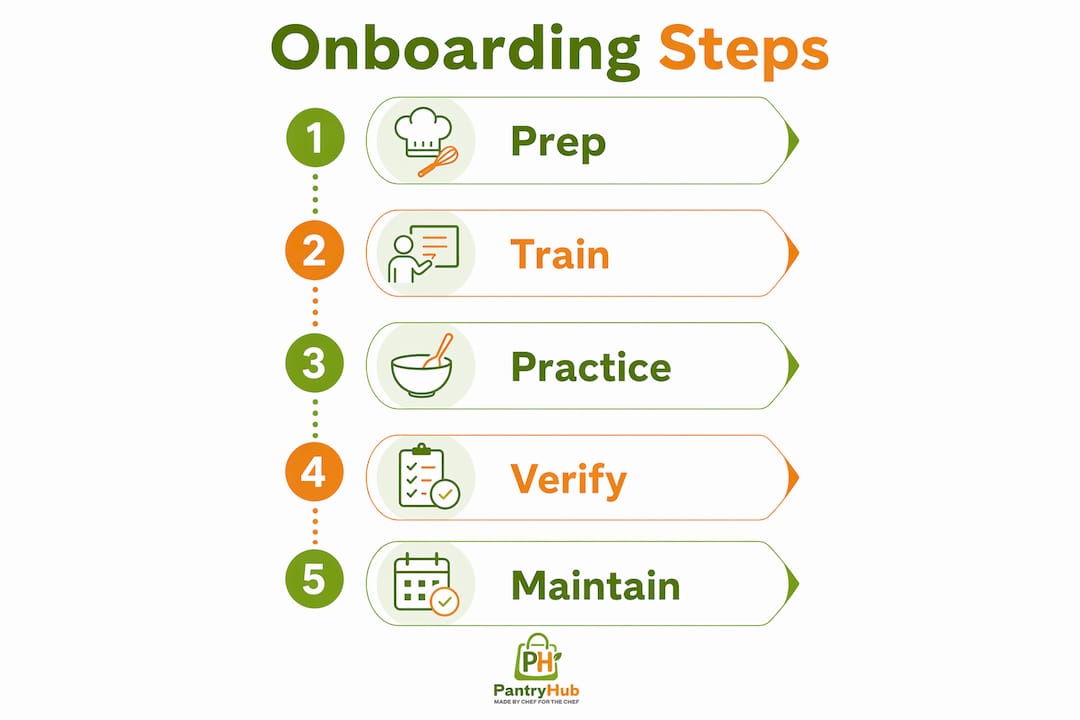
A structured onboarding process for a restaurant inventory tracking system follows a clear sequence. Skipping steps or rushing the timeline produces staff who know how to click buttons but do not understand why the system matters. That distinction determines whether your data stays accurate six months from now.
-
Deliver a system overview session. Start with the "why" before the "how." Explain how inventory accuracy connects to food cost, waste reduction, and the kitchen's profitability. Staff who understand the business impact take the process more seriously than those who see it as extra admin work.
-
Conduct an opening physical count with your full team. The first count is a training exercise as much as a data-gathering exercise. Shelf-to-sheet count methods arranged by physical storage location reduce count time and errors significantly. Counts that previously took four or more hours with paper can drop to under one hour with shelf-to-sheet software.
-
Train on receiving and labeling. Every delivery is an inventory event. Staff need to know how to verify incoming quantities against purchase orders, label items with received dates, and enter data into the system before product hits the shelf. Receiving errors compound over time and are nearly impossible to trace after the fact.
-
Teach waste recording. Spoilage, trim waste, and over-portioning are the silent killers of food cost. Show staff exactly how to log waste in the system at the moment it happens, not at the end of a shift when memory fades.
-
Integrate POS sales data. Once receiving and counting are running correctly, connect your POS system to generate perpetual inventory updates. This gives managers a theoretical count between physical counts and flags unusual variances worth investigating.
-
Establish count routines. Two-person counts conducted the same day, the same way, by the same people are the gold standard. Employee theft accounts for approximately 36% of restaurant shrinkage, and consistent two-person accountability is the most practical deterrent available.
"Inventory accuracy depends on treating inventory as an integrated cycle, with staff trained and accountable at every stage from receiving to reordering." — Restaurant Velocity
Pro Tip: Run your first three counts with a manager present at every station. The investment of time in weeks one through three pays back in data integrity for the rest of the year.
What common challenges arise when onboarding staff to inventory systems?
Even well-prepared kitchens hit friction during onboarding. Knowing the most common failure points lets you address them before they become habits.
-
Unit conversion confusion. Staff trained in one kitchen often carry assumptions about measurement that conflict with your standards. A cook who has always measured stock in liters will default to that even if your system uses quarts. Explicit, repeated instruction on your unit standards is not optional.
-
Resistance to new processes. Kitchen culture is fast-paced and resistant to anything that feels like extra paperwork. Frame inventory tasks as part of the job description from day one, not as an add-on. Managers who treat inventory as optional signal to staff that it is.
-
Underestimating count labor. Physical counts in high-volume kitchens still require two to four staff hours per cycle even with dedicated software. Scheduling counts during low-traffic periods and assigning specific roles prevents the count from collapsing under time pressure.
-
Inventory variances from unrecorded waste. The gap between theoretical and actual inventory is almost always explained by waste that was not logged, portions that were not standardized, or receiving errors that were not caught. Investigate variances above your threshold immediately rather than letting them accumulate.
-
Relying on POS data alone. POS-integrated systems provide theoretical counts but cannot detect theft, unrecorded waste, or receiving errors. Physical counts remain mandatory for accuracy and regulatory compliance.
-
Role separation failures. The person who receives deliveries should not be the only person who counts inventory. Separating these roles creates a natural check that catches both honest mistakes and deliberate manipulation.
How do digital inventory tools compare for kitchen staff onboarding?
Not all inventory systems create the same onboarding experience for kitchen staff. The right tool for your operation depends on your volume, your team's technical comfort, and the features you actually need.

| System type | Best for | Onboarding ease | Key limitation |
|---|---|---|---|
| Manual spreadsheets | Micro-operations, under 50 SKUs | High, no training needed | No automation, high error rate |
| POS-integrated (e.g., Square) | Small to mid-size restaurants | Medium, familiar interface | Theoretical counts only, no physical count tools |
| Dedicated platforms (Pantryhub, MarketMan, MarginEdge) | Mid to large operations | Medium, requires setup | Requires standardization before launch |
| Enterprise ERP systems | Multi-location groups | Low, complex interfaces | High cost, long implementation |
Dedicated platforms deliver the most value for operations that have completed the prerequisite steps. Digital inventory tools like Pantryhub, MarketMan, and MarginEdge automate purchase orders, capture invoices, and generate variance reports that would otherwise require hours of manual reconciliation. The real efficiency gain is not eliminating physical counts. It is reducing the cognitive load on staff during those counts and making the data they collect immediately useful.
Mobile apps are the feature that most directly improves the onboarding experience. A kitchen inventory app that guides staff through a shelf-to-sheet count on their phone removes the need to memorize count sequences and reduces transcription errors to near zero. Staff who might struggle with a paper count sheet can complete a mobile-guided count accurately within their first week.
AI-powered demand forecasting is now available in platforms like MarginEdge and is being integrated into Pantryhub's reporting suite. These tools analyze sales history and seasonal patterns to recommend reorder quantities, which reduces the judgment burden on junior staff and makes par level management more precise.
Pro Tip: When evaluating software for staff onboarding, ask vendors for their average time-to-competency metric. The best platforms get new staff to independent operation within two weeks. If a vendor cannot answer that question, their onboarding support is likely underdeveloped.
What are best practices for keeping staff accurate and engaged over time?
Getting staff through initial onboarding is the first challenge. Keeping them accurate and consistent three months later is the harder one. The inventory management cycle only works when every link stays intact, and staff disengagement is the most common way links break.
Practices that sustain accuracy over time include:
- Monthly refresher training focused on the specific tasks where variance data shows the most errors, not generic system reviews
- Digital checklists and photo confirmations built into your inventory app so staff confirm task completion with evidence rather than memory
- Weekly inventory reviews in team meetings where managers share variance data and explain what it means for the kitchen's food cost
- Dynamic par level adjustments reviewed quarterly to reflect seasonal menu changes, new supplier lead times, and shifts in customer volume
- Staff recognition for consistent accuracy, because positive reinforcement works better than correction alone in kitchen environments
- Clear escalation paths so staff know exactly who to tell when they find a discrepancy, rather than ignoring it because reporting feels complicated
The most durable inventory cultures are built by managers who treat count data as a management tool, not a compliance exercise. When staff see their accuracy data used to make real decisions, such as adjusting order quantities or catching a supplier short-shipping, they understand that their work matters.
Key takeaways
A successful onboard kitchen staff inventory system requires standardized processes, the right digital tools, and consistent staff accountability at every stage of the inventory cycle.
| Point | Details |
|---|---|
| Standardize before you train | Fix units of measure, par levels, and storage layout before staff touch any software. |
| Use shelf-to-sheet methods | Mobile-guided counts cut count time dramatically and reduce transcription errors from day one. |
| Two-person counts are non-negotiable | Paired counting reduces theft risk and improves data accuracy across every count cycle. |
| Software reduces variance, not labor | Dedicated platforms cut reconciliation time but physical counts still require two to four hours per cycle. |
| Sustain with data-driven reviews | Share variance reports in weekly meetings so staff see the real impact of their accuracy. |
Why most kitchens get inventory onboarding backwards
I have watched dozens of restaurant managers buy inventory software, spend a week on setup, and then hand login credentials to their team with a 20-minute walkthrough. Six weeks later, the data is a mess, the counts have stopped, and the manager blames the software.
The software is almost never the problem. The problem is that the kitchen was not ready for it. Menus were not simplified. Units were not standardized. Nobody explained to the prep cook why logging waste at the moment it happens matters more than logging it at the end of a shift.
The managers who get this right do something counterintuitive. They slow down the technology adoption and speed up the process work. They spend two weeks getting the physical environment right, the count sheets organized, and the unit standards posted on the wall before they open the app. Then onboarding takes half the time and the data is clean from day one.
The other thing I have seen consistently: role-based training outperforms general training every time. Your receiving team needs to know three things deeply. Your line cooks need to know two different things. Training everyone on everything produces staff who know a little about a lot and execute none of it reliably. Build short, specific training modules for each role and your accuracy rates will reflect it within a month.
— Admin
How Pantryhub makes kitchen staff onboarding faster and more accurate
Pantryhub is built specifically for the onboarding challenges described in this article. Its mobile inventory app guides staff through shelf-to-sheet counts with a clean, intuitive interface that new team members can use independently within their first week. Par level automation, low-stock alerts, and real-time reporting give managers visibility without requiring constant manual checks.

Restaurants and cafés using Pantryhub report measurable reductions in food waste and count labor within the first month of operation. The platform's hospitality inventory software integrates supplier ordering, invoice capture, and variance reporting in one place, which means your staff spend less time on admin and more time on food. If you are ready to build an inventory system your kitchen team will actually use, Pantryhub is where to start.
FAQ
What does it mean to onboard kitchen staff to an inventory system?
Onboarding kitchen staff to an inventory system means training your team on standardized stock control procedures and integrating them into a digital platform that tracks receiving, counting, waste, and reordering. The goal is consistent, accurate data from every staff member at every stage of the inventory cycle.
How long does kitchen inventory onboarding take?
Most kitchens reach basic staff competency within two to four weeks when prerequisites like unit standardization and menu simplification are completed first. Platforms with mobile shelf-to-sheet tools, such as Pantryhub, typically reduce time-to-competency compared to spreadsheet-based systems.
How do two-person inventory counts reduce errors?
Two-person counts require one staff member to count and one to record, which catches transcription errors in real time and removes the opportunity for a single person to manipulate data. This method also addresses the fact that employee theft accounts for roughly 36% of restaurant shrinkage.
Do I still need physical counts if I use a POS-integrated system?
Yes. POS-integrated systems generate theoretical inventory counts based on sales data, but they cannot detect theft, unrecorded waste, or receiving discrepancies. Physical verification remains required for accurate food cost management and regulatory compliance.
What is the biggest mistake managers make when setting up kitchen inventory systems?
The most common mistake is loading staff into software before standardizing units of measure and simplifying the menu. Misaligned measurement units corrupt inventory data from the first count, and no amount of retraining fixes data that was entered incorrectly from the start.