

Stock visibility is the practice of knowing exactly what's on your shelves, what's about to run out, and what's quietly going bad, before any of it hurts your bottom line. It prevents avoidable waste, stabilizes food cost, and makes supplier ordering predictable instead of reactive. The single highest-impact move you can make this week is connecting your POS to a recipe-driven stock ledger and starting daily quick checks on your top-selling items.
Business QLD's stock control guidance recommends regular stocktakes to catch loss before it compounds. Many cafés aim for a healthy margin target with food costs kept under typical industry benchmarks, and a platform like PantryHub exists specifically to make that number visible in real time rather than guessed at during a stressful end-of-month reconciliation.
- Connect your POS to a recipe-level ingredient ledger so sales automatically decrement stock
- Track 5 to 8 high-variance SKUs daily before expanding to full coverage
- Set reorder points and low-stock alerts so ordering stops being a guessing game
Table of Contents
- Why Visibility Matters for Café Margins, Waste, and Service
- What Are the Core Components of Reliable Stock Visibility?
- How Do You Improve Stock Visibility This Month?
- What Daily and Weekly Routines Keep Stock Under Control?
- What Mistakes Slow Down Stock Visibility, and How Do You Fix Them?
- How Does PantryHub Put These Visibility Practices Into Action?
- Does Stock Visibility Affect Customer Satisfaction and Service Speed?
- What Role Do RFID and IoT Play in Stock Visibility?
- What Documentation and Compliance Rules Apply to Queensland Café Stock?
- What Do Successful Stock Visibility Rollouts Look Like in Practice?
- How Do You Train Staff to Use Stock Visibility Tools Well?
- What Should Café Owners Actually Prioritize First?
- Get Real-Time Stock Visibility With PantryHub
- Frequently Asked Questions
- Sources
Why Visibility Matters for Café Margins, Waste, and Service
A stocktake does one job well: it lines up what you bought and sold against what's physically on the shelf, and the gap between those numbers tells you where stock is going missing, spoiling, or walking out the back door. Business QLD notes that some businesses run this annually while others check quarterly, but for a café with perishable stock, quarterly is often too slow to catch a problem before it becomes expensive.
Statistic Callout: A study of café inventory practices found a very strong link between inventory management and inventory speed, with a correlation coefficient of r = 0.861. Cafés that track stock closely move product faster and manage cost more tightly than those that don't.
That's not a rounding error, it's real margin leaking out through a gap nobody's watching.
- Spoiled dairy and produce rarely show up on a monthly P&L until the damage is already done
- Stockouts on popular items push customers toward competitors or lower-margin substitutes
- Reliable visibility turns cash flow from reactive firefighting into planned ordering
What Are the Core Components of Reliable Stock Visibility?
Good visibility isn't one tool, it's a system of people, process, and technology working together. Skip any one piece and the whole picture goes blurry.
- Recipe-level ingredient mapping. Every menu item ties to its exact ingredients so a sold flat white automatically deducts milk, beans, and syrup from stock, no manual entry required.
- A defined stocktake cadence. Daily partial counts on high-turnover items, weekly spot checks across the rest, and a full quarterly or annual count to catch anything the daily process misses.
- Low-stock alerts and reorder points. Set a par level and a safety stock buffer for each critical item, and let the system flag it before you run out, not after a barista tells you mid-rush.
- Supplier ordering visibility. Know what's actually available before you commit to an order, not after a delivery driver tells you an item is backordered.
- Wastage logging. Every spoiled, dropped, or over-poured item gets recorded with a reason, not silently written off.
- Multi-location transfer tracking. If stock moves between sites, that transfer needs a timestamp and an authorizing manager, or your per-location numbers drift within days.
Pro Tip: Reconcile daily sales against system-recorded consumption before you close the till. A five-minute check catches a $40 discrepancy before it becomes a $400 mystery three weeks later.
How Do You Improve Stock Visibility This Month?
You don't need to overhaul everything at once. Fixing visibility gaps works best as a short, prioritized sequence.
- Pick your 5 to 8 highest-variance SKUs first. These are usually your most expensive or fastest-moving ingredients, coffee, milk, and any protein or specialty item on the menu.
- Map your top recipes to your POS. Connect each menu item to its ingredient list so every sale automatically updates your stock ledger.
- Set pars, reorder points, and safety stock. Decide the minimum quantity you need on hand for each tracked item and turn on alerts before you hit it.
- Run daily partial counts. A quick physical check on your tracked SKUs takes minutes and catches drift before it snowballs.
- Build a short end-of-day reconciliation routine. Compare what the system says you sold against what's physically gone.
- Set up supplier draft purchase orders. Pre-fill your regular order so placing it takes seconds, not a phone call.
- Require delivery logging on receipt. Every delivery gets checked against the order before it's marked complete.
- Train staff on ownership. Decide who counts what, when, and how wastage gets logged.
- Start narrow. Expanding tracked SKUs too fast is the most common reason visibility projects stall.
- Closing staff should own the daily reconciliation, since they're already handling the till.
- Review your tracked SKU list every month and swap in whatever category is currently causing the most variance.
What Daily and Weekly Routines Keep Stock Under Control?
Visibility isn't a one-time setup, it's a rhythm. The cafés that stay in control run the same short checks on repeat, and they watch a small set of numbers closely enough to catch problems while they're still cheap to fix.
Daily: Quick counts on your top SKUs, a review of any low-stock alerts that fired overnight, and a comparison of the day's system-recorded consumption against actual sales.
Weekly: Investigate any variance that keeps showing up, reconcile your wastage log against what was actually thrown out, and check whether your suppliers are hitting delivery windows and order accuracy.
Monthly and quarterly: Run your full stocktake on schedule and reconcile your cost of goods sold against your accounting records, not just your inventory system.
Statistic Callout: Integrating POS, inventory, and accounting systems can cut end-of-day reconciliation from roughly 45 minutes down to about 5, time that goes straight back into running the floor instead of chasing numbers.
- Shrinkage percentage (unexplained loss versus recorded stock)
- Food cost ratio (cost of goods sold versus revenue)
- Days on hand for critical ingredients
- Supplier order lead time
- Variance between expected and actual consumption
What Mistakes Slow Down Stock Visibility, and How Do You Fix Them?
Most visibility failures come down to a handful of repeat mistakes, and each has a fast fix.
- Relying on memory or disconnected spreadsheets. Fix it by integrating your POS with your inventory system so stock updates itself with every sale.
- Trying to count every SKU every day. Fix it by focusing on your high-variance items and rotating the rest through a weekly schedule.
- Getting blindsided by a supplier's zero-stock item. Fix it with an alternate-supplier workflow or a slightly larger safety stock buffer on anything hard to substitute.
- Not logging transfers or wastage. Fix it by requiring a transfer entry with a timestamp and a simple reason code for every wasted item.
Pro Tip: Wastage reason codes, like spoilage, prep error, or breakage, turn a vague "we're losing stock somewhere" problem into a specific, fixable one within a couple of weeks of consistent logging.
How Does PantryHub Put These Visibility Practices Into Action?
Everything covered so far, recipe mapping, alerts, supplier visibility, waste tracking, is exactly what PantryHub was built to handle for hospitality operators. Built by a chef for chefs, it turns the manual side of stock control into something that runs quietly in the background.
- Recipe-level ingredient mapping that automatically decrements stock as items sell
- Low-stock alerts and reorder points tuned to your actual sales pattern
- Supplier ordering integration so draft POs are ready when you need them
- Multi-location controls for café groups running more than one site
- Waste and cost reporting that surfaces shrinkage before it eats into margin
You can see how these pieces fit together in PantryHub's best inventory software comparison for Australian hospitality or the practical guide on automating café stock ordering to cut waste.
Does Stock Visibility Affect Customer Satisfaction and Service Speed?
Running out of a popular item mid-shift doesn't just cost you that one sale, it slows down every order behind it while staff scramble for a substitute or apologize to a disappointed customer. A barista who has to stop and manually check whether there's enough oat milk left is a barista who isn't making the next drink.
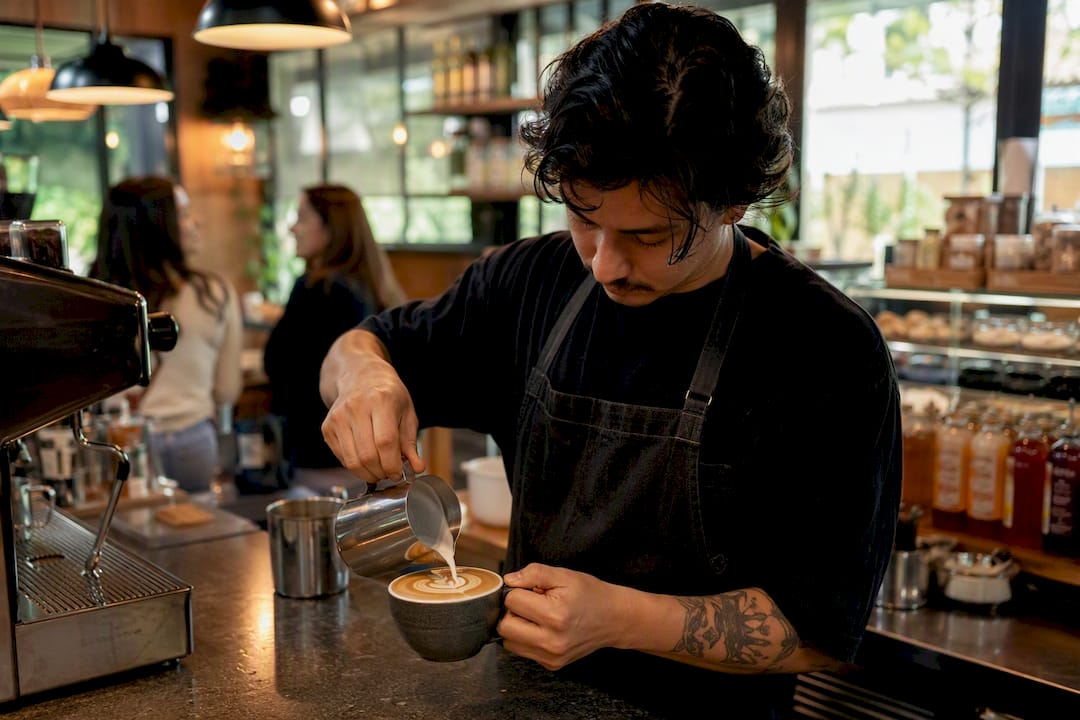
Real-time visibility removes that friction. When your system flags a low-stock item before the shelf is actually empty, you reorder with enough lead time that customers never notice a gap. Service speed during a morning rush depends heavily on staff not having to improvise, and improvisation is almost always what happens when nobody knew stock was low until it was gone.
There's a second, quieter effect too. Consistent stock means consistent recipes. If a café substitutes ingredients on the fly because the usual one ran out, drink quality and taste vary from one day to the next, and regulars notice inconsistency faster than almost anything else. Cafés that treat visibility as a service-quality issue, not just a cost issue, tend to see fewer complaints tied to substitutions or delays.
The connection between operational smoothness and customer experience isn't abstract. A kitchen or counter running on accurate, current stock data moves faster, makes fewer mistakes under pressure, and gives staff the confidence to handle a rush without stalling. That confidence is something customers feel even when they can't name exactly why the service felt tighter than usual.
What Role Do RFID and IoT Play in Stock Visibility?
Technology has changed what's realistically achievable for a small café's stock control, and the shift is bigger than most owners realize. A decade ago, real-time visibility meant a manager physically walking the storeroom with a clipboard. Now, automated systems can track consumption the moment a sale happens.
RFID tagging lets a café attach a small chip to bulk stock items or kegs, so a scan at receiving and another at depletion gives an exact read on what moved and when, without anyone manually counting. It's more common in bar and beverage operations than in a typical café pantry right now, but the same logic applies wherever high-value stock needs tight tracking.
IoT sensors, particularly smart scales and temperature-monitoring fridge units, add another layer. A smart shelf that weighs remaining stock can flag a reorder point automatically, and a fridge sensor that tracks temperature drift can catch a compressor problem before an entire batch of dairy spoils.
For most Queensland cafés, the more immediately useful technology shift isn't hardware at all. It's software-based integration, connecting POS, inventory, and supplier ordering into one system so that every sale automatically updates stock without anyone touching a spreadsheet. Standalone inventory platforms already deliver automated reordering and real-time food cost tracking, which for a single-site or small multi-location café covers most of what RFID and IoT promise, at a fraction of the hardware investment.
What Documentation and Compliance Rules Apply to Queensland Café Stock?
Stock records aren't just an operational nice-to-have, they intersect with real compliance obligations. Queensland cafés need accurate inventory documentation to support food safety traceability, tax reporting, and, if the business carries liquor stock, licensing accountability.
Food safety programs generally require you to be able to trace ingredients back to their supplier and delivery date, which means your receiving records need to log supplier name, delivery date, and batch or use-by information, not just a quantity. If a product recall happens, being able to identify exactly which stock is affected and where it went matters far more than most owners expect until they're actually asked for it.
Accurate stock records also feed directly into your tax reporting. Cost of goods sold, closing stock value, and wastage all affect your reported profit, and Business QLD's stocktake guidance exists partly because tax authorities expect stock figures to reconcile with financial records, not just approximate them.
If your café pours alcohol, liquor licensing conditions typically require you to keep purchase and stock records available for inspection, since discrepancies between recorded and physical stock can raise questions during a compliance check.
None of this needs to be complicated. A digital system that logs deliveries, dates, and wastage as they happen builds the paper trail automatically, instead of leaving you to reconstruct it under pressure during an audit or recall.
What Do Successful Stock Visibility Rollouts Look Like in Practice?
The cafés that get real value out of stock visibility rarely start with an ambitious, all-at-once overhaul. A common pattern that works: pick a small number of high-cost, high-variance items, connect them to the POS, and run a short daily counting routine for two to three weeks before expanding.
One documented case shows what integration alone can do for the operational side, not just the counting side. A Sydney café that connected its POS, inventory, and Xero accounting systems cut its end-of-day reconciliation from around 45 minutes to about 5. That's roughly 40 minutes a day given back to a manager who would otherwise be manually reconstructing what sold, what's left, and where the numbers don't line up.
The pattern that tends to repeat across implementations that stick: staff buy-in matters as much as the software. A system that requires closing staff to count 40 items every night gets skipped within a week. A system that asks for a two-minute check on eight items gets done, because it's actually realistic inside a closing shift.
Cafés running multiple locations report a related benefit: once transfers between sites are logged as discrete, timestamped transactions, per-location profit and loss numbers stop drifting apart, which makes it possible to actually compare site performance instead of guessing which location is genuinely more profitable.
How Do You Train Staff to Use Stock Visibility Tools Well?
The best inventory system in the world does nothing if your team doesn't know how or why to use it. Training staff on stock visibility isn't a one-off session, it's a short, repeatable routine baked into shift handovers.
Start by assigning clear ownership. Decide which staff member counts which items during which shift, and put it on the roster the same way you'd assign any other closing duty. Ambiguity about who's responsible is the fastest way for a counting routine to quietly stop happening.
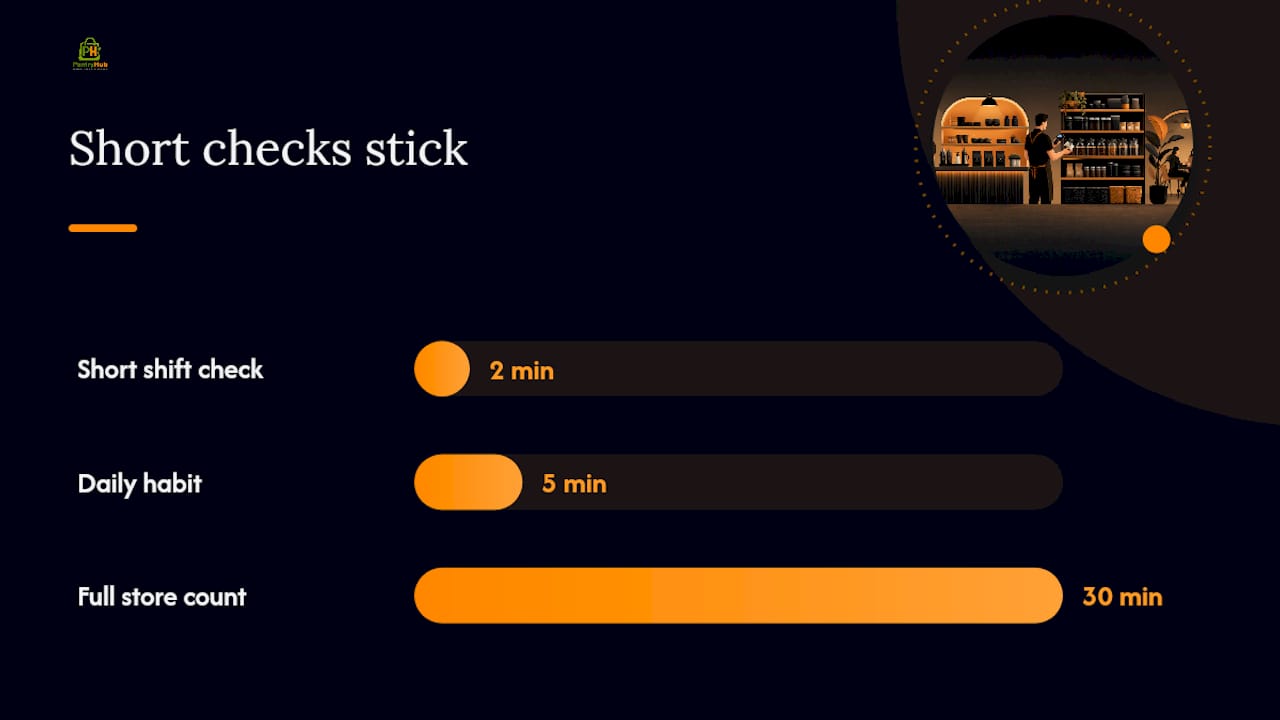
Keep the actual counting task short enough that it survives a busy closing shift. A two-minute check on eight tracked items gets done consistently; a 30-minute full-store count gets skipped the first time the café runs late. Train staff on the narrow list first, and only expand it once the routine is second nature.
Wastage logging needs the same clarity. Give staff a short list of reason codes, spoilage, prep error, breakage, staff consumption, so logging a wasted item takes seconds rather than requiring a written explanation. Over a few weeks, that log turns vague loss into a specific, fixable pattern rather than a mystery.
Finally, close the loop. Show staff what the numbers actually reveal, a shrinkage trend, a supplier delivery issue, a recipe that's over-portioned. When the team sees that their five-minute daily habit is the reason a real problem got caught early, the routine sticks far better than any policy memo ever could.
Good visibility depends on consistent daily habits more than on any single feature of the software.
| Point | Details |
|---|---|
| Start narrow | Track 5 to 8 high-variance SKUs first, then expand once variance drops. |
| Connect POS to recipes | Automatic ingredient deduction removes manual counting errors at the source. |
| Set alerts, not guesses | Reorder points and safety stock replace reactive, last-minute ordering. |
| Log waste with reason codes | Spoilage, prep error, and breakage codes turn vague loss into a fixable pattern. |
| Use a platform like PantryHub | PantryHub links recipe mapping, alerts, and supplier ordering into one daily routine. |
What Should Café Owners Actually Prioritize First?
Most stock visibility advice tries to sell you on tracking everything at once, and that's precisely why so many café owners abandon the effort within a month. The research here points somewhere narrower: variance concentrates in a handful of items, so that's where the effort should go first.
Conventional advice also underweights the human side. A system that demands 30 minutes of counting at close will get skipped the first busy Friday night, no matter how good the reporting dashboard looks. The cafés that actually sustain visibility built a two-minute daily habit around their eight riskiest items, not a comprehensive audit.
The other overlooked point is that visibility isn't a cost-control exercise alone. It shows up in service speed and consistency, in whether a barista scrambles for a substitute mid-rush. If you're deciding where to spend your limited setup time this month, connect POS to your ingredient ledger before you touch anything else. Everything downstream, alerts, wastage logs, supplier ordering, works far better once that foundation is in place.
Get Real-Time Stock Visibility With PantryHub
PantryHub gives Queensland café owners the exact setup this article recommends: a recipe-driven ledger connected to your POS, low-stock alerts tuned to your actual sales pattern, and supplier ordering that doesn't rely on a phone call or a guess. Instead of stitching together spreadsheets and memory, you get one system that shows you what's on hand, what's about to run low, and where waste is actually happening.
If you're running a single café or managing a handful of sites, PantryHub's hospitality inventory software is built specifically for that operational reality, not adapted from a warehouse tool. Start with your highest-variance items, connect your recipes, and see what a daily reconciliation looks like when it takes five minutes instead of forty. Book a demo and bring your top SKU list. That's the fastest way to see what's actually happening to your stock right now.
Frequently Asked Questions
What is the role of Queensland café stock visibility in reducing waste? Stock visibility catches spoilage, shrinkage, and overordering before they become expensive, giving owners the data to adjust par levels and reduce what gets thrown out.
How often should a Queensland café run a full stocktake? Business QLD's guidance notes that some businesses stocktake annually and others quarterly, but pairing that with daily partial counts on high-variance items catches problems faster than either cadence alone.
What's a realistic food cost target for a café? Many operators aim to keep food cost under 35% of revenue, though the right target depends on menu mix and pricing strategy.
Do small cafés really need POS-integrated inventory software? Even a single-site café benefits, since manual tracking and disconnected spreadsheets are the most common reason shrinkage goes unnoticed until it's already significant.
How does stock visibility affect customer service speed? When staff know stock levels in real time, they avoid mid-shift substitutions and delays caused by unexpected stockouts, keeping service consistent during busy periods.
Sources
- Business QLD — Stock control
- Inventory management practices and organizational performance in cafés (2026 study)
- Cafe POS + Inventory + Xero Setup: End-of-Day ~45 to ~5 Min | Nexus
- Best practices for inventory management in a small cafe — Back of House