

Centralized pantry control gives restaurants, cafés, bars, and multi-location kitchens a single live inventory record that cuts food cost, reduces waste, and removes the manual guesswork that silently eats into your margins. Here is what operators gain immediately:
- Lower food cost % through accurate, real-time deductions tied to every sale
- Faster purchasing with consolidated supplier ordering and automated low-stock alerts
- Less shrinkage and waste by catching unlogged transfers and unverified deliveries before they cascade
- Multi-location visibility so you can rebalance stock between sites before placing new orders
- Simplified supplier management with consolidated purchase orders and volume pricing leverage
The FDA Food Code requires temperature and receipt verification at delivery. Centralized systems make that verification trackable and auditable, not just a verbal checkbox.
Key Takeaways
Centralized pantry management works because it replaces invisible, manual workflows with a single live record that connects your POS, your team, and your suppliers.
| Point | Details |
|---|---|
| Visibility drives savings | Most inventory loss comes from unlogged transfers and unverified deliveries, not over-ordering. |
| Two-event transfers matter | Scan-out plus scan-in confirmation removes the in-transit gap that causes allocation errors. |
| Pilot before full rollout | A 60–90 day single-location pilot surfaces data gaps and staff habits before they scale. |
| KPIs need a baseline | Measure food cost %, shrinkage rate, and emergency purchases for four weeks before go-live. |
| Pantryhub accelerates the process | Pantryhub's real-time multi-site platform, AI alerts, and POS integration support a structured pilot from day one. |
Table of Contents
- What does centralized pantry control actually mean for commercial kitchens?
- The core benefits of centralized pantry control, broken down
- How centralized systems replace the manual habits that cause loss
- Implementation checklist and rollout timeline
- How to measure ROI: KPIs that tell you if it's working
- Tradeoffs to expect and how to handle them
- Pantryhub gives you real-time control from day one
- What operators typically notice first in a pilot
- Sources
What does centralized pantry control actually mean for commercial kitchens?
In the hospitality context, "centralized pantry control" refers to a cloud-based inventory and ordering platform that connects every location, every POS terminal, and every supplier portal to one shared item master. It is not about reorganizing a walk-in or tidying a breakroom shelf. The scope covers restaurants, cafés, bars, commissaries, and dark kitchens — any operation where stock moves between people, stations, or sites.
Cloud-based inventory platforms let remote managers monitor real-time stock, standardize item masters, automate ingredient deduction, and reduce emergency purchases across multiple locations. In the tech stack, the inventory layer sits between your POS (which triggers deductions) and your supplier portals (which receive consolidated purchase orders), with AI-powered alerts firing when any item crosses its par level.
The core benefits of centralized pantry control, broken down
Food cost reduction
Centralized purchasing consolidates your volume across locations, which unlocks supplier pricing tiers you cannot access as individual sites. Operators and consultants report meaningful reductions on core SKUs when volume and forecasting are aligned. The mechanism is straightforward: one purchase order, one negotiated price, one delivery schedule.
Waste and shrinkage control
Most waste is invisible until it shows up as a food cost variance at month-end. Multi-location groups typically have a visibility problem, not a quantity problem — unlogged transfers, unrecorded comps, and ad-hoc counts create phantom inventory that never existed. Network-level visibility lets you rebalance stock between sites before placing new supplier orders, cutting both waste and carrying costs.
Labor and admin time saved
Texting counts between managers, reconciling three spreadsheets after a shift, and chasing suppliers by phone are the most common failure points when scaling. Replacing those habits with POS-integrated, real-time deductions frees your team for work that actually moves the business forward.
Menu and pricing standardization
A single item master enforces consistent recipe costing across every location. When ingredient prices change, the cost update flows to every menu item automatically — no manual re-entry, no location running last month's margins.
Pro Tip: Build a "delegated exceptions" workflow before you go live. Give each location manager a small discretionary budget for local sourcing (a seasonal produce item, a regional specialty) so centralization does not kill the menu creativity that differentiates your brand.
How centralized systems replace the manual habits that cause loss
Manual workflows fail at scale. Here is how a centralized system changes the daily reality:
| Manual Workflow | Centralized Replacement | Expected Outcome |
|---|---|---|
| Text messages for stock counts | Automated low-stock alerts at par | Faster reorder, fewer stockouts |
| Spreadsheets updated after shifts | Single live item record, POS-deducted | Accurate real-time inventory |
| Unlogged inter-site transfers | Two-event confirmed transfer (scan out + scan in) | No in-transit invisible window |
| Verbal delivery confirmation | PO reconciliation at receiving | No payment for unverified goods |
| Ad-hoc emergency purchases | AI alert triggers supplier order | Lower emergency buy frequency |
Two-event transfer confirmation — scanning stock out at the sending site and scanning it in at the receiving site — removes the in-transit invisible window that causes over-commitment during allocation decisions.
Common failure modes that centralized control prevents:
- Unrecorded comps that inflate apparent food cost
- Missed transfer logs that make one location look overstocked and another look short
- Unverified delivery receipts where you pay for cases that were never counted or temperature-checked
Enforcing delivery verification and PO reconciliation at the point of receipt is the single most effective way to prevent initial inventory corruption from cascading into food cost swings.
Implementation checklist and rollout timeline
A disciplined rollout with clear ownership beats a rushed deployment every time. Follow this phased approach:
Phase 1: Prep and data cleanup (Weeks 1–2)
- Audit and clean your item master — remove duplicates, standardize naming conventions
- Map every POS menu item to its corresponding inventory item
- Set par levels by location based on actual sales data, not guesswork
- Define transfer rules and approval thresholds between sites
Phase 2: Pilot at one or two locations (Weeks 3–6) 5. Train staff on receiving verification: weigh, temperature-check, and reconcile every delivery before the driver leaves 6. Run daily short audits (10–15 minutes) on high-value or high-velocity items 7. Log every comp, transfer, and waste event without exception
Phase 3: Evaluate and adjust (Weeks 7–8) 8. Compare food cost % against your pre-pilot baseline 9. Identify naming convention gaps and fix them before expanding 10. Gather manager feedback on alert thresholds and adjust pars
Phase 4: Phased rollout and full deployment (Weeks 9–12+) 11. Onboard remaining locations in batches of two to three 12. Schedule 30/60/90-day review checkpoints with a named reporting owner
Common pitfalls to avoid: inconsistent item naming that breaks POS mapping, skipping receiving verification during busy services, and treating the first week's data as reliable before staff habits are established.
How to measure ROI: KPIs that tell you if it's working
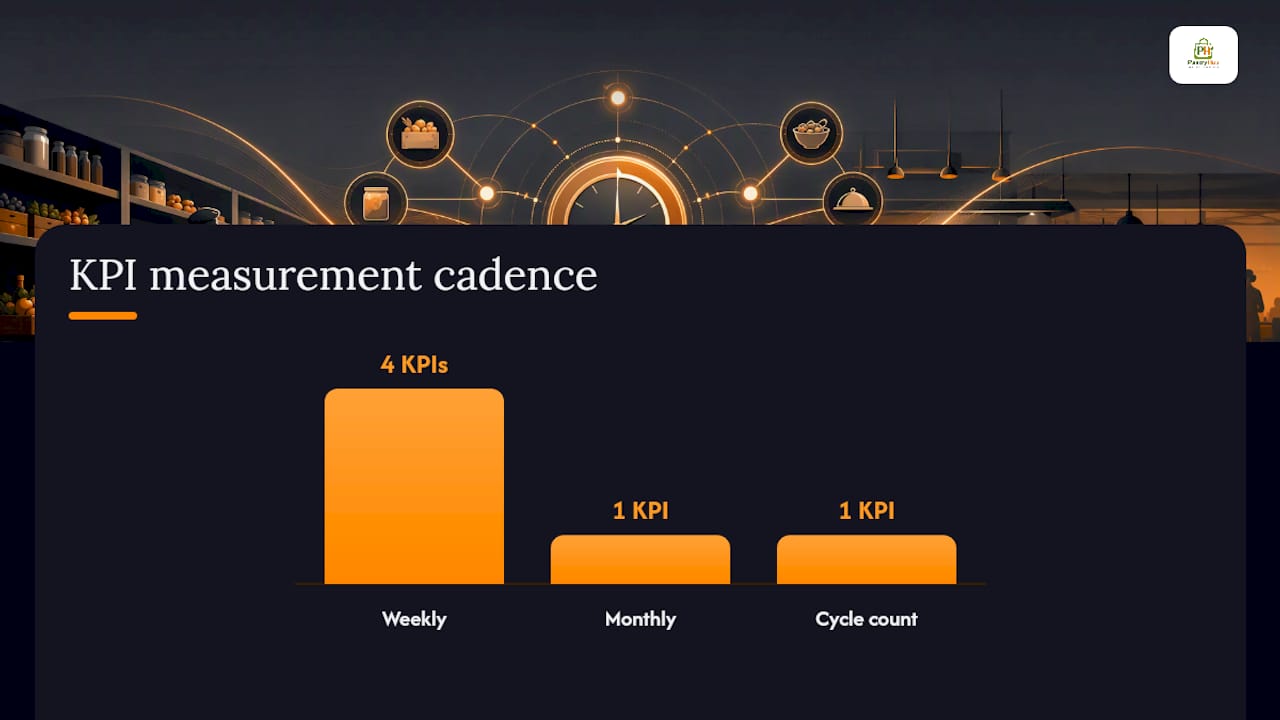
| KPI | Definition | How to Measure |
|---|---|---|
| Food cost % | Food spend ÷ food revenue | Weekly P&L vs. prior-period baseline |
| Shrinkage rate | Variance between theoretical and actual inventory | Cycle count vs. POS-deducted quantity |
| Inventory turnover | Cost of goods sold ÷ average inventory value | Monthly, per location and network total |
| Order accuracy | PO lines received correctly ÷ total PO lines | Logged at receiving, reviewed weekly |
| Emergency purchases | Unplanned orders outside normal cycle | Count per week, target trend down |
| Days of inventory on hand | Average inventory value ÷ daily cost of goods | Weekly snapshot per location |
Sample ROI framework: Take your current monthly food cost variance (the gap between theoretical and actual). Add the avoided cost of emergency purchases (typically a premium over standard supplier pricing). Compare that combined monthly saving against your platform subscription cost. Most operators reach payback within a few months of a disciplined pilot.
Measurement plan:
- Establish a four-week baseline before go-live — do not skip this step
- Review KPIs weekly during the pilot, monthly after full rollout
- Assign one named manager as reporting owner per location
- Define a minimum improvement threshold for pilot success before you start (e.g., food cost variance down, emergency purchases trending lower)
Tradeoffs to expect and how to handle them
Centralized purchasing delivers cost savings and operational efficiency, but it also introduces communication and responsiveness challenges that operators need to plan for.
- Slower local sourcing: A central approval workflow can delay a location's response to a local opportunity. Mitigation: build a delegated exceptions budget so managers can act without waiting for central approval on small, time-sensitive purchases.
- Upfront implementation cost: Data cleanup, POS mapping, and staff training take real time. Mitigation: stage the rollout and treat Phase 1 as an investment in data quality, not a cost center.
- Data discipline burden: The system is only as accurate as the data going in. Mitigation: enforce strict receiving SOPs from day one and make receiving verification a non-negotiable step, not an optional one.
- Supplier friction: Consolidating orders may disrupt existing local supplier relationships. Mitigation: negotiate transparently, lead with volume commitments, and keep one or two preferred local suppliers in the exceptions workflow.
Pro Tip: Celebrate the first visible KPI win publicly with your team — even a small drop in emergency purchases or a tighter food cost week. Early, visible wins convert skeptical staff into advocates faster than any training session.
Change management is often the hardest part. Small wins, visible on a shared dashboard, build the buy-in that sustains the discipline long-term.
Pantryhub gives you real-time control from day one
Running tighter margins while managing multiple locations is exactly the problem Pantryhub was built to solve. Where spreadsheets and text threads leave gaps, Pantryhub gives you a single live view of every item, every site, every order.

Core features tied to operator outcomes:
- 📦 Real-time multi-site stock visibility — see every location's inventory from one dashboard
- 🔔 AI-powered low-stock alerts — get notified before you run out, not after
- 🛒 Supplier ordering — send consolidated purchase orders directly from the platform
- 📊 Recipe-level deductions and cost reporting — know your actual food cost, not last month's guess
- 👥 Role-based access controls — give each team member the right level of visibility
- 🔗 POS integration — automatic ingredient deduction with every sale
Onboarding is structured around your timeline. Expect data import and POS mapping in the first two weeks, a supported pilot at one location through weeks three to six, and full rollout support through the 90-day mark. Questions to ask during any vendor demo: Which POS systems does it integrate with natively? How does it handle two-event transfer confirmation? What is the data sync SLA? What does the trial include?
Start your free trial at Pantryhub's hospitality inventory platform and see the difference a live item master makes in the first week.
What operators typically notice first in a pilot
The first thing most operators notice is not the savings — it's the visibility. Within the first week, you can see exactly where stock is sitting, which location is over-ordered, and which one is about to run short. That alone changes how managers make decisions.
Early in a pilot, receiving errors surface quickly. A single-site café running a 30-day pilot will typically find two or three recurring delivery discrepancies they had been absorbing silently. A multi-site group running two locations simultaneously often discovers that inter-site transfers were being logged inconsistently, creating phantom stock at one site and apparent shortages at another.
By day 60, emergency purchases tend to drop noticeably as par-level alerts replace reactive ordering. By day 90, the food cost variance between theoretical and actual inventory narrows — not because the food changed, but because the data finally reflects reality.
Sources
- Multi-Location Inventory Management: Boost Restaurant
- Multi-Location Inventory Control: Why Sites Disagree
- Procurement Strategies for Business Efficiency | GoodSource Solutions
- How to Manage Inventory Across Multiple Restaurant Locations Remotely | Slant POS
- Theseus