

Run a weekly, mobile-guided stocktake that locks the count window, records full units first, and reconciles counts to your POS, purchases, and waste log before approving any changes. That single workflow is how high-volume clubs catch shrinkage early, control pour cost, and turn a count into a real management decision. The minimal components are scope definition, assigned roles, a consistent shelf order, a reconciliation formula, and a clear action threshold for discrepancies. Tools like POS-integrated bar inventory software and mobile counting apps make the process faster and more reliable, and Pantryhub is built to handle exactly this workflow for club and bar operators.
- Scope: every area counted in the same order each cycle
- Roles: one counter, one reviewer, one manager to approve
- Counting rules: full sealed units first, then partials, then kegs, then mixers
- Reconciliation: opening inventory + purchases + transfers − closing inventory = actual usage; compare to POS-expected usage
- Action threshold: investigate any variance above your dollar-impact cutoff before updating records
Table of Contents
- How to Manage a Club Bar Stocktake: the Step-by-Step Workflow
- Which Tools Speed Up a Club Bar Stocktake?
- How Do You Reconcile Counts to POS, Purchases, and Waste?
- How to Count Items and Calculate Pour Cost
- When Should You Run Stocktakes, and Who Should Do Them?
- What KPIs Should You Check After Each Stocktake?
- How Do You Choose Inventory Software for a Club Bar?
- The One-Page Stocktake Checklist Every Club Bar Manager Needs
- Key Takeaways
- What Actually Changed When We Stopped Guess-Counting
- Pantryhub Makes Club Bar Stocktakes Faster and More Profitable
How to Manage a Club Bar Stocktake: the Step-by-Step Workflow
A repeatable stocktake process starts before anyone picks up a clipboard or opens an app. Lock the count window first.
Lock the count window
Define a hard start and end time, and freeze all receiving and inter-area transfers for that window. If a delivery arrives mid-count, log it separately and add it to purchases after the count closes. Any movement during the count corrupts your opening and closing figures.
Set your shelf order and scope
Count every area in the same sequence every cycle: front bar, back bar, coolers, liquor room, dry storage, and event stock last. Consistency means your team builds muscle memory, and your variance reports stay comparable week to week.
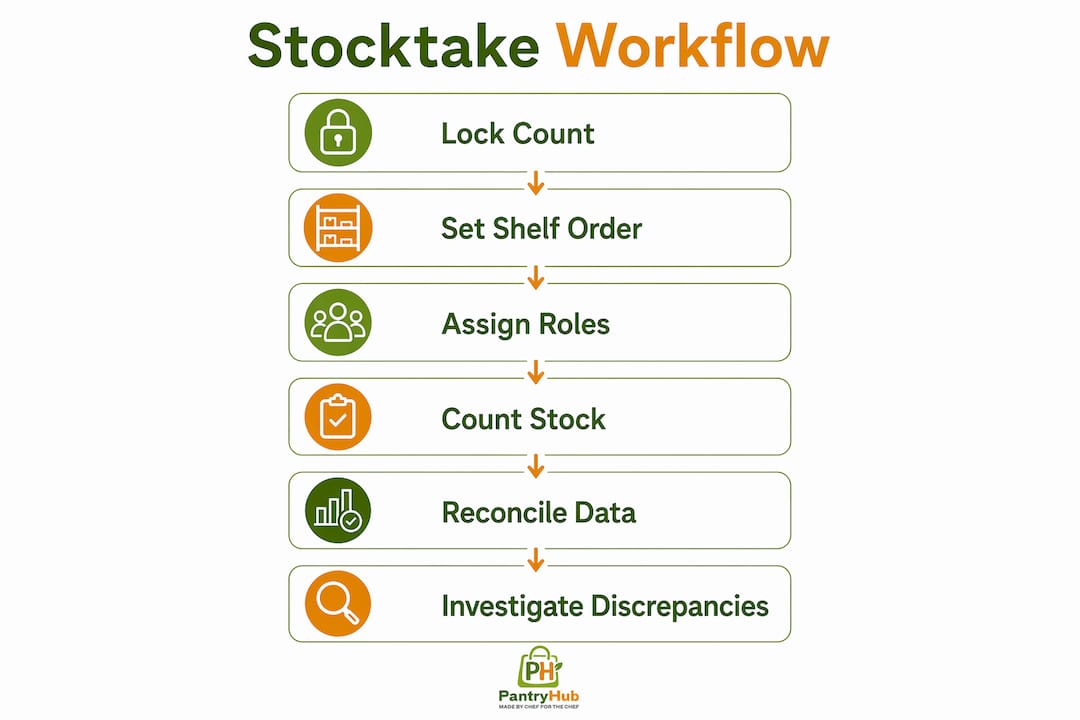
Roles and time estimates
| Role | Responsibility | Estimated time |
|---|---|---|
| Counter | Counts each area in shelf order, enters units on mobile | Approximately a quarter of an hour per area |
| Reviewer | Watches live count screen, flags anomalies in real time | Concurrent with count |
| Manager | Approves final count, signs off on reconciliation | Around ten minutes post-count |
Counting sequence
- Count all full, sealed units first (bottles, cases, kegs).
- Count partial bottles next, estimating to small consistent increments.
- Count kegs and casks by weight or gauge reading.
- Count mixers, garnishes, and non-alcohol items last.
Entry rules
Record every item in the same unit your POS and recipes use. If your POS tracks vodka by the ounce, count in ounces. Mixing units between count and POS is the single most common source of false variances.
Discrepancy first pass
Before you close the count, re-count any item that looks off. Log it as a suspected counting error with a note. Reconciliation reveals where product actually moved; the first pass just catches obvious mistakes.
Pro Tip: Print a short checklist for each counter and attach it to their counting area. It takes two minutes to prepare and cuts “I forgot that shelf” errors to near zero.
Printable stocktake checklist
- Count window locked (start time noted)
- All receiving frozen or logged separately
- Shelf order confirmed (front bar → back bar → coolers → liquor room → storage → event)
- Roles assigned: counter, reviewer, manager
- Full units counted first, partials estimated to nearest tenth
- Kegs gauged or weighed
- Mixers and garnishes counted
- Suspected errors re-counted and noted before closing
- Manager sign-off obtained before reconciliation begins
Which Tools Speed Up a Club Bar Stocktake?
Mobile-guided counting apps reduce bias and counting errors compared to clipboard methods. The reason is simple: a guided screen tells your counter what to count next, in what order, and in what unit. There is no guessing, no skipped shelves, and no transcription step back at the office.

Why mobile beats clipboards
A paper count requires a second person to enter data afterward, which doubles the labor and introduces transcription errors. A mobile app captures the count in real time, pushes it to a reviewer screen instantly, and creates an audit trail automatically.
Essential integrations to look for
- POS sync: real-time or frequent pulls of sales data so expected usage is always current
- Invoice capture: photo or OCR import of supplier invoices to speed purchase entry and reduce missing-purchase errors
- Recipe mapping: links POS menu items to ingredient quantities so the system calculates expected usage automatically
- Multi-location support: manage stock across multiple bars or event spaces from one dashboard
Feature checklist when evaluating apps
- Blind-count mode (counter sees items, not expected quantities)
- Live reviewer screen during the count
- Shift-based variance reporting
- Low-stock alerts with configurable par levels
- Export to CSV or direct POS reconciliation
Smaller setups using guided mobile counts can finish main area counts much faster than paper methods, resulting in significant time savings when counts are done weekly.
Pro Tip: Enable blind-count mode whenever possible. When counters can see the expected quantity, they unconsciously round toward it. Blind counting produces cleaner data for reconciliation and makes discrepancies easier to investigate.
For clubs managing off-site or event bars, mobile counting is especially useful because there is no fixed terminal to return to between areas.
How Do You Reconcile Counts to POS, Purchases, and Waste?
Counting alone tells you what is on the shelf. Reconciliation explains how product moved and turns a number into a management action.

The reconciliation formula
| Variable | Description |
|---|---|
| Opening inventory | Last approved closing count |
| + Purchases | All invoiced deliveries in the period |
| + Transfers in | Stock moved from another area or location |
| − Transfers out | Stock moved to another area or location |
| − Waste / comps | Recorded spills, breakage, and complimentary pours |
| = Closing inventory | Current count |
| Actual usage | Opening + Purchases + Transfers in − Transfers out − Waste − Closing |
| Expected usage | POS sales converted to ingredients via recipe mapping |
| Variance | Actual usage − Expected usage |
Reconciliation checklist
- Confirm all purchases and transfers are entered before running the report
- Match every POS SKU to a recipe so expected usage calculates correctly
- Include waste and comp records for the period
- Calculate unit variance and dollar impact for each item
- Sort the report by dollar impact, highest first
Prioritize by dollar impact, not percentage
A 10% variance on a slow-moving amaro matters far less than a 3% variance on your top-selling whiskey. Sort discrepancies by dollar impact and investigate the top items first. Never update inventory records until the largest dollar variances are checked for recording errors, missing invoices, or unlogged transfers.
Pro Tip: Build a short investigation sequence: (1) check for missing purchase invoices, (2) verify transfers were logged, (3) confirm recipe quantities match current pours, (4) check waste records. Most large variances resolve at step 1 or 2.
How to Count Items and Calculate Pour Cost
Common count units
- Bottle: standard unit for spirits, wine, and beer (750 ml, 1 L, 1.75 L)
- Case: 12 or 24 bottles; use for full-case storage counts
- Keg: sixth barrel (5.16 gal), firkin (10.8 gal), half barrel (15.5 gal)
- Ounce: preferred unit for reconciliation against POS and recipes
- Jigger: 1.5 oz standard pour; useful for expected-usage calculations
Estimating partial bottles
Use a consistent rule: estimate to the nearest tenth of a bottle (0.1 increments). A bottle that looks half full is 0.5; one that is nearly empty is 0.1. Post a simple pour chart near the bar so every counter uses the same visual reference.
Conversion example and pour-cost formula
- A standard 750 ml bottle contains approximately 25.4 oz.
- At a 1.5 oz standard pour, a standard bottle yields multiple pours.
- Calculate cost per pour by dividing bottle cost by pours.
- Pour cost % = (cost per pour ÷ menu price) × 100
- Example cocktail pour cost can be calculated by applying this formula.
Recipe mapping converts every POS sale into expected ingredient usage automatically, so you do not have to calculate this manually for every item every week.
Industry benchmark: Well-run bars typically aim for a total beverage pour cost within a moderate percentage range. Clubs running weekly stocktakes with reconciled variance data can identify which items are pulling that number up and act within days, not months.
When Should You Run Stocktakes, and Who Should Do Them?
High-volume clubs should run weekly stocktakes. Monthly counts are useful for accounting but too slow for loss prevention; by the time you find a problem, the shift-level details that explain it are long gone.
Scheduling best practices
- Run counts at a consistent quiet window: before opening or after close
- Use the same day each week so staff build a routine
- Avoid counting during or immediately after a busy event night
- Schedule spot checks on high-risk SKUs (top-selling spirits, premium bottles) between full cycles
Sample weekly schedule
- Sunday close (10:30 PM): Counter starts front bar and back bar; reviewer monitors live screen.
- Sunday close (11:00 PM): Counter moves to coolers and liquor room; manager reviews front bar results.
- Sunday close (11:20 PM): Counter finishes storage and event stock.
- Monday morning (9:00 AM): Manager runs reconciliation report, reviews top variances, approves count.
- Monday morning (9:30 AM): Variance summary shared with team; any investigation items assigned.
For clubs running corporate events or private functions, add a spot count of event stock before and after each function. That single step closes the most common gap in club bar inventory tracking.
What KPIs Should You Check After Each Stocktake?
A reconciliation report that shows item, expected usage, actual usage, unit variance, variance percentage, unit cost, and dollar impact gives you everything you need to prioritize follow-up.
The five KPIs that matter most
- Variance dollar impact: the total cost of unaccounted product. Rising dollar impact week over week signals a systemic problem, not a counting error.
- Variance percentage: unit variance divided by expected usage. High percentages on slow-moving items often indicate a counting or recipe error rather than theft.
- Pour cost percentage: actual beverage cost divided by revenue. A rising pour cost that is not explained by price changes or mix shift usually points to over-pouring or unrecorded waste.
- Weekly shrinkage rate: the dollar value of product lost to waste, theft, or unrecorded comps. Track this as a rolling four-week average to smooth out event-week spikes.
- Par level hit rate: the percentage of items that stayed above par between counts. A low hit rate means your ordering is reactive; a high rate means your par levels are calibrated correctly.
Report cadence
- Weekly: variance summary by dollar impact, top five items to investigate
- Monthly: trend report showing pour cost, shrinkage, and par level hit rate over four weeks
- Shift-level: when a large variance appears, pull shift-level data to identify which service period it originated in
How Do You Choose Inventory Software for a Club Bar?
The right software turns your stocktake from a counting exercise into a profit-control tool. Here is what to look for and how to run a proper trial.
Selection criteria
- Mobile-guided counting with blind-count mode
- POS integration (real-time or scheduled sync)
- Invoice capture via photo or OCR
- Recipe mapping that links menu items to ingredient quantities
- Shift-based variance reporting
- Multi-location support for clubs with multiple bars or event spaces
- Audit trail with user-level access controls
- Onboarding support and documented integration list
7–14 day trial checklist
- Import your full item list (match SKUs to POS items)
- Connect your POS and confirm sales data is pulling correctly
- Run one complete guided stocktake from start to finish
- Import last month's purchase invoices
- Run a variance report and review the top five discrepancies
- Check that recipe mapping is calculating expected usage correctly
Pro Tip: Ask the vendor for a real customer case study from a club or high-volume bar before you commit. A vendor who cannot show you a working example from a similar venue is a vendor whose onboarding you will be doing yourself.
Why Pantryhub fits club bar operations
Pantryhub is built for exactly this workflow: mobile-guided counts, POS sync, invoice capture, recipe mapping, variance reporting, and multi-location management in one platform. It is designed for bars, clubs, and hospitality groups that need real-time stock visibility without a complex setup. You can start a free trial and run your first guided stocktake within a day of signing up.
The One-Page Stocktake Checklist Every Club Bar Manager Needs
A printable template does not need to be elaborate. It needs to match your POS SKUs, capture the right units, and give your counter a clear path from start to sign-off.
One-page template structure
- Header: venue name, date, count window (start/end time), counter name, reviewer name
- Scope confirmation: list each area (front bar, back bar, coolers, liquor room, storage, event)
- Count columns: item name | POS SKU | unit | opening qty | counted qty | variance note
- Top 5 investigation items: pre-filled from last week's variance report
- Purchases included: yes/no checkbox with invoice reference numbers
- Transfers logged: yes/no checkbox with transfer notes
- Manager sign-off: signature and timestamp
Adapting for events and off-site bars
For event or mobile bar stations, add a pre-event count column and a post-event count column. The difference is your event usage; compare it to POS sales from that event to catch any gap. This is the same logic as a full stocktake, just scoped to a single service period.
Template column headers
Use the exact same item names and units your POS uses. If your POS calls it "Tito's Handmade Vodka 1L," your template uses that name. Mismatched names are the fastest way to create reconciliation errors that take an hour to untangle.
Pro Tip: Add a "partial bottle rule" note at the top of every template: "Estimate to nearest tenth. 0.5 = half full. When in doubt, go lower." Document any transfer notes directly on the sheet before handing it to the manager. A note written at the time of the count is worth ten minutes of investigation later.
Key Takeaways
A reliable club bar stocktake comes down to three things: a locked count window with a defined shelf order, mobile-guided counting reconciled to POS and purchases, and variance sorted by dollar impact before any records are updated.
| Point | Details |
|---|---|
| Lock the count window | Freeze receiving and transfers before counting; any movement during the count corrupts your figures. |
| Count in consistent shelf order | Same sequence every cycle builds staff routine and keeps variance reports comparable week to week. |
| Reconcile to POS and purchases | Opening + purchases + transfers − closing = actual usage; compare to POS-expected usage to find real variance. |
| Sort variance by dollar impact | Investigate the highest-dollar discrepancies first; percentage alone misleads you on which items actually matter. |
| Pantryhub for guided stocktakes | Pantryhub's mobile counting, POS sync, and variance reports give club bar managers a complete, trial-ready workflow. |
What Actually Changed When We Stopped Guess-Counting
The shift from spreadsheet-based guessing to guided weekly stocktakes with reconciled variance reports changes how a bar operates at a fundamental level. Before that shift, discrepancies were investigated by memory: "I think we sold more of that last week." After it, you have a report sorted by dollar impact with a clear investigation sequence. The conversation with staff changes from accusatory to factual.
Weekly counts also compress the investigation window. When a variance appears in a weekly report, the service periods it covers are recent enough that staff remember what happened. A monthly count surfaces a problem that is four weeks old; the shift-level details that would explain it are gone. That is why weekly stocktakes are the industry standard for high-volume clubs, not a best-practice aspiration.
The other change is pour-cost control. Once recipe mapping connects POS sales to expected ingredient usage, a rising pour cost is no longer a mystery. You can see exactly which items are over-pouring or under-recording, and you can act on that data within days. Mobile apps and POS sync make this possible without adding hours of labor. The technology does the math; your job is to investigate the top five items on the variance report and close the gap.
Pantryhub Makes Club Bar Stocktakes Faster and More Profitable
Running a tight stocktake every week is only half the job. The other half is having a system that turns your count data into clear variance reports, flags low-stock items before you run out, and connects your purchases to your POS without manual entry. That is exactly what Pantryhub delivers for club bar operators.

Pantryhub gives you mobile-guided counting with blind-count mode, real-time POS sync, photo invoice capture, recipe-based expected usage, and multi-location management in one platform. You can run your first guided stocktake the same day you sign up, with onboarding support included.
Your trial checklist:
- Import your item list and match SKUs to POS items
- Connect your POS and confirm sales data is syncing
- Run one complete guided stocktake
- Enter recent purchase invoices
- Run a variance report and review your top discrepancies
Ready to replace the clipboard? Start your free trial with Pantryhub and run your first reconciled stocktake this week.