
Automated stock replenishment is the process of using integrated inventory and POS systems combined with intelligent reorder workflows to replace manual purchasing decisions with data-driven triggers. For cafe owners, this means your coffee shop ordering system places supplier orders automatically when stock hits a defined threshold, without a manager counting bags or sending emails at 6 a.m. Platforms like Pantryhub, Deelo, and Neudash have made this accessible to independent operators, not just large chains. The payoff is real: automated inventory-to-POS integration can reduce excess inventory by 20 to 30% while maintaining fill rates above 99%.
What tools do you need to automate cafe stock ordering?
The foundation of any automated stock ordering setup is a POS system that shares live sales data with your inventory software. Without that connection, your reorder triggers are working from guesswork rather than actual consumption. Most modern cafe POS platforms, including Square and Toast, offer native or third-party inventory integrations that feed real-time depletion data into a central stock management platform.

Beyond POS integration, you need stock management software for cafes that supports par levels, low-stock alerts, and supplier-linked purchase orders. The good news on cost: consolidated automation platforms typically run around $19 per seat per month and replace three to five separate tools, with setup taking as little as 15 minutes per location. That is a fraction of what most operators spend managing spreadsheets and chasing suppliers by phone.
Here is what a complete automation toolkit looks like for a typical cafe:
- POS integration layer: Connects sales data to inventory counts in real time (Square, Toast, Lightspeed)
- Inventory management software: Tracks stock levels, sets par levels, and generates reorder alerts (Pantryhub, Deelo)
- Supplier communication interface: Sends orders via API, email, or text depending on vendor preference
- Reporting dashboard: Surfaces variance data, cost trends, and order history in one view
| Tool Category | Key Feature | Example |
|---|---|---|
| POS integration | Real-time depletion tracking | Square, Toast, Lightspeed |
| Inventory platform | Par levels and auto-reorder | Pantryhub, Deelo |
| Supplier portal | Multi-format order dispatch | Neudash |
| Reporting tool | Variance and cost analysis | Built into most platforms |
Pro Tip: Before selecting software, confirm it supports your top two or three suppliers natively. A platform that cannot connect to your main coffee roaster or dairy vendor will create more manual work, not less.
How do you set par levels and reorder points for cafe stock?
A par level is the minimum quantity of a product you need on hand to cover demand between deliveries, plus a safety buffer for unexpected spikes. The formula is straightforward: calculate your average daily usage, multiply by your lead time in days, then add 20 to 30% as a buffer. For a cafe moving through 5 kg of espresso beans per day with a two-day lead time, your par level is 10 kg plus a 2 to 3 kg buffer, so roughly 12 to 13 kg.
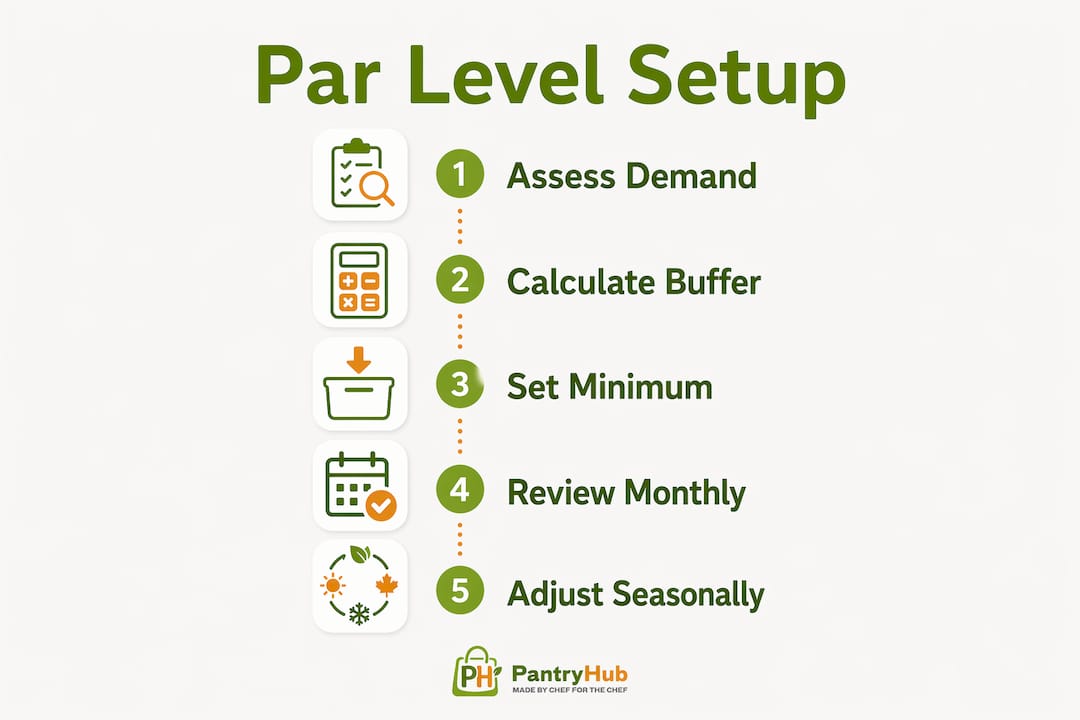
Static par levels work for predictable items, but high-velocity cafe stock like milk, pastries, and single-use cups fluctuates with weather, events, and seasonal shifts. Machine learning models replace fixed reorder points with dynamic triggers that factor in demand variability and supplier lead time, then automatically generate purchase requisitions when thresholds are crossed. This is where cafe supply chain automation moves from basic to genuinely useful.
Focus your par-setting effort on these categories first:
- Espresso beans: High cost, daily variance, and supplier lead times make this your most critical item to get right
- Fresh milk: Short shelf life means tight par levels are non-negotiable
- Pastries and baked goods: Often ordered daily from local suppliers; automation here saves the most time
- Disposables: Cups, lids, and sleeves have long shelf lives but high volume; automate to avoid emergency orders
Pro Tip: Review your par levels every four weeks for the first three months after setup. Seasonal shifts and menu changes will throw off your initial calculations, and catching drift early prevents both stockouts and overstock.
How to set up automated purchase orders and supplier communications
Getting your purchase orders to generate and send automatically requires linking each inventory SKU to a specific supplier and defining the order format that supplier accepts. Supplier-specific order formatting is non-negotiable because vendors use different preferred methods including APIs, email, text, and phone. A platform that sends every order as a PDF email will fail the moment your produce supplier only accepts EDI orders.
Follow these steps to build a working automated ordering workflow:
- Map every SKU to a supplier. Assign each product in your inventory system to its primary vendor, including unit of measure, order minimum, and lead time.
- Set reorder triggers. Define the par level and reorder quantity for each item. Start with your top 10 highest-turnover products.
- Configure supplier communication preferences. Set whether each vendor receives orders by API, email, or text. Most platforms let you save a template per supplier.
- Enable draft purchase order generation. Set the system to create draft orders automatically when stock hits par, then review and approve before sending. This approval step is worth keeping for the first four to six weeks.
- Add event-aware adjustments. Flag upcoming catering bookings, public holidays, or seasonal peaks in your system so reorder quantities scale up automatically.
- Test with one supplier first. Run a full order cycle manually alongside the automated version to confirm accuracy before going live.
Common issues you will hit during setup include duplicate orders when POS sync lags, incorrect unit conversions between your inventory system and supplier catalogs, and order minimums that conflict with your par-level quantities. Each of these has a fix, but catching them in a test cycle beats discovering them on a busy Monday morning.
For multi-location operators, multi-location inventory management adds another layer: each site needs its own par levels and supplier assignments, but reporting should consolidate across all locations so you can spot purchasing inefficiencies at a group level.
How do you track daily inventory variances to prevent losses?
Inventory variance is the gap between what your system says you should have and what a physical count confirms you actually have. A small variance is normal. Variances above 3 to 5% signal something beyond data entry errors, typically theft, over-pouring, or recipe drift, and require immediate investigation.
The financial stakes are concrete. Daily shrinkage at 4% variance on espresso beans alone costs a single cafe location roughly $168 per month. Across a year, that is more than $2,000 disappearing from one product line. Multiply that across milk, syrups, and food items and you understand why daily variance tracking is not optional.
Build variance tracking into your daily close routine with these steps:
- Count three to five high-value items daily. You do not need a full stocktake every day. Focus on espresso beans, milk, and your top-selling food items.
- Compare actual counts to system-expected quantities. Your inventory platform should calculate this automatically once you enter the physical count.
- Flag anything above 5% for immediate review. Investigate before the next shift starts, not at the end of the week.
- Log the cause when you find it. Over time, this data reveals patterns like a specific shift with consistent over-pouring or a supplier delivering short.
Pro Tip: Set your system to send an automated alert to the manager on duty whenever a counted item exceeds your variance threshold. Catching a 6% bean variance on Tuesday morning is far cheaper than discovering it during a monthly stocktake.
Integrating variance data into your automated ordering system closes the loop. If your actual counts consistently run below system expectations, your reorder triggers will fire too late. Accurate daily counts keep your automation calibrated.
Key takeaways
Automating cafe stock ordering works when you combine accurate par levels, real-time POS integration, and daily variance tracking into a single connected workflow.
| Point | Details |
|---|---|
| Start with POS integration | Connect live sales data to your inventory platform before setting any reorder triggers. |
| Set dynamic par levels | Calculate par levels from actual usage data and review them monthly as demand shifts. |
| Automate supplier orders by format | Configure each vendor's preferred order method to avoid failed or duplicate orders. |
| Track variance daily | Monitor three to five key items each day; investigate anything above 5% before the next shift. |
| Phase your rollout | Start with your top two suppliers over four weeks to build confidence in the system before expanding. |
Why most cafe automation rollouts fail in the first month
I have watched operators invest in solid inventory software and still end up back on spreadsheets within six weeks. The failure point is almost never the technology. It is the assumption that automation replaces physical discipline.
FIFO rotation is the clearest example. A system that triggers a milk reorder at the right time does nothing if your team is pulling from the front of the fridge and leaving older stock to spoil at the back. The automation handles the when and how much of ordering. Your team still controls the what happens to stock once it arrives.
The other mistake I see consistently is going live with every supplier at once. Starting with your top two vendors over a four-week period gives you time to catch formatting errors, wrong unit conversions, and lead time mismatches before they cascade across your entire supply chain. Week one should be inventory tracking only. Week two, set par levels. Week three, add your first vendor. Week four, layer in event-aware ordering adjustments.
The operators who get the most out of automation are the ones who treat it as a tool for managing exceptions, not eliminating attention. When your system flags an unusual spike in milk consumption on a Wednesday, that is the signal for a manager to investigate, not ignore. Automation handles routine orders so your attention is free for the irregularities that actually cost money.
— Admin
How Pantryhub makes cafe inventory automation practical
Running a cafe means your attention is split across staff, customers, and quality every single shift. The last thing you need is a stock ordering system that creates more decisions, not fewer.

Pantryhub is built specifically for hospitality operators who need inventory control for coffee shops that connects POS data, supplier ordering, and variance tracking in one place. Low-stock alerts fire automatically, draft purchase orders generate when par levels are hit, and multi-vendor ordering handles different supplier formats without manual reformatting. Whether you run one location or several, Pantryhub gives you real-time visibility across your entire operation from any device. If you are ready to stop managing stock by memory and start managing it by data, Pantryhub is where that shift begins.
FAQ
What does it mean to automate cafe stock ordering?
Automated stock ordering uses integrated inventory and POS systems to trigger supplier purchase orders automatically when stock falls below a set threshold, removing the need for manual counts and phone orders.
How much does cafe inventory automation software cost?
Most platforms designed for cafes run around $19 per seat per month and replace three to five separate tools, with setup typically completed in under 15 minutes per location.
What is a par level in cafe inventory management?
A par level is the minimum stock quantity needed to cover demand between deliveries plus a safety buffer. It is calculated from average daily usage multiplied by supplier lead time, with an additional 20 to 30% added for demand spikes.
How do I know if my inventory variance is a problem?
Variances above 3 to 5% on any item indicate issues beyond normal data error, such as theft, over-pouring, or recipe drift. A 4% daily variance on espresso beans alone costs roughly $168 per month per location.
How long does it take to set up automated ordering for a cafe?
A phased rollout starting with your top two suppliers takes approximately four weeks to complete, covering inventory tracking, par level setup, vendor integration, and event-aware ordering adjustments.